 Aller au contenu

Comparison tables let visitors evaluate products, prices, and features side by side without jumping between pages. Done right, they boost engagement and conversion rates, which is why they’re a staple of affiliate blogs, review sites, and online stores.
The problem: WordPress doesn’t make them easy. The built-in Table block only supports plain text, so you can’t add images, buttons, star ratings, or anything else a real comparison table needs. That’s where a dedicated comparison table plugin comes in.
Quick answer: For most sites, Constructeur de tableaux WP is the best WordPress comparison table plugin thanks to its drag-and-drop builder and free version. Tableberg is the best choice if you work inside the block editor, and TablePress is best for large data tables.
Below, I break down the 10 best comparison table plugins, including what each one costs, its standout feature, and who it’s best for.
Greffon | Version gratuite | Pro Price (From) | Idéal pour |
Oui | $39/year (1 site) | All-purpose product and comparison tables with drag and drop | |
Oui | $29/year (1 site) | Comparison tables inside the block editor | |
Oui | $63/year (1 site) | Data-heavy tables with Google Sheets sync | |
Oui | $89/year (1 site) | Large, spreadsheet-style data tables | |
Oui | $55/year (1 site) | Affiliate comparison and versus blocks | |
Oui | $49/year (1 site) | Dedicated pricing tables | |
Oui | $39/year (1 site) | Amazon affiliate product tables | |
Oui | $43 (one-time) | Product catalogs with built-in comparison | |
Oui | $25 (one-time) | Comparing custom post types | |
Oui | $49.97/year (1 site) | Comparison tables in Elementor |
How I Evaluated These Plugins
I’ve been building table plugins for WordPress for over a decade, so I approached this list the way I’d evaluate a competitor: by installing each plugin on a test site and building an actual product comparison table with it. Here’s what I judged each one on:
- Ease of use. How fast can a non-developer go from installing the plugin to publishing a working comparison table? I gave extra weight to visual builders and prebuilt templates, and marked down anything that required shortcodes, custom CSS, or documentation-diving for basic tasks.
- Comparison-specific features. A comparison table needs more than rows and columns. I checked for images, buttons, star ratings, ribbons, and highlighted columns, the elements that turn a data table into something that actually converts.
- Responsiveness. Every table was tested on mobile. Plugins that stack, collapse, or scroll gracefully on small screens scored higher, since a comparison table that breaks on phones is worthless for most sites.
- Pricing and free version value. I looked at what the free version genuinely lets you build, what the pro upgrade costs, and whether the price matches what you get. All prices in this post were checked in [month, year].
- Maintenance and support. I checked each plugin’s last update date, WordPress compatibility, and support responsiveness. Abandoned plugins are a security risk, so active development was a requirement for making this list.
- A note on transparency: WP Table Builder and Tableberg are our own products. I obviously believe they’re the best options here (that’s why we built them), but I’ve applied the same criteria to them as to everything else, and I’ve noted honestly where a competitor is the better fit, like TablePress for large datasets or AzonPress for Amazon affiliates.
Now, let’s see the details of the plugins.
1. Constructeur de tableaux WP
WP Table Builder is a drag-and-drop WordPress table plugin. It’s the only table plugin that comes with a true drag-and-drop interface. You can easily create any table using WP Table Builder.
It’s a free plugin. You can download it from WordPress.org.
Currently, it has 7 elements in the free version.
- Texte
- Bouton
- Image
- Liste
- Note d'étoiles
- HTML personnalisé
- Code court
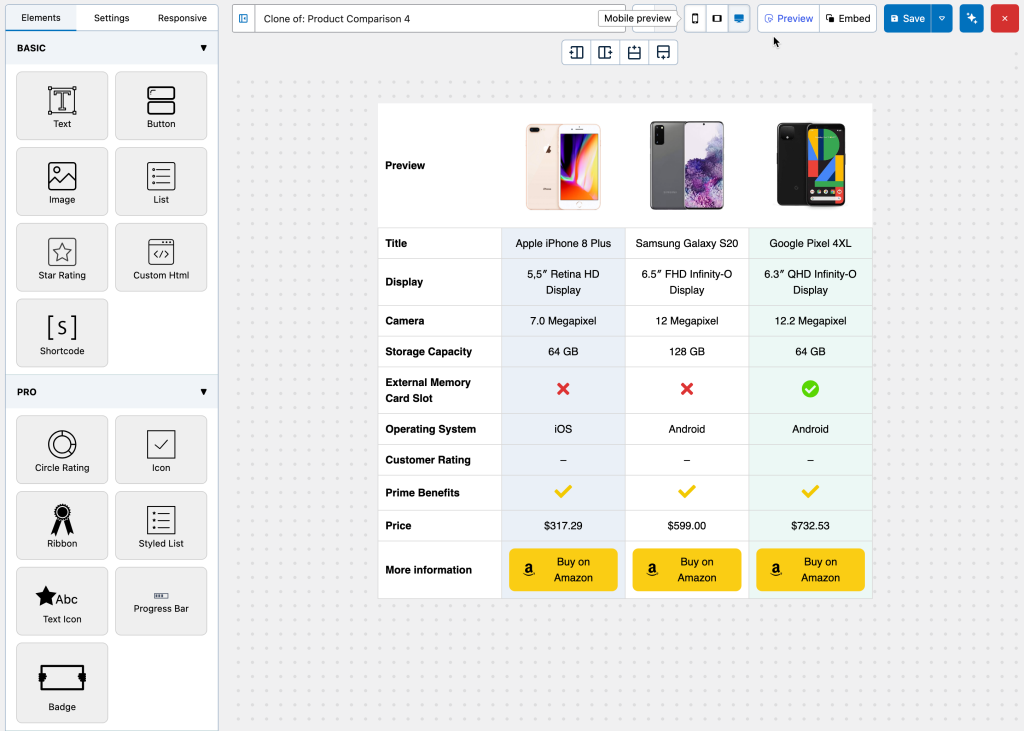
Using the WP Table Builder plugin is extremely easy. If you are familiar with WordPress page builders like Elementor, Thrive Architect, etc., you can immediately use the plugin. The plugin has a similar interface to the page builders.
WP Table Builder Pro Add-On
WP Table Builder also offers a Pro Add-on that takes the builder to the next level and makes table building almost effortless.
The pro add-on comes with 5 additional advanced elements:
- Note du cercle
- Icône
- Ruban
- Liste stylisée
- Icon Text
- Barre de progression
- Badge
Another great feature of the Pro add-on is Prebuilt tables. With Prebuilt tables, you can select a prebuilt table and replace the data instead of creating a table from scratch.
To make it easier, save one of the tables you created as a prebuilt template. This can save tons of time.
Other notable features include – advanced customization options like full column/row duplication, drag & drop ordering of columns/rows, tooltips for list items, padding & margin settings, and more.
Verdict: The easiest way to build a conversion-focused comparison table in WordPress, with a true drag-and-drop canvas instead of a spreadsheet grid.
Key features:
- Drag-and-drop builder: place text, images, buttons, lists, and star ratings anywhere in the table
- Prebuilt comparison table templates you can edit instead of starting from scratch
- Responsive controls with mobile-friendly display modes
- Import/export for moving tables between sites
Tarifs Free version on WordPress.org. Pro starts at $39/year for one site.
Best for: Product and affiliate comparison tables where design and conversion elements matter more than raw data volume.
2. Tableberg
Tableberg is a specialized WordPress plugin designed to create comparison tables. It offers an easy-to-use interface, making table creation and customization straightforward.
The plugin allows users to adjust table headers and footers, enabling precise layout control. This feature is particularly useful for product and price comparisons.
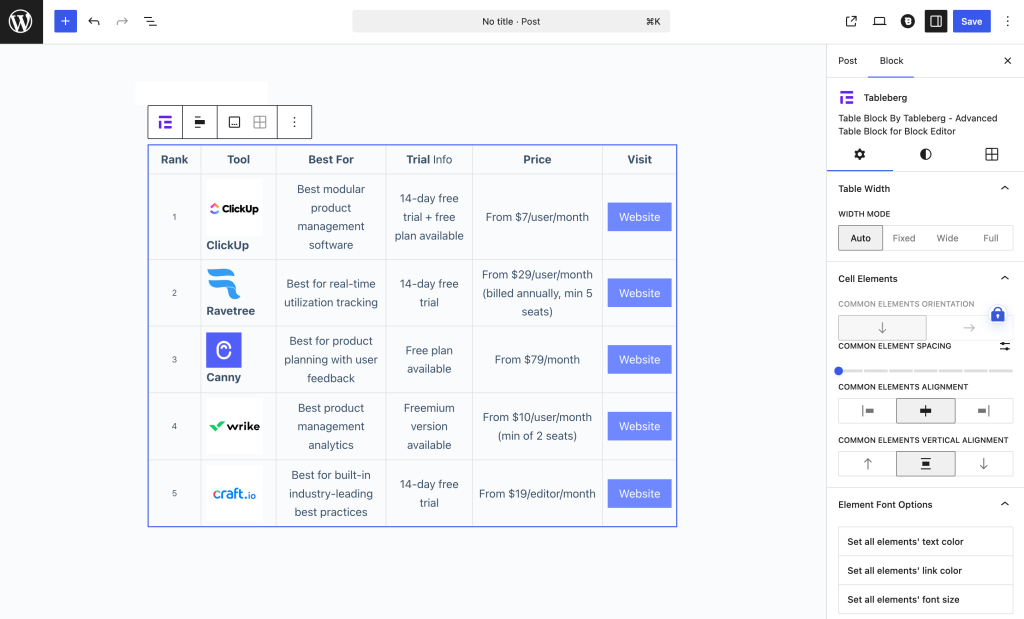
Tableberg also includes options for customizing table width and cell padding, adding to its versatility. This flexibility is valuable for displaying different types of comparison data effectively.
Color customization for table headers, footers, and rows enhances the visual appeal of the tables, making them more engaging for website visitors.
Finally, the control over table and inner border sizes and colors allows users to fine-tune the aesthetics, ensuring that the tables align with the overall design of their site.
Verdict: The best comparison table plugin for the block editor, because tables are built from native blocks so the editing experience feels like Gutenberg, not a plugin bolted onto it.
Key features:
- Every cell accepts blocks: paragraphs, lists, images, and buttons in the free version
- Pro adds star ratings, ribbons, icons, styled lists, and custom HTML
- Prebuilt tables and patterns for one-click starting points
- Responsive display controls for mobile
Tarifs Free version on WordPress.org. Pro starts at $49/year for one site.
Best for: Anyone who works in the block editor and wants comparison tables without leaving it.
3. Ninja Tables
If you want a complete solution to add tables to your WordPress site, Ninja Tables is the perfect plugin. It allows you to create responsive, quick-to-load tables that are even better to look at.
Whether you’re displaying product listings, sports stats, or movie reviews, this table plugin does it all flawlessly with its enhanced table styles. This rich collection of styles gives you a solid design foundation.
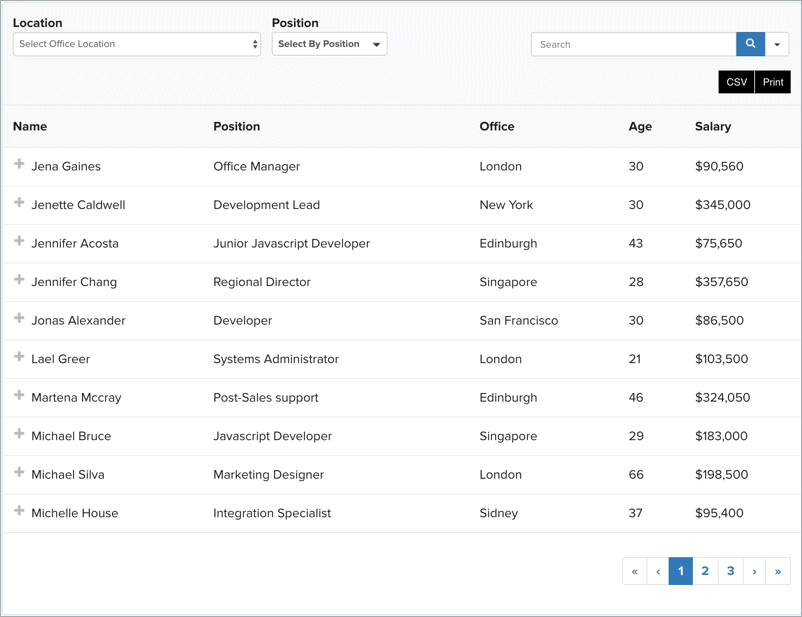
After picking the most fitting table style, all you can do is add content and tailor it to harmonize with your website. The tables support all kinds of content, so there are no limitations to what you present and how.
It is SEO-friendly and includes the 3 most popular CSS libraries that offer unlimited color schemes. Also, you can import your tables from other plugins like TablePress or back them up into CSV or JSON formats.
Ninja Tables is available in paid and free versions, enhancing your website’s front end. The paid version of this comparison table plugin for WordPress includes additional features like advanced data sorting. It provides an option to connect your website’s table to your Google Sheets, which rids you of the hassle of redoing your tables.
Verdict: A data-focused table builder that shines when your comparison pulls from live sources like Google Sheets or WooCommerce.
Key features:
- Google Sheets sync for tables that update automatically
- WooCommerce product table support
- Handles large datasets with pagination, search, and lazy loading
- Conditional formatting to highlight cells by rules (Pro)
- Drag-and-drop column reordering
Tarifs Free version on WordPress.org. Pro starts at $63/year for one site (first-year discount; renews at the regular rate).
Best for: Data-heavy comparisons and tables that need to stay in sync with an external source.
4. TablePress
TablePress is the most popular comparison table WordPress plugin, used by over 600,000+ websites. This ultra-popular plugin is used across countless niches to create and manage beautiful tables. This powerful plugin lets you add tables anywhere – pages, posts, or even text widgets!
The data in the table fields can be altered via spreadsheet-like interfaces and sorted, filtered, and paginated using an additional JavaScript library.
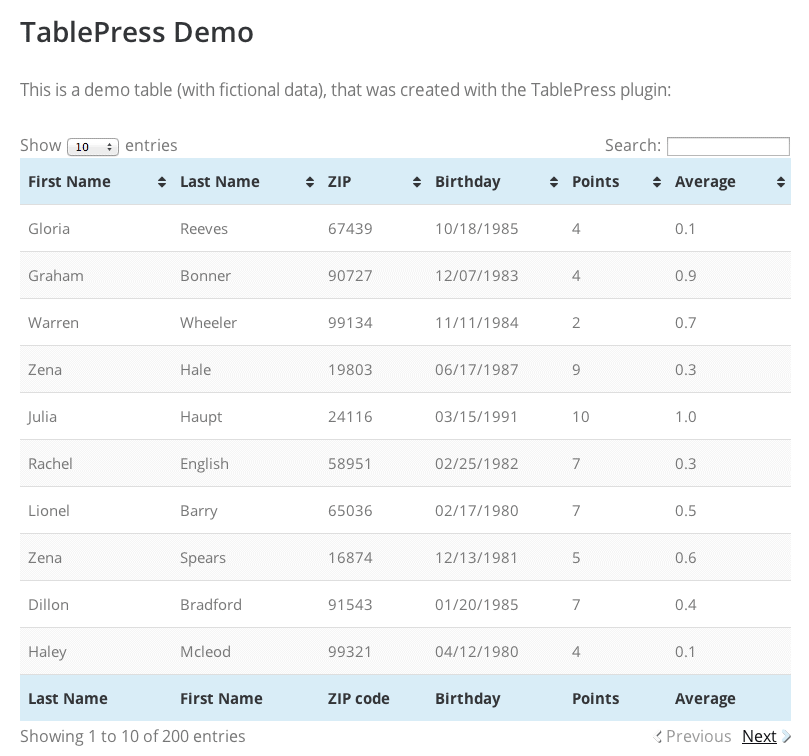
TablePress Extensions enable you to add many features to your tables like automatic URL conversion and table row ordering.
You don’t have to take the trouble of recreating your tables for the site since TablePress enables you to import tables from Excel, CSV, JSON, and even HTML formats. Tables can also be exported, making backing them up super easy.
TablePress is licensed under the GPL (v2) and boasts a thriving support community, making it exceptionally extensible. This free, feature-rich plugin is in a league of its own.
Verdict: The veteran of WordPress table plugins and still the best choice for large, spreadsheet-style data tables, though not for visual product comparisons.
Key features:
- Spreadsheet-like editing interface, instantly familiar from Excel
- Import and export via CSV and Excel
- Frontend sorting, searching, and pagination
- Used on more than 750,000 sites, actively maintained since 2012
- Premium adds responsive display modes, fixed headers, and server-side processing
Tarifs Free version on WordPress.org. Pro is $89/year; a Max plan at $189/year adds performance features for very large tables.
Best for: Big data tables with hundreds of rows, not image-and-button product comparisons.
5. AffiliateX
AffiliateX is the ultimate plugin for creating visually appealing and informative comparison tables. This plugin is designed to help you increase your conversion rates and create lightning-fast affiliate blogs with high Click-Through Rates (CTR).

In addition, the premium version of this product comparison WordPress plugin also offers Versus Line blocks, which can be used to compare specifications between two products.
What sets AffiliateX apart from the competition is it offers an array of customization and layout options, allowing you to effortlessly modify the appearance of each block with a live preview. In addition, it doesn’t slow down your website and improves performance.
With its intuitive interface, customizable templates, and live previews, this plugin is a must-have for any affiliate marketer looking to take their business to the next level.
Verdict: A block collection built specifically for affiliate reviews, with dedicated comparison and versus layouts rather than a general table builder.
Key features:
- Ready-made versus and comparison blocks for head-to-head product matchups
- Product box, pros/cons, and CTA button blocks that pair with comparisons
- Built for the block editor, no shortcodes
- Design presets so blocks match your theme quickly
Tarifs Free version on WordPress.org. Pro starts at $55/year.
Best for: Affiliate reviewers who want purpose-built comparison layouts instead of assembling them cell by cell.
6. Pricing Table by Supsystic
Created by the team at Supsystic, it’s a dedicated pricing table builder plugin that allows you to create colorful pricing tables without any programming skills. It offers preset templates, custom CSS, animation effects, and more features.
You can add unlimited rows and columns, a description column, head, and footer rows, and fully customize everything from alignments to colors with just a few clicks.

Also, this product comparison table plugin includes badges for columns and hover animations that give your site a distinct style. Supsystic offers its Pricing Table block for free and a PRO version that includes additional premium templates and role restrictions, giving your site another layer of security.
Verdict: A focused tool for one job: pricing tables that compare your own plans side by side.
Key features:
- Template library of prebuilt pricing table designs
- Row and column cloning for fast plan setup
- Hover animations and highlighted “featured plan” columns
- Responsive layouts out of the box
Tarifs Free version on WordPress.org. Pro starts at $49/year.
Best for: SaaS and service sites comparing their own pricing plans rather than third-party products.
7. AzonPress
AzonPress is an Amazon Affiliate WordPress plugin that helps build Tables and showcase boxes with staggering ease.
Creating and customizing product comparison tables with their Table-builder is quick and straightforward. The data for the table is directly pulled from Amazon, which makes the whole creation process convenient.
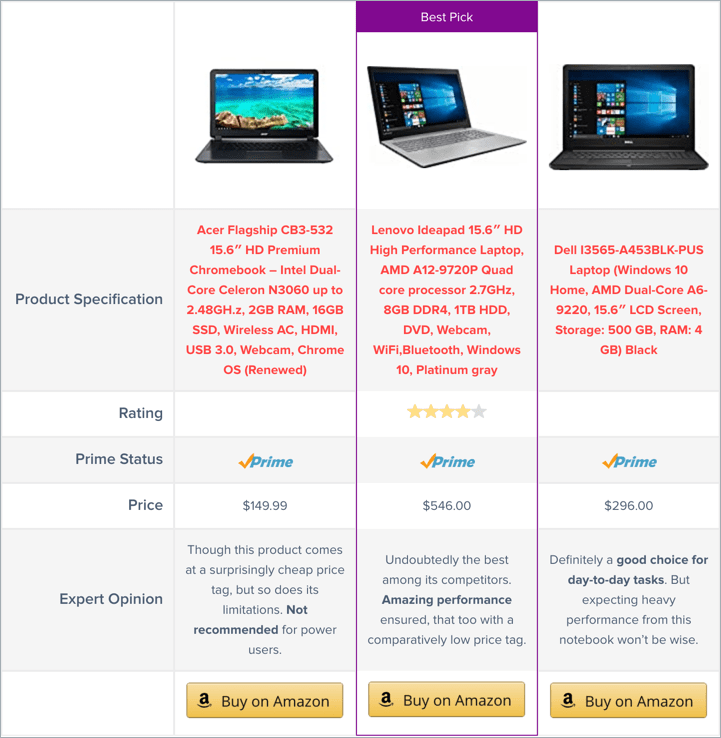
The table builder features a fully responsive design that offers complete control. With AzonPress, you can create unlimited tables and store the table data in your database.
This WordPress comparison plugin includes advanced styling options and settings that allow you to curate tables to match your site. You can also add a custom Call to Action button or a buy button to increase click-through rates significantly.
It works seamlessly with Gutenberg, and you can confidently use WordPress’s new editor to insert any of AzonPress’s amazing showcase boxes, tables, and links.
Verdict: The most streamlined way to build Amazon affiliate comparison tables, with product data pulled straight from the Amazon API.
Key features:
- Automatic product import: images, prices, and details fetched from Amazon
- Comparison tables, bestseller lists, and single product boxes
- Prices stay updated automatically, keeping you compliant with Amazon’s rules
- Affiliate link management built in
Tarifs No free version. Single site license is $39/year, with lifetime licenses available.
Best for: Amazon affiliates who want product tables that populate and update themselves.
8. Arena Products Store
Creating a product catalog and categorizing products is effortless with Arena Products Store. Essentially, this all-in-one plugin can single-handedly create an online mart alongside your theme of choice.
This high-end plugin is compatible with all WordPress themes and includes 9 pre-defined color schemes. You can classify your products and create categories to assign different attributes, groups, and filters.
The plugin has product built-in comparison features, which enable your visitors to compare an unlimited number of the products side by side.

The comparison table is optimized to be crisp and precise – and each such table is created to mention all the attributes of the products. This makes for a neat and straightforward interface.
Advanced users can customize the plugin thanks to their clean, commented, and easy-to-understand options.
Verdict: A product catalog plugin with comparison features built in, useful when you need a full product directory rather than individual tables. [Adjust after your hands-on check]
Key features:
- Product catalog with category organization
- Side-by-side product comparison view
- Inquiry/contact options per product
Tarifs $43 (one-time)
Best for: Sites showcasing a whole product catalog with comparison as one feature among many.
9. Alike – WordPress Custom Post Comparison
If you’re looking for a pocket-friendly plugin that makes lively, attractive tables, Alike is your best bet. It gives you complete control over your data and works with every post type.
The plugin features a drag-and-drop comparison model, which makes the whole endeavor facile. It supports other custom widgets and is translation-ready, which makes this plugin very versatile.

You can set any custom taxonomy terms and factor in custom metadata to build the most dynamic comparison logic. It is one of the best solutions for any directory-listing WordPress site.
They include two different table designs for the comparison table, which can be selected from the plugins’ basic settings panel. You can also set the image size you want to be rendered on the page!
Verdict: A niche but clever option that compares custom post types, so your comparison data lives in WordPress itself instead of hand-typed table cells.
Key features:
- Compares any custom post type: products, listings, services
- Visitors pick which items to compare via AJAX, no page reload
- Comparison data managed through custom fields, reusable across the site
- Shortcode-based placement
Tarifs No free version. $25 one-time on CodeCanyon (includes 6 months of support). Updated in 2025.
Best for: Sites with structured post data (directories, listings) that want dynamic, visitor-driven comparisons.
10. Essential Add-ons for Elementor
Essential Add-ons is a plugin library for Elementor users featuring 110+ polished and high-quality elements.
All the elements in the library have been optimized to give your site a boost. It features multiple elements focused on enhancing different sections of your site, like social elements and content elements.
This plugin breaks down your approach by utilizing two table elements instead of one. Data Table block is utilized when you’re looking to market products by providing a visual and highlighting the details.
Also Check: 7 Best Elementor Table Plugins for WordPress

The pricing table block provides an alluring visual when you’re looking to sell a service and offer different packages at different prices.
Data Table is handy as a comparison table for products with its multifaceted design and striking appearance. The element represents all kinds of products with ease and finesse.
All the elements in this pack come with prebuilt templates, which are completely customizable and offer many styling options.
Essential Add-ons is one of the most resourceful plugins on the list, and it also comes in a free version with limited features.
Verdict: Not a table plugin but the practical answer if you build in Elementor: its table and comparison widgets live right in the page builder you already use.
Key features:
- Data Table widget with styling controls, available in the free version
- Pricing table and comparison-friendly widgets that match Elementor workflows
- Part of a 110+ widget suite, so no separate plugin just for tables
- Live drag-and-drop editing inside Elementor
Tarifs Free version on WordPress.org. Pro starts at $49.97/year for one site.
Best for: Elementor users who want comparison tables without adding a standalone table plugin.
FAQs
What is the best comparison table plugin for WordPress?
WP Table Builder is the best comparison table plugin for most WordPress sites. Its drag-and-drop builder supports images, buttons, star ratings, and lists inside table cells, and the free version covers most comparison table needs. If you prefer working in the block editor, Tableberg is the best Gutenberg-native option.
What is the best free WordPress comparison table plugin?
WP Table Builder and Tableberg both offer capable free versions that support images, buttons, and styling. TablePress is the best free option for large, data-heavy tables, though its free version is limited to plain text and lacks responsive display modes.
Can I create a comparison table in WordPress without a plugin?
Yes, but with major limitations. The built-in Table block only supports plain text, so you can’t add images, buttons, or ratings. The alternative is custom HTML and CSS, which requires coding skills and breaks easily. For any comparison table meant to drive conversions, a plugin is the practical choice.
Why should I use a comparison table plugin?
Comparison tables help visitors make faster decisions by putting products, prices, and features side by side. They increase engagement and conversion rates, keep visitors on the page instead of tab-switching to compare options, and give affiliate sites a natural place for call-to-action buttons. Plugins make these tables responsive and easy to update without code.
Are comparison tables good for SEO?
Yes. Well-structured tables can appear in featured snippets and are easy for search engines and AI tools to parse and cite. Tables also improve dwell time by making content scannable. Make sure your plugin outputs real HTML table markup rather than images of tables, which search engines can’t read.
Which comparison table plugin is best for Amazon affiliates?
AzonPress is built specifically for Amazon affiliates, with automatic product data import via the Amazon API. If you want a general-purpose builder that also handles affiliate tables, WP Table Builder’s pro version includes ready-made comparison table templates with buttons and ratings.
Do comparison table plugins slow down my website?
Lightweight builders like WP Table Builder and Tableberg output plain HTML and CSS, so their impact on load time is minimal. Data-focused plugins like Ninja Tables and TablePress use JavaScript for sorting and filtering but include lazy loading options for large tables. Any of the plugins in this list is fine for performance if you avoid embedding oversized images in cells.
Conclusion
Tables are perfect tools that convey a lot of information quickly and concisely. Their simplicity makes it difficult to choose the right plugin to showcase your products since approaches vary broadly across niches.
However, choosing the right plugin becomes easier if you have a clear idea about the message you want to convey. Regardless of niche and what you’re trying to market and sell, the tables are meant to be impactful and moving.
These plugins cover tables of all kinds, fitting for a vast range of niches, and will undoubtedly make choosing what fits your page best easier.
Affiliate Disclosure: This post contains affiliate links. That means we will get a small commission without extra cost if you purchase using these links. Thank you for being so supportive.


Laisser un commentaire
Vous devez vous connecter pour publier un commentaire.