 Zum Inhalt springen

A league table is the page your visitors check first. Standings, points, goal difference, form: it is the fastest way to answer “who is winning?” and it keeps fans coming back week after week.
WordPress does not give you one out of the box. The built-in Table block only handles plain text, so you cannot add club badges, link team names, highlight the promotion and relegation zones, or let visitors sort by points. And no core feature will recalculate the table for you when a result comes in.
That is what a league table plugin is for. The catch is that “league table plugin” covers two very different tools, and picking the wrong type is the most common mistake.
Quick answer: For most sites, WP Table Builder is the best choice: you build the standings yourself with drag and drop, add badges and styling, and publish in minutes. If you want standings that calculate themselves from match results, SportsPress is the best all-round option, and AnWP Football Leagues is the best free pick for football and soccer specifically.
Below are the 10 best league table plugins, what each one costs, and who each is actually for.
Plugin | Free Version | Pro Price (From) | Best For |
Ja | $39/year (1 site) | Hand-built standings with badges and styling | |
Ja | $99/year (1 site) | Standings that update automatically from results | |
Ja | $29/year (1 site) | Sortable standings pasted from a spreadsheet | |
Ja | $29/year (1 site) | League tables built in the block editor | |
Ja | $149/year (1 site) | Football and soccer sites | |
Ja | €129/year | Multi-sport leagues and tournaments | |
Ja | $89/year (1 site) | A free, plain, sortable standings table | |
Ja | $63/year (1 site) | Standings you keep in Google Sheets | |
Ja | $59/year (1 site) | Stat-heavy tables plus charts | |
Ja | Free core, paid extensions | A single club’s fixtures, results, and table |
First, Decide Which Kind You Need
Every plugin on this list falls into one of two camps. Getting this right will save you hours.
Table builders. You enter the standings yourself and the plugin makes them look good and behave well: sortable columns, responsive layout, club badges, highlighted rows. Nothing is calculated for you, so you update the table after each round. Best for blogs, media sites, fan sites, and anyone displaying an external league’s table (Premier League, NBA, a local competition) or a non-sports ranking such as a leaderboard or “top 50” list.
In this camp: WP Table Builder, League Table, Tableberg, TablePress, Ninja Tables, wpDataTables.
League managers. You enter teams, fixtures, and match results, and the plugin builds the standings for you. Publish a result and the table, form, and player stats all update. These come with player profiles, fixtures, season archives, and a fair bit of setup. Best for clubs and league organisers running their own competition.
In this camp: SportsPress, AnWP Football Leagues, JoomSport, WP Club Manager.
A quick rule of thumb: if you did not play the matches, you probably want a table builder. If you run the competition, you want a league manager.
How I Evaluated These Plugins
I have been building table plugins for WordPress for over a decade, so I judged these the way I would judge a competitor. Here is what mattered:
- Time to a finished table. How long from installing the plugin to a published standings table that looks right? Visual builders and prebuilt templates scored higher. Anything that needed custom CSS or a trip to the docs for basic tasks scored lower.
- League table specifics. A standings table needs more than rows and columns: sortable columns, a position or rank column, club badges in cells, and a way to highlight the top and bottom of the table (champions, playoff places, relegation).
- Mobile behaviour. A 10-column standings table is the hardest thing to fit on a phone. I gave weight to plugins that hide columns by breakpoint, scroll horizontally, or stick the team name column in place instead of squashing everything.
- Automation. For the league managers, does publishing a result actually recalculate the table, and can you define your own points system? For the table builders, can the data come from a spreadsheet or feed instead of being retyped?
- Maintenance. I checked each plugin’s last update, WordPress compatibility, and support activity. A few well-known options here have not shipped a release in over a year, and I have said so rather than glossing over it.
- Pricing. What the free version genuinely covers, what the upgrade costs, and whether the price fits the job. All prices in this post were checked in July 2026.
- A note on transparency: WP Table Builder and Tableberg are our own products. I think they are the best options for building a league table by hand, which is why we built them, but they do not calculate standings from results, and I have pointed you at SportsPress, AnWP, and JoomSport where those are the better fit.
Now, let’s look at each plugin in detail.
1. WP Table Builder
WP Table Builder is a drag-and-drop table builder, and it is the fastest way to publish a good-looking league table without touching code. You drop elements into cells the same way you would in a page builder like Elementor, so if you have used one, you already know how this works.
The free version, available on WordPress.org, includes seven elements: text, button, image, list, star rating, custom HTML, and shortcode. For a standings table, the image element is the one that matters: it is how you get club crests next to team names, which is the single change that makes a league table look professional instead of like a spreadsheet dump.
The Pro add-on is where the league-table-specific features live. Sticky header and first column keep the team names and column labels in view while you scroll a wide stat table sideways. Row and column highlighting lets you colour the promotion places green and the relegation zone red. Pagination, search, and lazy loading handle long ladders with 40 or 50 entries. There are also 25+ prebuilt templates, including a ready-made league points table you can copy and fill with your own data.
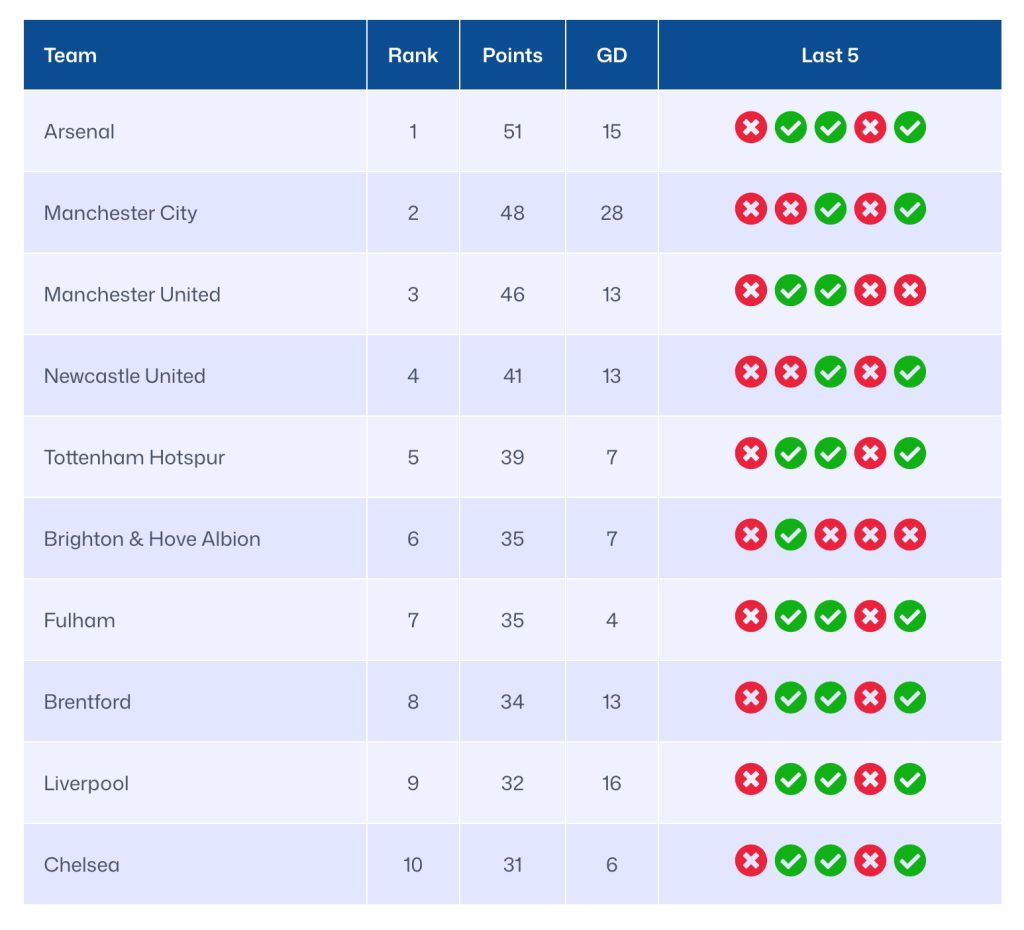
Being honest about the limitation: WP Table Builder does not know what a football match is. It will not calculate points from results. You update the table after each round, which takes a couple of minutes, and in exchange you get complete control over how it looks.
Verdict: The easiest way to build a league table by hand in WordPress, and the best pick if you care how the table looks on the page.
Hauptmerkmale:
- Drag-and-drop builder with images, buttons, lists, and star ratings inside cells
- Prebuilt league points table template you can edit instead of starting from scratch
- Sticky header and sticky first column for wide standings tables (Pro)
- Row and column highlighting for promotion, playoff, and relegation zones (Pro)
- Pagination, search, and lazy loading for long tables (Pro)
- CSV and XML import and export
Preise: Free on WordPress.org. Starter is $39/year for one site, Pro is $59/year for unlimited sites, and a lifetime licence for unlimited sites is $179.
Best for: Blogs, fan sites, and club sites that update standings manually and want the table to look designed.
2. SportsPress
SportsPress is the best-known sports plugin for WordPress, and the free version does the thing most people come to this article for: you enter match results and the league table updates itself.
Setup starts with a sport preset. There are more than 20, covering association football, basketball, ice hockey, cricket, rugby league and union, American football, handball, volleyball, and others, plus esports presets for CS:GO, Dota 2, and League of Legends. The preset configures your table columns and player statistics so you are not starting from a blank slate. From there you add clubs, players, staff, and fixtures, publish results, and the standings recalculate.
The equation builder is the standout feature. It is a drag-and-drop editor for defining how points are awarded, so you can handle bonus points in rugby, overtime losses in hockey, or any custom system your competition uses. There is no limit on the number of events, players, teams, or leagues in the free version, and CSV importers let you bring in existing fixtures and rosters.
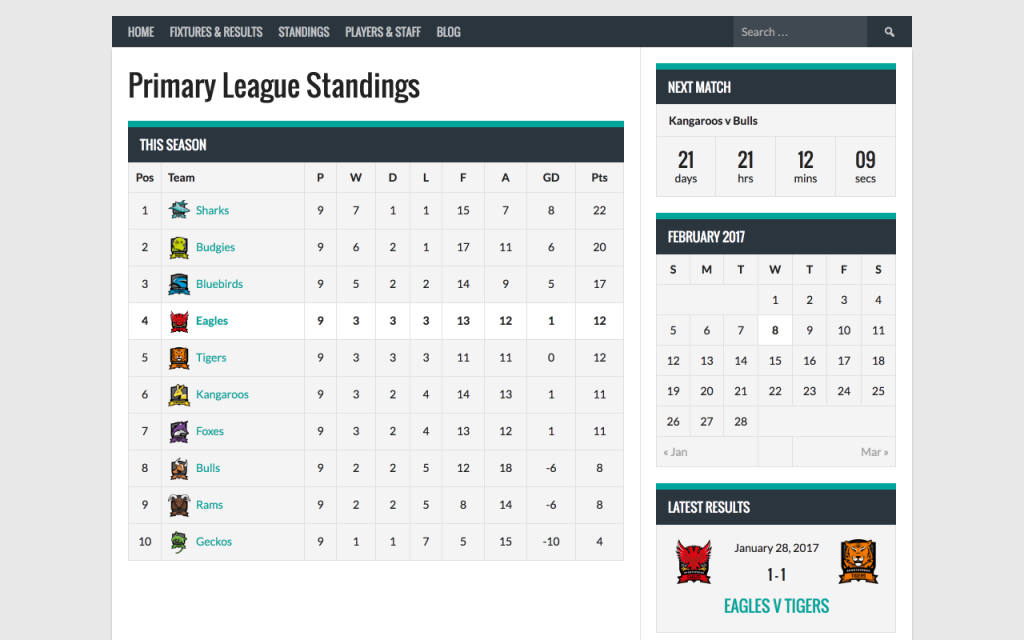
SportsPress Pro adds 19 modules in a single licence, with no separate add-on store: knockout tournaments and brackets, a horizontal scoreboard, match timelines, sponsor tracking with click and impression counts, team access control (so a team manager can only edit their own team’s data), team colours, a league-wide navigation menu, and admin branding.
One caveat worth knowing: the free plugin has been on version 2.7.29 since early 2026, so releases are infrequent. Support responsiveness is good (recent reviews mention it repeatedly, and it holds a 4.7 star average across 368 reviews on 10,000+ active installs), but do not expect a rapid feature pace.
Verdict: Still the most complete free league manager for WordPress, and the safest default if you run a competition across any mainstream sport.
Hauptmerkmale:
- Automated standings that recalculate when you publish a result
- Equation builder for custom points systems
- 20+ sport presets plus esports presets
- Club, player, and staff profiles with career statistics
- Season archives, event calendar, and iCal integration
- CSV importers for events, clubs, players, and staff
- Pro adds tournaments and brackets, scoreboard, timelines, sponsors, and team access
Preise: Free on WordPress.org. Pro is $99 for one site (Club), $199 for unlimited sites (League), and $499 for unlimited sites with lifetime updates (Agency). Club and League renew at 50% off.
Best for: Clubs and league organisers who publish results regularly and want the table to maintain itself.
3. League Table
League Table by DAEXT has been around since 2014 and is built with standings in mind, which shows in the details other table plugins skip.
Data entry happens in an embedded spreadsheet editor, so you can copy a block of cells straight out of Excel, Google Sheets, or LibreOffice and paste it in. No CSV import step, no retyping. On top of that sits a sorting system that understands data types (text, digits, percentages, currency, time, dates) and supports up to five sorting criteria at once, which is exactly what you need for a football table sorted by points, then goal difference, then goals scored.
Two more features earn their keep here. The plugin can generate a position column automatically based on your sorting rules, so ranks stay correct when the order changes. And the autocolors option applies colours to specific ranking positions, which is the quickest way to shade a Champions League zone and a relegation zone without styling rows by hand. For mobile, you can hide specific columns and images below a chosen viewport width, and set a different font size per breakpoint.
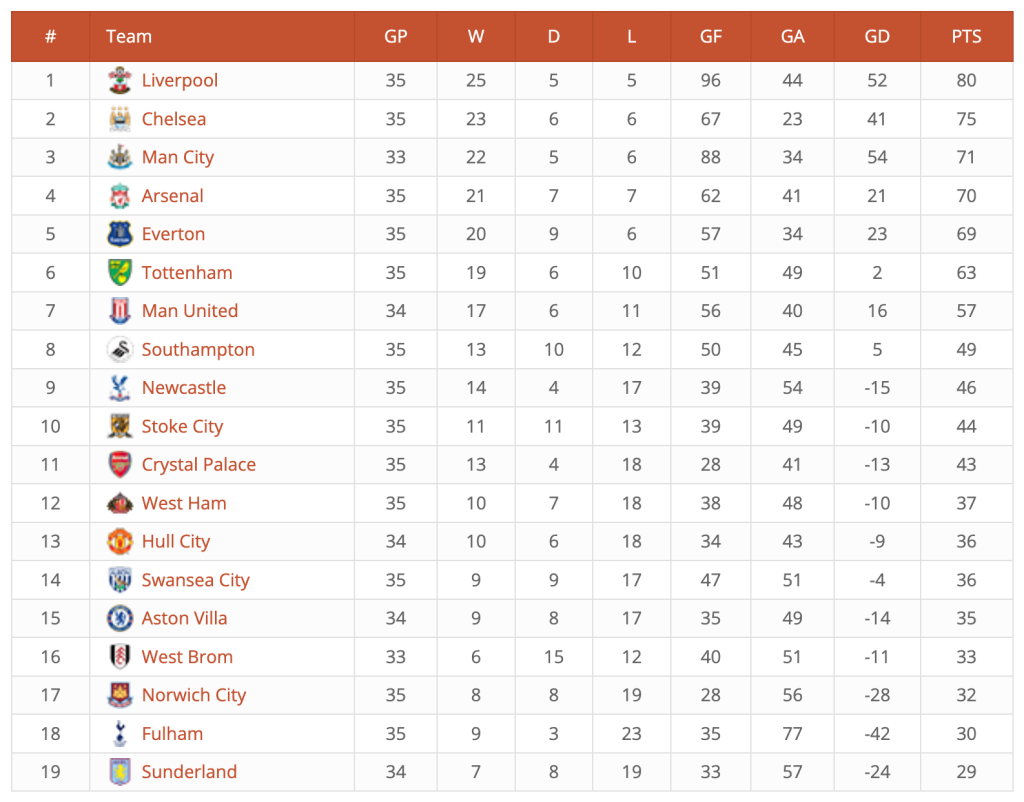
There is a free version on WordPress.org (about 2,000 active installs) that covers the spreadsheet editor, styling, images, and basic sorting. Formulas, multi-column sorting, cell-level styling, autocolors, merged cells, custom HTML in cells, and import/export are Pro.
Two things to note before you buy. Pricing changed significantly: the CodeCanyon listing is now $129 as a one-time purchase with six months of support, while the same plugin is $29/year direct from DAEXT. Buy from the right place. Also, the last release was in mid-2025, so it is stable rather than actively evolving.
Verdict: The most standings-aware table builder here, and worth it for the multi-column sorting and automatic rank column alone.
Hauptmerkmale:
- Embedded spreadsheet editor: paste straight from Excel or Google Sheets
- Up to five sorting criteria, with data-type-aware sorting (Pro)
- Automatically generated position or rank column
- Autocolors to highlight specific ranking positions (Pro)
- Hide columns and images by viewport width, plus per-breakpoint font sizes
- Images and links in cells, arithmetic formulas, XML import and export (Pro)
Preise: Free version on WordPress.org. Pro is $29/year for one site, $59/year for 5 sites, and $109/year for 25 sites direct from DAEXT. The CodeCanyon licence is $129 one-time with six months of support.
Best for: Sites that keep standings in a spreadsheet and want a sortable, correctly ranked table with minimal fuss.
4. Tableberg
If you write in the block editor, Tableberg is the natural choice, because the table is made of blocks. Every cell accepts real blocks, so adding a club badge or a link is the same action you already know, with the same toolbar and the same sidebar controls. There is no separate table screen to visit and no shortcode to paste.
The free version covers paragraphs, lists, images, and buttons in cells, plus header and footer settings, column width and row height, cell padding and spacing, and border controls. That is enough for a clean standings table.
Pro is what makes it work for larger league tables. It adds front-end searching and sorting so visitors can reorder by any column, sticky rows and columns for wide tables, cell and row background colours for highlighting zones, merged cells, and extra sub-blocks including star ratings, icons, ribbons, styled lists, and custom HTML. There are 30 prebuilt tables to start from.
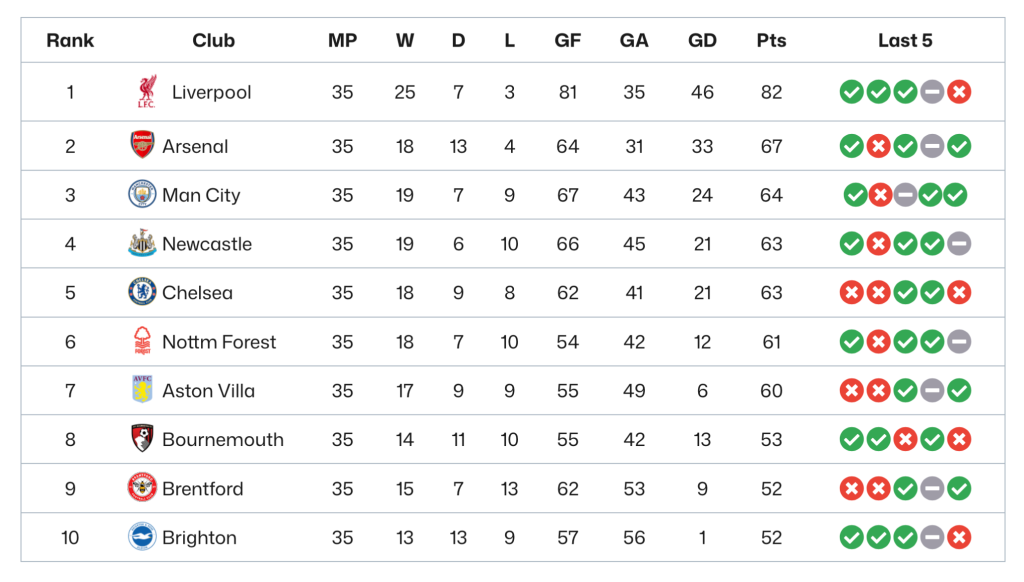
Like WP Table Builder, Tableberg displays data, it does not compute it. You are updating the table yourself each week.
Verdict: The best league table option for block editor users, because the editing experience is Gutenberg rather than a plugin bolted on top of it.
Hauptmerkmale:
- Every cell is a block: paragraphs, lists, images, buttons in the free version
- Front-end searching and sorting (Pro)
- Sticky row and column for wide standings tables (Pro)
- Cell, row, and column background colours for highlighting (Pro)
- Star rating, icon, ribbon, styled list, and custom HTML sub-blocks (Pro)
- 30 prebuilt tables
Preise: Free on WordPress.org. Starter is $29/year for one site, Pro is $49/year for unlimited sites, and a lifetime licence for unlimited sites is $149.
Best for: Anyone who works in the block editor and wants league tables without leaving it.
5. AnWP Football Leagues
If your site is about football or soccer, this is the free plugin to start with. It is narrower than SportsPress by design, and better for that one sport because of it.
The free version handles competitions in round-robin, knockout, or mixed formats, automatic standings, club and player profiles, squads, player statistics, and stadiums. It ships with Gutenberg blocks, shortcodes, and widgets, so you can drop a standings table, a next-match countdown, or a top-scorers list anywhere. Note that it requires the free CMB2 plugin alongside it.
The premium add-on is aimed at sites that want to look like a real football portal: a drag-and-drop page layout builder for team, match, player, and competition pages, knockout brackets, live scores with match commentary and timelines, a results matrix, transfers, formations, club trophies, referee statistics, and import from an external football data API.
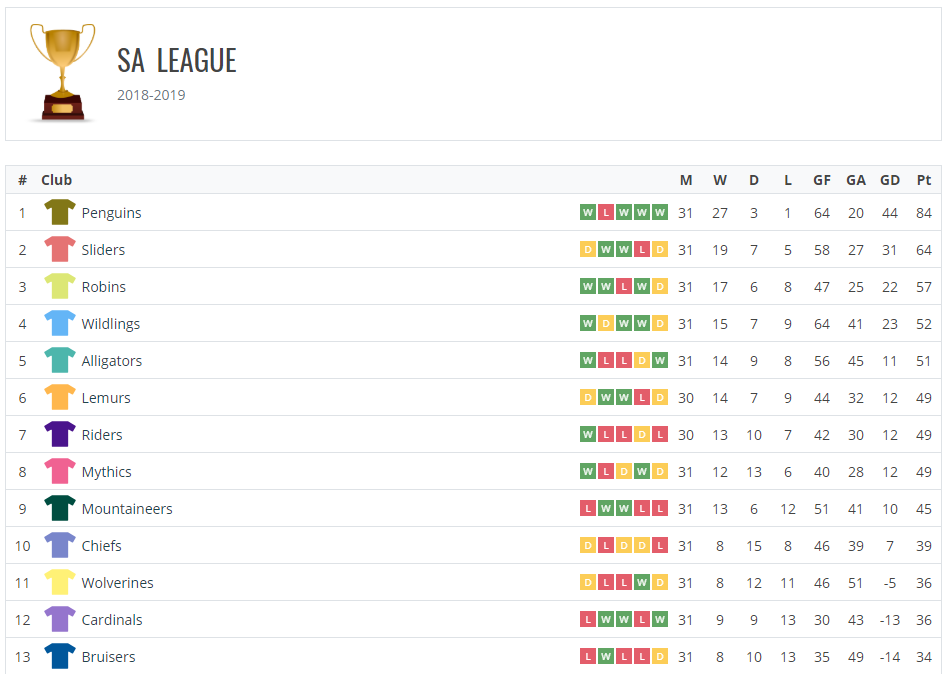
It is a smaller plugin by install count (around 1,000 active installs) but it is well-rated at 4.9 stars, and it is one of the more actively developed options here, built on a modern stack rather than legacy jQuery.
Covering a different sport? The same developer makes AnWP Sports Leagues for basketball, ice hockey, handball, rugby, volleyball, cricket, and baseball. It is newer and smaller, so treat it as promising rather than proven.
Verdict: The best free option if your site is specifically about football or soccer, with the most modern feature set of the league managers here.
Hauptmerkmale:
- Round-robin, knockout, and mixed competition formats with automatic standings
- Club and player profiles, squads, player statistics, stadiums
- Gutenberg blocks, shortcodes, and widgets for standings and fixtures
- Premium adds live scores, match commentary, brackets, and a layout builder
- Premium adds import from an external football data API
- Requires the free CMB2 plugin
Preise: Free on WordPress.org. The premium add-on is $18/month, $149/year, or $499 lifetime for one site (regular prices $22, $189, and $599).
Best for: Football and soccer sites, from a single club up to a full league portal.
6. JoomSport
JoomSport has been developed since 2009 (it started life on Joomla) and is built around a clear hierarchy: leagues contain seasons, seasons contain matchdays, and matchdays contain matches. If you run multiple competitions across multiple seasons, that structure is the reason to choose it.
It supports both team competitions and single-player competitions, so it works for darts, bowls, and similar sports as well as football and hockey. Standings, team pages with stats, player profiles with achievements, and match pages with score details all come from the same data. There are widgets for season standings, upcoming matches, and player statistics, with per-column control over what the table displays.
The feature that sets it apart is front-end management: with the Pro edition, team representatives can submit results and manage their own team without ever seeing the WordPress dashboard. If you run a league where twenty different club secretaries need to report scores, that is worth more than any styling option.
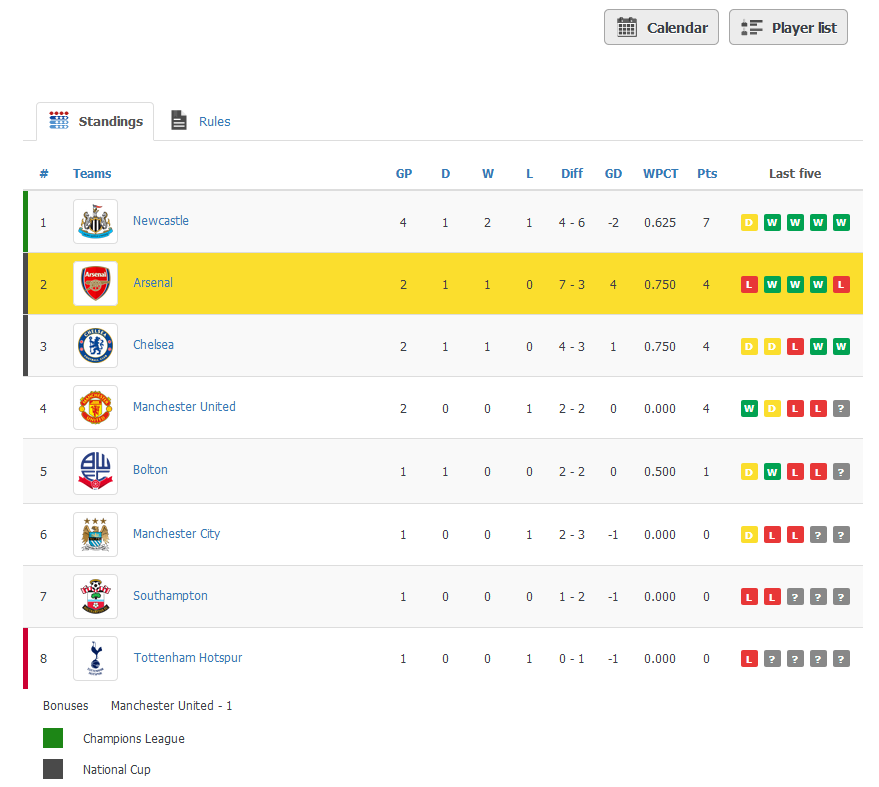
Pro also connects to the Statorium sports API for live scores and public league data, adds a match generator for building fixture lists, CSV import, and a predictions game plugin for fan engagement.
It is the most expensive option on this list, and pricing is quoted in euros with several models, so read the pricing page carefully before you commit.
Verdict: The strongest choice for organisers running real competitions with multiple seasons and multiple people entering results.
Hauptmerkmale:
- League, season, matchday, and match hierarchy for multi-competition sites
- Team and single-player competition modes
- Front-end management so club admins can submit results (Pro)
- Statorium API connector for live scores and public league data (Pro)
- Match generator for building fixture lists (Pro)
- Prediction game plugin included with higher tiers
Preise: Free on WordPress.org. Pro is €129/year (Basic) or €249/year (Advanced), with monthly plans from €14/month plus a €60 one-time start fee, and one-time GPL licences at €499 and €699 including two years of updates.
Best for: League and tournament organisers who need multiple people entering results.
7. TablePress
TablePress is the most-installed table plugin for WordPress, with over 600,000 active installations and a near-perfect rating across more than 4,600 reviews. It is also one of the most reliably maintained plugins in this category, with releases shipping regularly and full compatibility with the latest WordPress versions.
For league tables, the free version gives you a spreadsheet-style editor, front-end sorting, searching, and pagination, and import from Excel, CSV, JSON, and HTML files or URLs, including Google Sheets and files on Dropbox or OneDrive. It also supports math formulas in cells, so you can calculate goal difference or points from other columns. The output is accessible, SEO-friendly HTML.
The gaps in the free version matter for standings tables specifically. There is no responsive display mode, no fixed header or fixed column, and no visual styling controls, so a wide table on a phone means horizontal scrolling and any colour-coding means writing custom CSS. Pro adds responsive tables, fixed rows and columns, a visual style customiser, row and cell highlighting, column filter dropdowns, and row grouping. Max adds automatic periodic imports (useful if a Google Sheet is your source of truth) and server-side processing for very large tables.
Verdict: The most dependable free table plugin, and the right pick when you want a functional standings table and do not care about design.
Hauptmerkmale:
- Spreadsheet-style editor, familiar from Excel
- Front-end sorting, searching, and pagination in the free version
- Import from Excel, CSV, JSON, and HTML files or URLs, including Google Sheets
- Math formulas in cells
- Responsive display modes, fixed headers and columns, and row highlighting (Pro)
- Automatic periodic table import (Max)
Preise: Free on WordPress.org. Pro is $89/year for one site and Max is $189/year. Lifetime licences and multi-site packages are available.
Best for: Plain, fast, sortable standings tables where appearance is not the priority.
8. Ninja Tables
Ninja Tables earns its spot here for one feature: Google Sheets sync. Keep the league table in a spreadsheet, update it there after each round, and the table on your site follows. If several people help maintain the standings, or you already track the competition in a sheet, that removes the copy-and-paste step entirely.
Beyond that, it is a capable general table plugin. Conditional formatting lets you set rules that colour cells automatically, which is a neat way to shade the top four and the bottom three without editing them by hand. There are two building modes (a simple drag-and-drop builder and an advanced mode with finer control), a large template library, and elements including images, buttons, icons, and progress bars. It also pulls from remote CSV files, WordPress posts, custom post types, ACF fields, and WooCommerce.
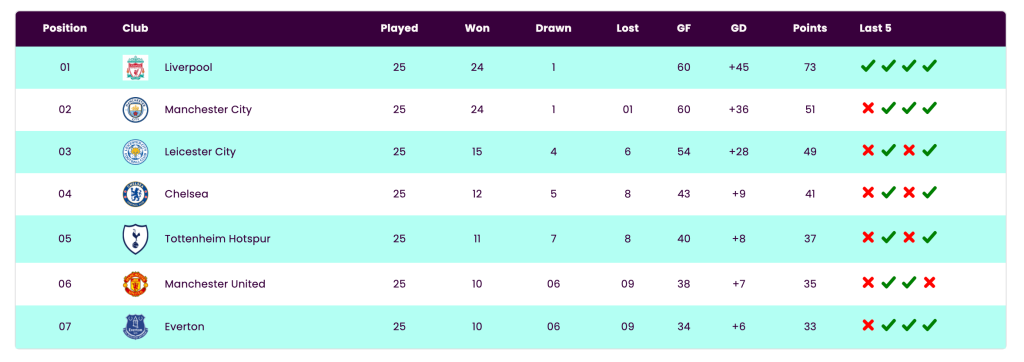
The trade-off is price. It is the more expensive of the general table builders, and the advertised annual price is a first-year rate that renews higher, so check the renewal figure before you buy.
Verdict: The best pick if your league table already lives in a Google Sheet and you want the site to mirror it.
Hauptmerkmale:
- Google Sheets sync for tables that update from a spreadsheet
- Conditional formatting to colour cells by rule
- Simple and advanced building modes
- Remote CSV, WordPress posts, custom post types, and ACF as data sources
- Large template library
Preise: Free on WordPress.org. Pro starts at $63/year for one site as an introductory rate that renews at the regular price. Lifetime licences are available.
Best for: Anyone already maintaining standings in Google Sheets who wants the site to update itself.
9. wpDataTables
wpDataTables is the heavyweight of this list. It is less a table builder than a data plugin: it connects to Excel and CSV files, JSON and XML feeds, Google Sheets, nested JSON from any API, MySQL, MSSQL, and PostgreSQL databases, then renders the result as a table, a chart, or both.
For a sports site, the interesting part is what happens after the table exists. You can generate charts from the same data using Google Charts, Chart.js, ApexCharts, or HighCharts, and the charts follow the table’s filtering, so a reader who filters to one team sees that team’s chart. Conditional formatting highlights rows or individual cells by rule, front-end editing lets approved users update data without the dashboard, and server-side processing keeps very large stat tables fast.
The free Lite version on WordPress.org is genuinely limited (row-capped, with no external data connections), so this is effectively a paid plugin.
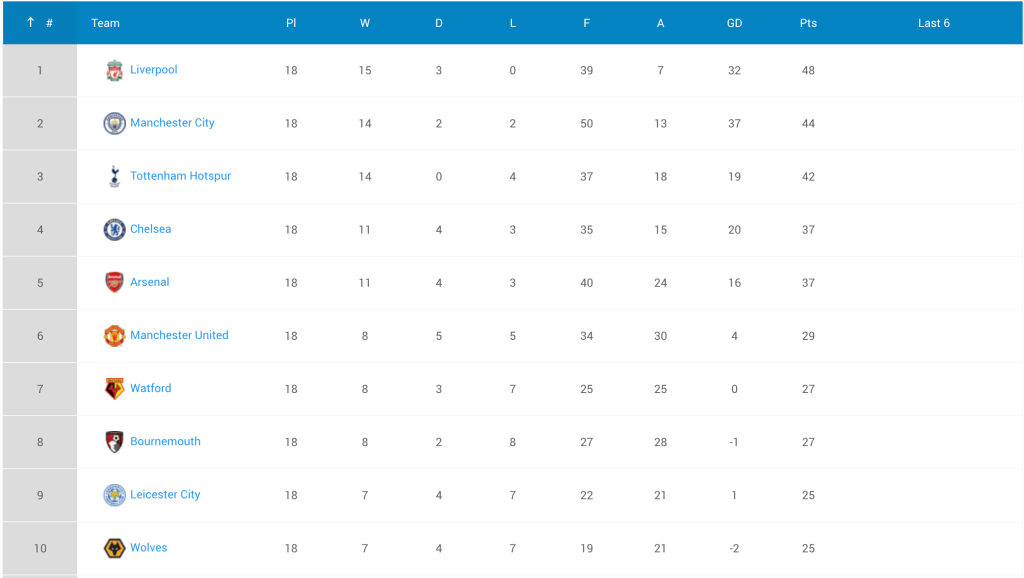
Be honest with yourself about whether you need it. For a 20-row standings table, this is far more plugin than the job requires, and the setup cost is real. For a site publishing season-long player statistics with charts alongside them, it is the strongest option here.
Verdict: Overkill for a simple league table, but the best choice when standings are one piece of a larger statistics section.
Hauptmerkmale:
- Data from Excel, CSV, JSON, XML, Google Sheets, APIs, and SQL databases
- Charts from table data via Google Charts, Chart.js, ApexCharts, and HighCharts
- Charts follow table filtering
- Conditional formatting for rows and individual cells
- Front-end editing and server-side processing for large tables
Preise: Free Lite version on WordPress.org with row limits. Paid plans start around $59/year for one site (Starter), with Standard, Pro (3 domains), and Developer (unlimited) tiers above it, available annually or as lifetime licences. Prices move with promotions, so check the current rate.
Best for: Stat-heavy sports sites that want tables and charts from the same data.
10. WP Club Manager
WP Club Manager is built around one club rather than one league, and that focus is the point. If you run a club with several teams (a first XI, a reserves side, a youth team) and each plays in a different competition, this models that better than a league-wide plugin.
You manage teams, player and staff profiles, player performance ratings, sponsors, fixtures, and results, and league tables are generated from those results. It is quick to set up compared with the bigger league managers, and the templates are straightforward to customise if you are comfortable in a child theme.
Development is steady, with the most recent release in mid-2026, and it holds a 4.7 star rating. The install base is small, so treat the community as limited: documentation and paid extensions come from the developer rather than a large ecosystem. Sport-specific extensions (cricket, for example) and club themes are sold separately.
Verdict: The most club-shaped option here, and a lighter setup than SportsPress if you only need one club’s fixtures, results, and table.
Hauptmerkmale:
- Built around a single club with multiple teams
- Player and staff profiles with performance ratings
- Fixtures, results, and generated league tables
- Sponsor management
- Sport-specific extensions and club themes available separately
Preise: Free core plugin on WordPress.org. Sport extensions and themes are sold separately by the developer.
Best for: A single sports club that wants a tidy site with fixtures, results, and a table.
FAQs
What is the best WordPress league table plugin?
It depends on whether you enter the standings or the plugin calculates them. For hand-built league tables, WP Table Builder is the best option for most sites: drag and drop, club badges in cells, highlighted rows, and a free version. For standings that update automatically from match results, SportsPress is the best all-round pick, and AnWP Football Leagues is the strongest free choice for football and soccer.
What is the best free WordPress league table plugin?
SportsPress, if you want automatic standings: the free version has no limits on teams, fixtures, or leagues, and includes the equation builder for custom points systems. If you are entering the table yourself, WP Table Builder and Tableberg both have capable free versions that support images and styling, and TablePress is the best free option for a plain sortable table.
Which plugin updates league standings automatically?
SportsPress, AnWP Football Leagues, JoomSport, and WP Club Manager all calculate standings from published match results. The table builders on this list (WP Table Builder, League Table, Tableberg, TablePress, Ninja Tables, wpDataTables) do not, with one partial exception: Ninja Tables and TablePress Max can sync from a Google Sheet, so if you maintain the table in a spreadsheet, the site updates without you touching WordPress.
Can I create a league table in WordPress without a plugin?
You can, but it will not do much. The core Table block only accepts plain text, so no club badges, no linked team names, no sortable columns, and no highlighting. The alternative is hand-written HTML and CSS, which works but breaks easily and is painful to update weekly. For anything you will maintain across a season, a plugin is the practical answer.
How do I make a league table responsive on mobile?
Standings tables are wide, so plan for this. The best approaches are hiding less important columns below a set screen width (League Table and WP Table Builder both do this), sticking the team name column in place while the rest scrolls sideways (WP Table Builder Pro, Tableberg Pro, TablePress Pro), or letting the table scroll horizontally inside a container. Avoid shrinking the font until everything fits: nobody reads a six-pixel table. WP Table Builder users can follow our guide to making tables responsive.
Are league tables good for SEO?
Yes, when they output real HTML. Search engines and AI assistants can read and cite a properly marked-up table, standings tables attract recurring search traffic through a season, and they hold attention on the page. Two rules: never publish a league table as a screenshot, since none of that data is readable, and make sure your plugin renders actual table markup rather than styled divs.
Do league table plugins slow down my site?
The table builders are light. WP Table Builder and Tableberg output plain HTML and CSS and load nothing on pages without a table. TablePress and Ninja Tables load JavaScript for sorting and filtering, which is a small cost for a 20-row standings table. The league managers are heavier because they add custom post types, database tables, and front-end templates, and wpDataTables is the heaviest of all. For a normal standings table, none of this will be your performance bottleneck.
Fazit
Most people arrive at this topic looking for one thing and needing another. If you cover a league you do not run, you want a table builder: WP Table Builder if you want it to look good, League Table if you live in a spreadsheet, Tableberg if you live in the block editor.
If you run the competition, you want a league manager, and the extra setup pays for itself the first time a result publishes and the table sorts itself. Start with SportsPress unless you are football-only (take AnWP Football Leagues) or you need club admins entering their own results (take JoomSport).
Every plugin here has a free version or a free tier, so try before you buy. If you are leaning toward WP Table Builder, the league points table demo will show you what you can build in about ten minutes.
Also read:
- Best WordPress Excel Spreadsheet Plugins
- Best WordPress Comparison Table Plugins
- Best WordPress Sports Plugins
- Best Google Sheets Integration WordPress Plugins
Disclosure: This post contains affiliate links. That means we will get a small commission without any extra cost if you purchase using any of these links.
Schreiben Sie einen Kommentar
Sie müssen angemeldet sein, um einen Kommentar abzugeben.