 Vai al contenuto

Tutti cerchiamo di essere produttivi nella nostra vita quotidiana, e la produttività è qualcosa che cerchiamo ancora di più quando dobbiamo gestire un sito web.
Per essere più produttivi, puoi scegliere di installare plugin che ti aiuteranno ad avere una vita produttiva. Ci sono molti modi in cui puoi distrarti mentre lavori sul tuo sito web WordPress.
Ci sono anche varie cose che potresti fare, ma sei bloccato su una sola cosa. Tutte queste distrazioni possono anche essere risolte utilizzando i giusti plugin di produttività per WordPress.
Inoltre, è una grande seccatura gestire un sito web WordPress da soli ed essere produttivi allo stesso tempo. In più, la quantità impressionante di funzionalità ed estensioni che si possono utilizzare rende difficile selezionare quelle giuste.
Nel post di oggi parleremo dei migliori plugin di produttività per WordPress che abbiamo selezionato con cura. Questi plugin ti aiuteranno a gestire i tuoi progetti e le attività rapide in modo efficiente, così potrai occuparti del tuo altro lavoro con meno problemi.
Ora vediamo nel dettaglio.
Nome del plugin | Valutazioni | Versione | Scarica |
Assistente | Libero | ; | |
Trasforma in comando | Gratuito e Pro | ; | |
SureTriggers | Gratuito e Pro | ; | |
HubSpot | Gratuito e Pro | ; | |
WP Project Manager Pro | Gratuito e Pro | ; | |
Task Manager Pro | Pro | ; | |
Elenco attività della dashboard | Libero | ; |
Assistente

Assistant è l'applicazione di produttività quotidiana che ti consente di eseguire attività rapide senza accedere al pannello di amministrazione di WordPress. Ad esempio, puoi trovare rapidamente una pagina o un articolo, aggiornare il titolo o l'immagine in evidenza di un articolo e così via.
Questo plugin WordPress dedicato alla produttività è una raccolta di diverse app; ad esempio, con l’app “Media” del plugin è possibile caricare file multimediali e accedere alle pagine degli allegati. Utilizzando l’app “Commenti”, è possibile aggiornare, rispondere, rimuovere e spostare nel cestino qualsiasi commento.
Grazie all'app "Aggiornamenti", puoi tenere traccia degli aggiornamenti dei tuoi temi e plugin e aggiornarli contemporaneamente.
In altre parole, è un'applicazione che ti permette di fare di più senza accedere al backend del tuo sito.
Caratteristiche principali
- Esegui le operazioni sul tuo sito senza accedere al backend
- Mostra i post modificati di recente
- Carica file multimediali
- Modera i commenti
- Aggiorna Temi e Plugin
- Trova rapidamente post, pagine e tipi di post personalizzati
- Aggiungi etichette personalizzate ai tuoi post e alle tue pagine
Versioni disponibili e prezzi: Provalo gratuitamente.
Trasforma in comando
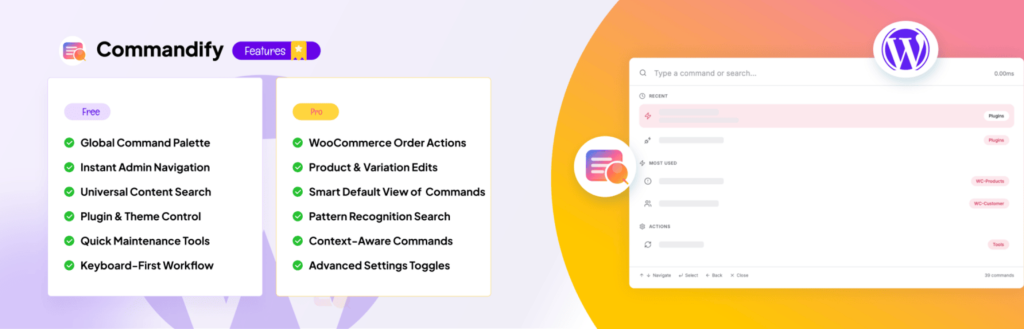
Commandify è un potente strumento di produttività che porta una tavolozza di comandi in stile Spotlight su WordPress. Le funzionalità e le integrazioni consentono di lavorare più velocemente attivando azioni, cercando contenuti e gestendo flussi di lavoro complessi senza lasciare la tastiera.
Con Commandify puoi passare a qualsiasi pagina, modificare i post, gestire gli utenti o aggiornare le impostazioni in pochi secondi. Ti aiuta a rimanere concentrato sul tuo lavoro invece di dover navigare tra i menu.
Commandify può migliorare notevolmente il tuo flusso di lavoro se gestisci siti di grandi dimensioni o complessi.
Ad esempio, puoi cercare template di Elementor o Bricks e modificarli all'istante, gestire gli ordini WooCommerce e le varianti di prodotto da qualsiasi schermata, oppure visualizzare e gestire gli invii di Contact Form 7 senza caricamenti di pagina.
Supporta anche flussi di lavoro intelligenti, come il passaggio a un altro utente per testare i permessi, la revisione dei dettagli dei clienti prima di apportare modifiche o l'esecuzione di interventi di manutenzione ordinaria come la pulizia dei dati temporanei o l'eliminazione dei commenti spam, il tutto da un'unica scorciatoia.
Un altro modo in cui Commandify aumenta la produttività è attraverso modelli di ricerca intelligenti.
Inserisci l'ID di un post, un numero d'ordine, un indirizzo e-mail o un @nomeutente e Commandify riconoscerà automaticamente ciò che desideri fare, proponendoti le azioni esatte di cui hai bisogno.
Questo lo rende ideale per agenzie, sviluppatori, proprietari di e-commerce e chiunque lavori regolarmente con WordPress e abbia bisogno di un modo più rapido e orientato all'azione per portare a termine le cose.
Caratteristiche principali:
- Cerca e agisci immediatamente su post, pagine, utenti, contenuti multimediali, modelli e impostazioni
- Integrazioni avanzate con Elementor, Bricks, WooCommerce, Contact Form 7, Flamingo e User Switching
- Esegui operazioni quali la modifica dei modelli, l'aggiornamento degli ordini, la modifica delle varianti o la visualizzazione delle richieste senza allontanarti dallo schermo
- Riconoscimento di modelli per @utenti, #postID, indirizzi e-mail e numeri d'ordine
- Strumenti di manutenzione con un solo clic, tra cui la pulizia dei transienti, la rigenerazione delle miniature e l'eliminazione dello spam
- Comandi intelligenti e contestuali che si adattano in base al luogo in cui stai lavorando
- Un'interfaccia veloce e priva di distrazioni, pensata per gli utenti che preferiscono utilizzare la tastiera
- Le prossime integrazioni includono Fluent Forms, Gravity Forms, WPForms, LearnDash, TutorLMS, MemberPress e PaidMembershipsPro
Roadmap del prodotto Pro

Product Roadmap Pro aiuta i team a trasformare la pianificazione del prodotto in un flusso di lavoro visibile e strutturato all’interno di WordPress. Invece di rispondere ripetutamente alle domande sulle funzionalità o condividere manualmente gli aggiornamenti della roadmap, è possibile pubblicare una roadmap accessibile a tutti, in cui gli utenti possono inviare idee, votare le priorità e monitorare lo stato di avanzamento, dalla fase di pianificazione a quella di completamento.
Ciò migliora la produttività del team riducendo i ticket di assistenza ripetitivi, organizzando il feedback dei clienti in un backlog chiaro e allineando le priorità di sviluppo alla domanda effettiva. Per le aziende che operano nel settore dei prodotti, la trasparenza della roadmap diventa sia uno strumento di comunicazione sia un sistema di gestione del flusso di lavoro.
Poiché funziona interamente all’interno di WordPress, l’implementazione risulta leggera e consente al contempo di mantenere la tua roadmap integrata con i contenuti e il marchio esistenti.
Caratteristiche principali:
- Public roadmap with visible status updates
- Built-in suggestion submission system
- Voting for transparent prioritization
- Comment discussions for context
- Flexible visual templates
- Notifications and update alerts
Prezzi
Product Roadmap Pro is a premium plugin offering advanced roadmap and feedback management features.
SureTriggers
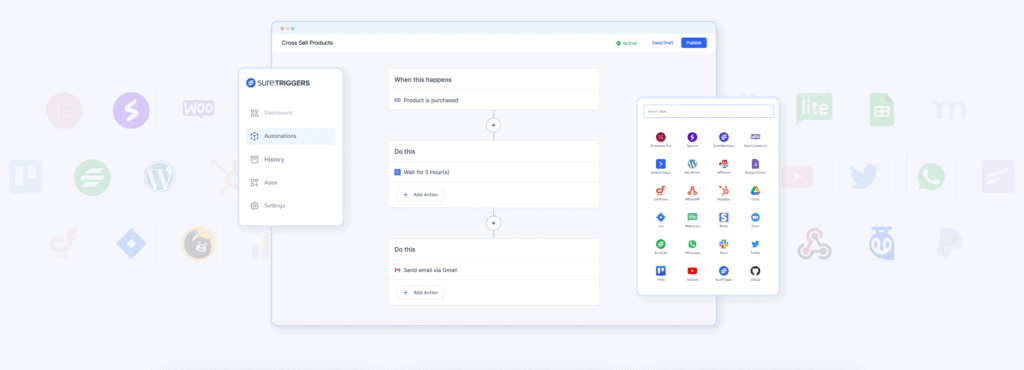
SureTriggers is a sophisticated automation solution that can enhance WordPress productivity by automating repetitive or time-consuming processes.
SureTriggers allows you to construct workflows that trigger activities when particular events occur, such as when a user submits a form, places an order, or publishes a new post.
SureTriggers can also help you increase productivity on WordPress by automating your lead creation process.
SureTriggers, for example, can send an email to a new lead when they fill out a form on your website or instantly add their contact information to your CRM.
This will save you time and keep you on top of your leads, allowing you to concentrate on completing business.
Another option to increase productivity using SureTriggers is to automate your content publication process.
For instance, it can automatically publish new blog articles to your social media networks or send an email to your subscribers when a new piece is published. This will assist you in reaching a larger audience and driving more traffic to your website.
SureTriggers can also be used to automate e-commerce activities such as sending order confirmation emails or adding consumers to your mailing list after purchase.
It will reduce your action time and assist you in streamlining your processes and improving the client experience.
SureTriggers is a powerful solution that may help you increase WordPress productivity by automating repetitive processes and optimizing your workflows.
Caratteristiche principali:
- Automate routine tasks on your WordPress site, such as posting to social media, sending emails, and creating backups, saving you time and effort.
- Integration with a range of other tools, including popular CRM and email marketing software, enables you to streamline your workflows and improve your overall productivity.
- Set up customized triggers that will automatically execute specific actions based on certain criteria, such as the time of day, the number of visitors to your site, or the completion of a specific form.
- Provides a range of pre-built templates that you can use to quickly set up automation workflows for common tasks, such as lead generation, email marketing, and content distribution.
- Send real-time notifications when certain events occur on your WordPress site, such as a new comment, a form submission, or a purchase, enabling you to take immediate action.
- Use conditional logic to trigger different actions based on specific conditions, such as the content of an email or the location of a user.
- Offers a user-friendly interface that makes it easy to set up and manage automation workflows, even if you have no coding or technical skills.
- It can be used to automate tasks across multiple WordPress sites, making it ideal for businesses with a large online presence.
Available Versions & Prices: Get the plugin for free. The price of the Premium Version starts from $99 per year for 5 websites.
HubSpot
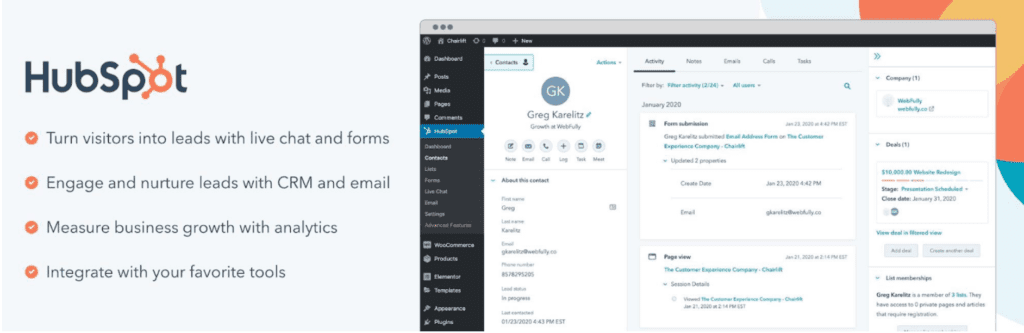
If you want to improve your productivity by streamlining your marketing, sales, and customer services in a single centralized platform, HubSpot is the absolute choice.
You can easily integrate your website with various marketing and sales automation tools using HubSpot. Since you can also include email marketing tools, you can manage customer data, track interactions, and monitor the sales funnel.
The key benefit that will help you manage your productivity is that it provides actionable insights and analytics to optimize your marketing campaigns and sales process. It also allows you to analyze your traffic, conversion rates, and other key performance metrics.
Overall, it is an excellent productivity plugin for WordPress users to develop customer relationships and boost productivity and efficiency.
Caratteristiche principali
- 20+ Predesigned Email Templates
- Email Automation, Tracking, & A/B Split Testing
- Live Chat & Chatbots
- Analisi avanzata
- Social Media Integration & Analytics
- CRM & Contact Management Platform
- Facebook Messenger & Chat
Versioni disponibili e prezzo: Get the plugin for free. The pricing of the Pro version starts from $18 monthly for a single website.
WP Project Manager Pro

WP Project Manager Pro lets you be more productive at work by letting you organize and track all your tasks and projects. It works like a supercharger that charges your productivity, creating, organizing, and assigning tasks within a few clicks.
Among its several features, Kanban Board helps you to create boards for managing your projects and assign the projects to the team members. Therefore, you can see the progress of your team and project effortlessly.
It offers you a user-friendly interface & web-based task management tool that lets you accomplish your to-do or simple tasks quickly. Its calendar feature lets you see the tasks of each day you assign to your team members.
However, the plugin is also packed with a Project manager that lets you see your to-do list with a quick view. It includes the time, project name, assigned deadline, assigned team members, project progress, etc.
The built-in performance tracker of this productivity plugin for WordPress generates advanced performance reports of each member of your team. It also offers you a built-in time-tracking tool that gets your team to finish all the projects within the assigned time.
Also Read: 5 Best WordPress Project Management Plugins
Caratteristiche principali
- Interactive Task Calendar
- Control Team Capacities & Member Roles
- Recurring Task
- Time Tracker
- Overview Dashboard
- Task Priority Management
- Advanced Reports with Deep Insights
- Kanban Board
- In-Project Discussion
Versioni disponibili e prezzi: Get the free version from the WordPress repository. The Pro Version starts from $79/year for a single website.
Task Manager Pro
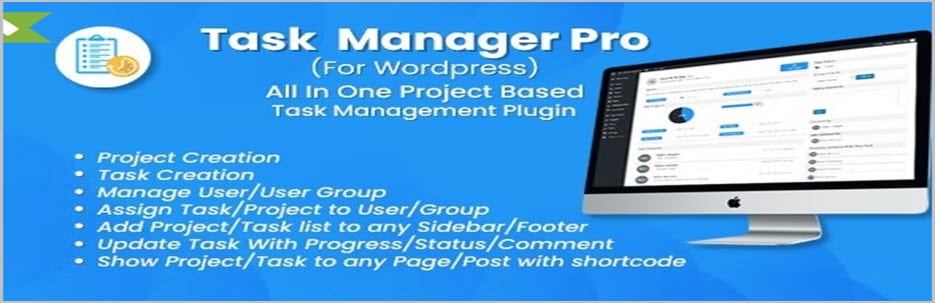
Task Manager Pro is another premium full-fledged task management plugin to manage your tasks, projects, and tickets efficiently.
Task Manager Pro lets you create your to-dos with required descriptions. With its advanced user management, you can assign tasks to a particular user. In other words, it allows you to control user roles.
Since you have complete control, you can assign your tasks and projects to any user and group you create using the plugin.
Your users can change their task status to done or doing the project. They can even change the task progress using a pie chart or bar chart. The more efficient way to do that is using the task board functionality.
The task board of this WordPress Productivity plugin lets you add cards and create new boards for particular users. You can move cards according to your needs and add the required time to finish the project with its time-tracking feature.
There’s also the option to see all the tasks in the list view for a quick view of the overall progress of all of your projects. You can also import and export all your tasks only by clicking the import/export buttons.
Caratteristiche principali
- Task Board
- Complete Solutions for Task, Project, and ticket Management
- User Management
- Time Tracking
- Multiple Language Support
- Task/Project User Update Notification
- Assign Tasks or Projects to Any User or Group
- Shortcode Support to Show Projects on Any Page or Posts
Versioni disponibili e prezzi: Get the premium version of this Productivity plugin for WordPress for $22 for a single website.
Elenco attività della dashboard

Keep track of all of your tasks easily using the Dashboard To-Do List. It lets you create a to-do list within the Admin Dashboard.
This WordPress Productivity plugin lets you keep your project list in one place that is particularly specific to your website or projects.
It also allows you to display the to-do list as a floating widget on the front end of your website. However, the list will be visible only to the logged-in administrators.
It’s a free straightforward WordPress productivity plugin that requires your activation from the plugin directory to write your to-do list from the Admin dashboard.
Caratteristiche principali
- Create To-do Lists Instantly
- Display To-do Lists As A Floating Widget
- Adjust the Visibility of the Floating Widget Using the Checkbox
- Create a To-Do List from the Admin Panel
- Straightforward & Lightweight Plugin
Versioni disponibili e prezzi: Download and enjoy the plugin for free.
Conclusione
That’s all for today’s list. Hope this post has been able to help you get familiar with the best WordPress Productivity Plugins.
We always recommend our users try the free plugins first before trying the premium plugins. Let us know what you think about these plugins in the comment section.
Do share the post on your social media with your friends and family if you’ve liked the post.
We also have a bunch of other posts that are related to WordPress plugins. Feel free to check them out.
Related Posts:
- 5 Best WordPress Anchor Links Plugins
- 7+ Best Team Member WordPress Plugins
- 7+ Best Testimonial WordPress Plugins (Free & Premium)
- Best 7 Free WordPress Author Box Plugins
- 6 Best WordPress Slack Plugins To Improve Customer Experience
- 6 Best Facebook Review Plugins for WordPress
Disclosure: This post contains affiliate links. That means if you make a purchase using any of these links, we will get a small commission without any extra cost to you.
Lascia un commento
Devi essere connesso per inviare un commento.