


Showcasing the brands, clients, or partners you work with is one of the most effective ways to build trust on your website. A well-designed logo section instantly communicates credibility and social proof — helping visitors feel more confident about your business.
While you could simply upload a static image containing multiple logos, that approach limits flexibility, responsiveness, and visual impact. A dedicated logo showcase or logo slider plugin allows you to present logos in animated carousels, structured grids, filterable showcases, or even organized table layouts — depending on your needs.
With so many WordPress logo showcase plugins available, choosing the right one can be challenging. Some focus on smooth carousel animations, others provide advanced grid filtering, and some integrate directly with page builders like Gutenberg or Elementor.
To help you make an informed decision, we’ve compiled a carefully categorized list of the best Logo Showcase and Logo Slider WordPress plugins — covering sliders, grid-based showcases, builder-specific solutions, and structured logo display options.
Let’s explore them in detail.
Plugin | Category | Slider Support | Grid Layout | Filtering | Free Version | Starting Price |
|---|---|---|---|---|---|---|
Logo Carousel | Slider & Carousel | ✅ | ❌ | ❌ | ✅ | $29 (Pro) |
GS Logo Slider | Slider & Carousel | ✅ | ❌ | Limited | ✅ | $30 (Pro) |
WP Logo Showcase Responsive Slider and Carousel | Slider & Carousel | ✅ | ✅ (Pro) | ✅ | ✅ | $99/year |
WP Logo Showcase | Grid & Filter | Optional | ✅ | ✅ | Limited | Premium |
Logo Showcase Ultimate Pro | Grid & Filter | Optional | ✅ | Advanced | ❌ | Premium |
JetElements | Elementor Widget | ✅ | ✅ | Limited | ❌ | Premium |
Sliderberg | Gutenberg Alternative | ✅ | ❌ | ❌ | ✅ | Premium |
Galleryberg | Gutenberg Alternative | ❌ | ✅ | ❌ | ✅ | Premium |
Ultimate Blocks | Gutenberg Alternative | ✅ (Image Slider) | Manual | ❌ | ✅ | Premium |
Tableberg | Structured Table | ❌ | Structured | ❌ | ✅ | $49+ |
WP Table Builder | Structured Table | ❌ | Structured | ❌ | ✅ | Premium |
Best Logo Slider & Carousel Plugins
Logo slider plugins focus on animated carousel layouts that automatically rotate brand logos. These are ideal for homepage trust sections, client showcases, and partner displays where visual movement increases engagement.
GS Logo Slider
GS Logo Slider is one of the robust WordPress logo showcase plugins that lets you showcase brand logos on your website.
It creates a custom post type that lets you add a client’s logo carousel to show on your site using shortcodes. The plugin is flexible and lightweight, which does not hamper site load speed.

If you are a Gutenberg Block user, this plugin has got your back. Moreover, it offers you more excellent features in the pro version, such as 12 templates for the logo slider and 24 different themes to give your slider a better outer appearance.
With the pro version, you can control the logo sliding speed, logo grayscale feature, logo size, categories, etc. A cool widget is also offered with the plugin.
Key Features
- Gutenberg Block
- Shortcode Ready
- Custom Post Type for Logo Posting
- Compatible with all WordPress Themes
- Lightweight & Responsive
- 12 Templates (Pro)
- 24 Themes (Pro)
- GS Logo Widget (Pro)
- Tooltip (Pro)
- Logo Grayscale (Pro)
Price
If you want to use the basic features of this logo slider WordPress plugin, download the free version from the WordPress repository. If you’re going to buy the pro version, you have to pay $30 for a single site.
Logo Carousel By ShapedPlugin
You can show your logos in a beautiful slider using the Logo Carousel plugin. With the magical touch of this plugin, show off your brand’s logo in a more professional manner on your site.
Showing off the logo carouse is easy using the shortcode generator provided with the plugin. With its aesthetic designs, you can make your logo carousel unique yet straightforward in style. You can easily customize the logo showcase. The entire control is on you.

You can control sliders’ speed, hover actions, navigation, pagination, etc. You can even activate the slider autoplay and infinite looping for the carousel. If you own a multilingual site, you have good news cause this plugin is also translation-ready.
The best part of this plugin is it is user-friendly. Even a non-techy person can configure this plugin with ease. Moreover, it is optimized for speed and is SEO-friendly.
Key Features
- Stunning Design
- Lightweight & Robust
- Unlimited Logo Showcase
- Advanced Shortcode Generator
- Highly Customizable
- Translation Ready
- SEO Friendly
- Advanced Carousel Control Options
- Major Page Builders Support
Price: The great news is this logo showcase WordPress plugin is free. Download the plugin from the WordPress repository. The pro version costs $29 for a single site.
WP Logo Showcase Responsive Slider and Carousel
WP Logo Showcase Responsive Slider is one of the most downloaded free WordPress logo showcase plugins. This famous logo showcase plugin lets you professionally showcase multiple logo carousels.
Showing the logo showcase slider is very easy using shortcodes. Like the previous plugin, this plugin also offers you Gutenberg Block support. Using shortcodes, you can also display the logo category.

If you want, you can also share your link in the logo. This plugin also offers you complete control over your slider. You can control sliding speed, the number of logos in the slider, navigation, pagination, etc.
This WordPress logo showcase plugin is also RTL compliant and supports WPBakery Page Builder. With their drag-and-drop feature, you can reorder the components of the slider.
Key Features
- Slider Lazy Loading
- Shortcode Support
- Logo Showcase According to Category
- Tooltip and Custom Animation Options (Pro)
- Drag and Drop Feature
- 2 Built-in Widgets for Slider and Grid View (Pro)
- 15+ Layouts for Logo Showcase (Pro)
- Gutenberg Block Support
- Major Page Builder Supports (Pro)
- Slider RTL Support (Pro)
Price
This plugin is downloadable from the WordPress repository for free. For the pro version, you have to pay $99/year.
Best Logo Showcase (Grid & Filter) Plugins
Logo showcase plugins focus on structured grid-based layouts rather than animated sliders. These plugins typically support category filtering, custom post types, and organized brand displays — making them ideal for portfolio-style client sections, partner listings, and case study archives.
Logo Slider and Showcase
The free version of WP Logo Showcase is known as Logo Slider and Showcase, created by RadiusTheme. Using this WordPress logo slider plugin, you can showcase your clients’ logos and partners in a grid, slider, and isotype style.
The free version of this plugin offers you 2 layouts: Grid and Carousel Layouts. The isotope layout is only available on the pro version.

You can place the slider using shortcodes and can put links on the logos. You can resize the logos according to your needs.
With the shortcode generator, you can create unlimited shortcodes with various settings. If you want to see the preview of the layout, you can see that at the bottom. Designing the showcase is also easy with its drag-and-drop feature.
You can customize the colors of logos, buttons, colors, title colors, sizes, etc. It is also RTL-supported and available in various languages.
Key Features
- 100% Mobile Responsive
- RTL Supported
- Custom Logo Size
- Widget Ready
- Category Filtering
- Text Size, Alignment, & Color Control
- 3 Different Layouts (Pro)
- Grayscale Logo (Pro)
- Box Highlight (Pro)
- Drag and Drop Layout Builder (Pro)
- Tooltip (Pro)
Price
The free version of this plugin is downloadable from the WordPress repository. You can get the pro version from the Codecanyon for $18.
Logo Showcase Ultimate
Logo Carousel Slider is one of the best highly customizable WordPress logo showcase plugins. Besides creating and showcasing the logos, you can customize the logo’s font size, color, title color, etc. It also offers you navigation, autoplay, arrows, and pagination.

The plugin is Visual Composer and RTL compatible. It also does not hamper your site load speed for being lightweight and supports every browser. Using the shortcode, you can display your logo carousel anyplace you want.
Again the plugin is 100% responsive so that it will support every modern display size. Its robust features let you control the number of logos you want to display, autoplay, navigation arrows, pagination, etc.
Key Features
- Mobile Responsive
- Lightweight and Fast
- Unlimited Logo Display
- Autoplay Control
- Navigation and Pagination
- Logo Hover Effect
- Translation Ready and RTL Support
- Advanced Shortcode Generator (Pro)
- Logo Category (Pro)
- Two Different Types of Pagination (Pro)
- Slide Speed Control (Pro)
- Drag & Drop Functionality (Pro)
- Tooltip (Pro)
Price
You can get the free version without spending a penny. Just go to the WordPress repository and download the for free. The pro version will cost you $39/year.
Best Logo Showcase Plugin for Elementor Users
If you build your website using Elementor, choosing a native logo showcase widget ensures better design control and smoother workflow integration. Instead of relying on shortcodes or custom post types, Elementor-based solutions allow you to visually customize logo sliders and grids directly within the page builder interface.
Logo Showcase for Elementor
JetElements logo showcase widget is an Elementor addon for displaying brand logos. You can create brand logo layouts from scratch or choose among ready-made templates. Thus, you can edit logo images, company descriptions, company names, website links, etc.

With this logo showcase plugin, you can add up to 6 columns and as many companies as needed. Styling configurations include logo, description, and name settings, like padding, shadows, background, alignments, etc.).
Key Features
- Elementor compatible
- 10+ logo layout templates
- Dynamic tags compatible
- Drag and drop functionality
- Responsive
Price
JetElements plugin costs $43 per 1 website for a year. Also, you can opt for Crocoblock All-inclusive or Lifetime plans.
Gutenberg-Based Logo Display Alternatives
If you primarily use the WordPress Block Editor (Gutenberg), you may not need a dedicated logo showcase plugin at all. Several Gutenberg-native plugins allow you to create logo sliders, grids, and galleries using blocks — without relying on shortcodes or separate custom post types.
While the following plugins are not purpose-built logo showcase tools, they offer flexible layout capabilities that can be configured to display client, partner, or brand logos effectively.
Sliderberg
Sliderberg, while primarily designed as a Gutenberg-based slider plugin, offers a flexible way to showcase logos within the WordPress Block Editor. Although it is not built exclusively as a logo showcase plugin, its slider functionality allows users to create responsive logo carousels directly inside Gutenberg.
With Sliderberg, users can add image slides featuring brand logos and configure slider settings such as autoplay, navigation controls, and transition speed. Because it works natively within the Block Editor, you can visually build and customize your logo slider without relying on shortcodes or external page builders.

While Sliderberg may not include advanced logo management features like category filtering or custom post types, its simplicity and block-native approach make it a practical solution for users who prefer a lightweight, Gutenberg-focused workflow.
Key Features
- Gutenberg-Native Slider Block
- Autoplay & Speed Controls
- Navigation & Pagination Options
- Responsive Design Settings
- Block-Level Customization
- Image-Based Slide Support
Price
Sliderberg is available from the WordPress repository, while premium version is in the making.
Galleryberg
Galleryberg is a Gutenberg gallery plugin that enables users to create structured image layouts within the WordPress Block Editor. While it is primarily intended for image galleries, it can be creatively used to display brand logos in clean grid or masonry-style layouts.
With Galleryberg, users can arrange logos in multi-column grids, control spacing and alignment, and ensure responsive behavior across devices. This makes it suitable for client listings, partner showcases, or integration pages where a static grid layout is preferred over animated sliders.

Although Galleryberg does not provide dedicated logo management features, its visual layout flexibility offers a straightforward and organized approach to presenting multiple brand logos in one view.
Key Features
- Gutenberg Gallery Block
- Grid & Masonry Layout Options
- Responsive Column Controls
- Spacing & Alignment Customization
- Image-Focused Layout Design
- Block Editor Integration
Price
Galleryberg provides a free version through the WordPress repository. The premium version starts at $49 for a single site.
Ultimate Blocks
Ultimate Blocks is a Gutenberg block collection that includes an Image Slider block, which can be effectively used to display logos in a responsive slider format. While it is not a dedicated logo showcase plugin, its Image Slider block allows users to create multi-column logo sliders directly inside the WordPress Block Editor.
With the Image Slider block, users can add multiple logo images and configure how many slides appear per view. This makes it possible to display several brand logos in a single row while maintaining slider functionality. Since everything works natively within Gutenberg, users can visually adjust spacing, layout, and alignment without relying on shortcodes or external builders.
Although Ultimate Blocks does not include advanced logo-specific features like category filtering or custom post types, its Image Slider block offers a straightforward and block-native way to create responsive logo carousels with multiple columns.
Key Features
- Gutenberg Image Slider Block
- Multiple Columns Per Slide
- Autoplay & Navigation Controls
- Responsive Layout Settings
- Block Editor Customization
- Lightweight Frontend Output
Price
Ultimate Blocks is available in both free and premium versions. The free version can be downloaded from the WordPress repository, while the premium version includes additional advanced blocks and features (check the official website for current pricing details).
Structured Logo Display with Tables
Not every website needs animated sliders or grid-based showcases. In many cases, logos are better presented in a structured format alongside descriptions, features, pricing tiers, or partnership details. Table-based layouts provide a clean and organized way to display brand logos while maintaining clarity and hierarchy.
WP Table Builder
WP Table Builder is a drag-and-drop table plugin that enables users to build customizable tables in WordPress. While it is commonly used for comparison tables and data presentation, it can also be configured to display logos in a structured grid format.
By inserting logos into table cells, you can create organized brand directories, partner showcases, or feature comparison layouts that include both visual and textual information. This structured approach allows visitors to scan logos and related details simultaneously, rather than interacting with animated sliders.
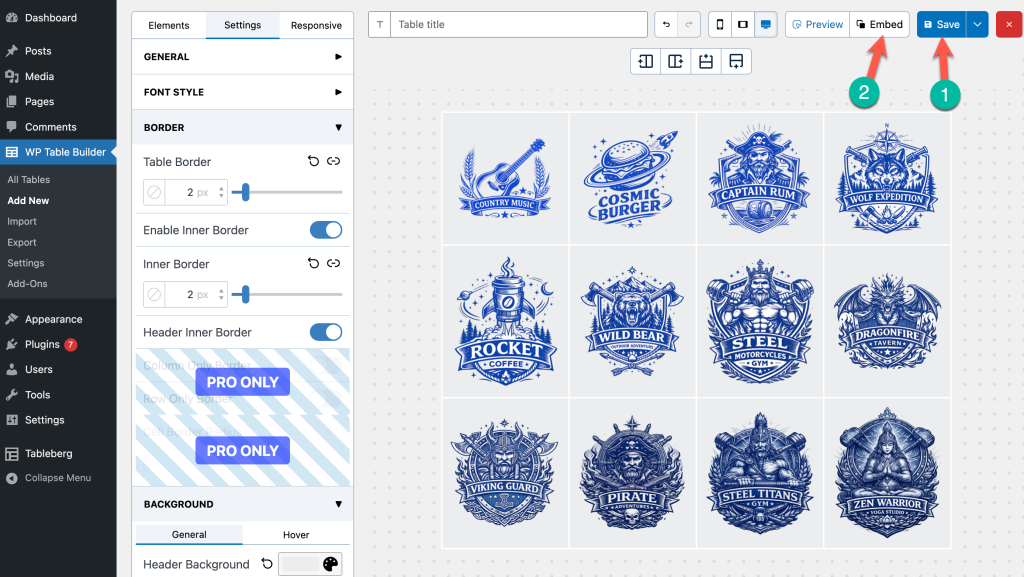
The intuitive interface makes it easy to control alignment, spacing, and layout without requiring custom code, making it a practical alternative for structured logo displays.
Read: How to Showcase Clients’ Logos in WordPress
Key Features
- Drag-and-Drop Table Builder
- Image, Text & Button Elements
- Responsive Table Design
- Cell-Level Customization
- Pre-Built Table Templates
- Comparison-Style Layout Support
Price
WP Table Builder offers a free version available in the WordPress repository. The premium version is available through annual licensing plans.
Tableberg
Tableberg, while primarily praised for its robust table creation capabilities within the WordPress Block Editor, offers a unique perspective when it comes to showcasing logos. Though not specifically designed as a logo showcase plugin, Tableberg’s flexibility and comprehensive feature set enable users to creatively display logos in a neatly organized and responsive table format.
With Tableberg, users can craft aesthetically pleasing and adaptable tables to present logos, company names, and brief descriptions. The plugin’s user-friendly interface allows for effortless customization and styling, ensuring that the logo showcase aligns seamlessly with your website’s design.

While Tableberg might not be a conventional choice for a logo showcase plugin, its adaptability and wide array of features present a novel approach to feature logos in an organized, engaging manner.
Key Features
- Block Editor Compatibility
- Intuitive Interface
- Responsive Design
- Customization Flexibility
- SEO-Friendly
- Speed Optimization
Price
The good news is this plugin is available in both free and premium versions. Grab the free version from the WordPress repository for free. The premium version will cost you $49.
Final Thoughts
Choosing the best logo showcase or logo slider plugin for WordPress ultimately depends on how you want to present your brands, clients, or partners.
If you prefer animated carousels that create movement and visual engagement, dedicated logo slider plugins are a strong choice. For structured grid layouts with filtering options, logo showcase plugins offer better organization and category control. Elementor users benefit from native widget-based solutions, while Gutenberg users can leverage block-based alternatives to maintain a streamlined workflow.
If your goal is to display logos alongside descriptions, features, or comparison data, table-based solutions provide a more structured and information-rich presentation.
There is no one-size-fits-all solution. The right plugin depends on:
- Your page builder or editor (Gutenberg, Elementor, etc.)
- Whether you prefer sliders, grids, or structured layouts
- The level of customization and filtering you need
- Your performance and workflow priorities
By understanding these differences, you can choose a plugin that not only displays logos effectively but also aligns with your website’s overall structure and user experience.
Affiliate Disclosure: This post contains affiliate links. That means if you make a purchase using any of these links, we will make a small commission without any extra cost to you. Thanks for your support.
Leave a Reply
You must be logged in to post a comment.