 Skip to content

CSV, short for Comma Separated Values, is a versatile file format for storing tabular data. Its simplicity and compatibility make it an excellent choice for data exchange between different software applications. Whether you’re managing product listings, customer information, or any other structured data, CSV files offer a convenient way to organize and transfer large volumes of information efficiently.
For WordPress users handling substantial amounts of data, the need for efficient CSV import functionality becomes paramount. While WordPress provides basic tools for content management, importing CSV files directly into the platform often requires specialized plugins. These plugins streamline the process, offering features such as mapping fields, handling large datasets, and ensuring data integrity, empowering users to integrate external data into their WordPress sites seamlessly. We’ve made a list of the best CSV import plugins to simplify your search for such tools. Let’s have a look at them.
Plugin Name | Active Installs | Ratings | Download |
100,000+ | |||
50,000+ | |||
20,000+ | |||
90,000+ | |||
5,000+ | |||
50,000+ |
WP All Import

To commence our article, we have WP All Import taking the spotlight in the opening column. WP All Import takes the lead as a simple and powerful CSV importer plugin, streamlining data migration and content integration. The plugin implements a straightforward four-step import process to differentiate itself from competitors, along with an intuitive drag-and-drop interface, simplifying even complex import tasks.
WP All Import is a flexible solution adept at managing diverse tasks, such as transferring content from a previous CMS to WordPress, establishing an affiliate-based store, or developing a real estate platform. It seamlessly works with data stored in common CSV and XML file formats, eliminating the need for file modification or code interaction during the process. Simply use the drag-and-drop option to import your desired content. It offers features such as importing data to custom fields, importing images to the post media gallery, scheduling cron jobs for recurring imports, importing files from a URL, and executing custom PHP functions on data. With all these, the plugin is capable of accommodating a diverse range of file layouts, eliminating the necessity to adhere to specific formatting requirements for files.
Key Features:
- Streamlined four-step import process.
- Intuitive drag-and-drop interface.
- Easily import image galleries, categories, and custom fields.
- Effortless importation of data to custom fields.
- Convenient scheduling of cron jobs for recurring imports.
- Direct importation of files from a URL.
- Flexibility to accommodate diverse file layouts without specific formatting requirements.
Price:
WP All Import offers both free and paid versions, with three different packages available, ranging from $199 to $299.
WP Table Builder

WP Table Builder lets you import CSV or XML files and present the data as clean, structured tables in WordPress. Rather than focusing on bulk content imports, WP Table Builder is designed for displaying CSV data visually on the frontend.
It allows users to upload CSV or XML files exported from Excel, Google Sheets, or other tools and instantly convert them into editable WordPress tables. Once imported, the table opens in a drag-and-drop visual editor, where users can customize layout, styling, and content without writing any code. This makes it especially useful for presenting pricing tables, comparison tables, product lists, and structured datasets.
The plugin works well for bloggers, affiliate marketers, and business websites that need clear data presentation instead of complex database imports. By combining CSV/XML import with full design control, WP Table Builder bridges the gap between raw data and user-friendly tables, eliminating the need to manually recreate tables inside the editor.
Check: How to Import CSV/XML Files via WP Table Builder
Key Features:
- Import CSV and XML files directly into WordPress tables
- Visual drag-and-drop table builder for easy customization
- Convert imported data into pricing, comparison, or data tables
- Add text, buttons, images, and icons to imported tables
- Responsive tables that work well on all devices
- No coding or database configuration required
Price:
WP Table Builder offers a free version with CSV/XML import support, along with premium plans that unlock advanced styling, elements, and customization options.
WP Ultimate CSV Importer
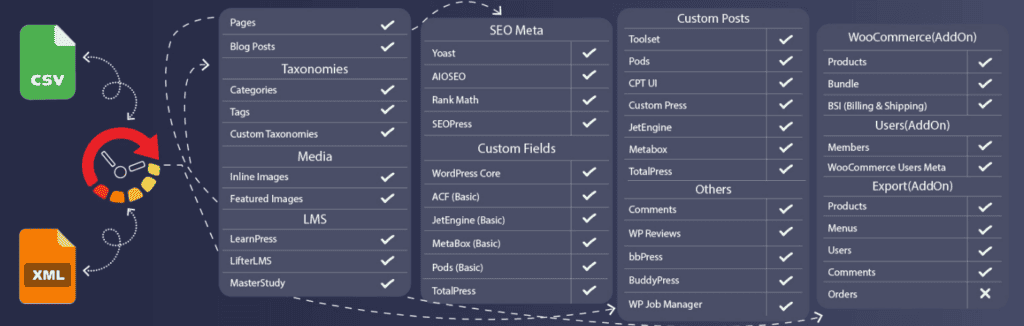
WP Ultimate CSV Importer optimizes content management on WordPress, enabling users to import diverse content types from CSV and XML files with ease and precision. Whether you’re a developer or a beginner, its intuitive drag-and-drop feature ensures smooth content uploads, catering to all skill levels.
The plugin’s primary functions involve importing, exporting, and updating WordPress content from CSV/XML files, with options for instant or scheduled imports from sources such as desktop, FTP/SFTP, and external URLs. The plugin stands out with features like bulk image upload, support for importing data from Google Sheets and Dropbox, and mapping options to relate CSV fields with WP fields. It supports multilingual import with WPML, qTranslate X, & Polylang plugins and allows for importing/exporting or updating various custom fields and plugin data, including ACF, Toolset, Pods, MetaBox, and SEO plugins. On top of that, it provides seamless import/export or updating of WooCommerce products, variations, and more into WordPress, making it a suitable choice for your collection.
Key Features:
- Import/export WordPress content from CSV/XML.
- Instant/scheduled import.
- Upload from Desktop, FTP/SFTP, URL.
- Bulk image upload.
- Import from Google Sheets/Dropbox.
- Inline & featured image import.
- Multilingual support.
Price:
Within WP Ultimate CSV Importer, users can access both free and paid versions, with the premium option available at a competitive rate starting from $199.
Product Import Export for WooCommerce
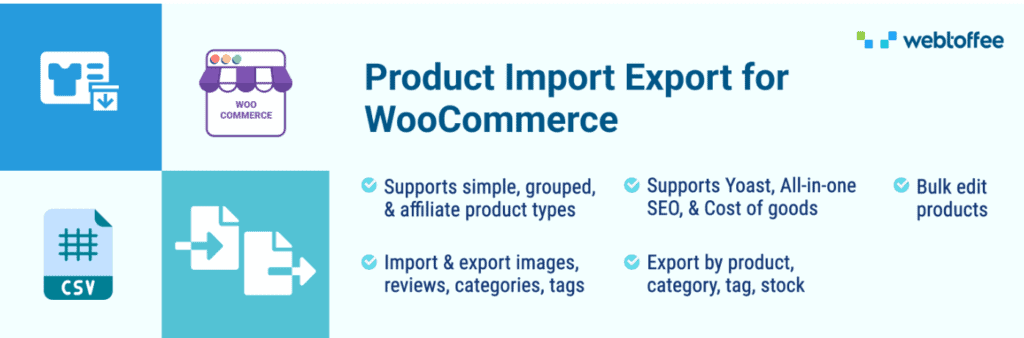
Product Import Export for WooCommerce lets you import and export WooCommerce products effortlessly from your store. Using this WooCommerce product import/export plugin, you can transfer product data including images, categories, tags, reviews, and custom meta using CSV, XML, Excel, or TSV files, saving time during migrations, updates, or bulk edits.
Key Features
- Supported multiple file formats for import/export — CSV, XML, Excel, TSV.
- Import and export WooCommerce products in bulk with advanced filters.
- Supports all product types — simple, variable, grouped, affiliate, subscription, etc.
- Export and import product images and custom metadata.
- Bulk update product data like prices, stock levels, categories, and attributes.
- The free version allows basic import and export of WooCommerce products For more advanced functionality such as support for Excel/TSV/XML formats, advanced filters, scheduling, and ChatGPT integration, the premium version is recommended.
Price
- Single Site for $69 / year
- Up to 5 Sites for $129 / year
- Up to 25 Sites for $249 / year
Import WP

WP Import enhances WordPress data transfer with intuitive visual tools, making it easy to import CSV and XML files into posts, pages, and categories. Its smooth compatibility simplifies attachment and image imports, distinguishing it as a user-friendly plugin choice.
The plugin offers an array of features, including exporting CSV, XML, or JSON files with customizable WordPress data. It enables users to import any XML or CSV file into WordPress, covering posts, pages, custom post types, users, categories, and tags. With Import WP, you can efficiently schedule and run imports, as well as utilize bulk editing options for WooCommerce products, posts, pages, categories, tags, users, and custom fields. With all these features, the plugin supports seamless migration of WordPress data between sites, making it a comprehensive solution for website management.
Key Features:
- Streamlined import/export of CSV, XML, and WooCommerce products.
- Simplified process for attachments, images, and data.
- Customizable export with add-ons available.
- Visual tools for easy selection.
- Support for WooCommerce products, posts, and users.
- Bulk editing for efficient management.
- Smooth migration between sites.
Price:
Import WP provides a range of options, including free access and a premium plan priced at $59.00 per site.
WP Import Export Lite

The last plugin on our list, WP Import Export Lite, facilitates easy management of WordPress site data. The plugin allows users to export their site data into multiple file formats and import them seamlessly across various sites on the fly.
Users can take advantage of the plugin’s scheduled import and export functions and drag-and-drop field mapping for effortless data management. The plugin offers features like pause, resume, and stop processes with background import and export functionalities, as well as powerful filter options for filtering your uploaded file data. You will also have the opportunity to leverage the power of 19+ freemium add-ons for enhanced plugin support and multiple file format compatibility to simplify your import and export tasks. All these features, coupled with import process logs, will ensure transparency and accountability in your data management processes.
Key Features:
- Pause, resume, and stop process for import & export.
- Background import and export support.
- Automatic scheduled import and export.
- Powerful filter available for import & export.
- Drag & drop field mapping.
- 19+ freemium add-ons for multiple plugin support.
- Import process log.
Price:
The plugin comes in both free and pro versions, with the pro version priced at $179/year for a regular license.
Conclusion:
The selection of the right CSV import plugin can enhance the efficiency and effectiveness of managing data within WordPress. By leveraging the capabilities of these plugins, users can simplify the process of importing and organizing data, saving time and effort while ensuring accuracy. Whether it’s for e-commerce, content migration, or any other data-driven task, integrating a reliable CSV import plugin into your WordPress toolkit can prove invaluable in maximizing productivity and maintaining data integrity.
That’s it for today. Check out our blog section to discover articles perfectly suited to your needs.
Leave a Reply
You must be logged in to post a comment.