

Contact Form 7 is free, light and on millions of WordPress sites. But out of the box it is very basic. It does not save your messages, it cannot show or hide fields, and it has no payments, file upload limits or multi-step layouts.
That is where Contact Form 7 extensions come in. Each one adds a missing feature, so you can keep the form plugin you already know instead of moving every form to a new builder.
The hard part is choosing. There are hundreds of add-ons, some have been closed or renamed, and many do the same job. This guide covers the 11 that are worth your time, with stats and prices checked on 8 November 2026.
Quick answer: Ultra Addons for Contact Form 7 is the best all-in-one Contact Form 7 extension, with conditional fields, multi-step forms, a database and redirects in one free plugin. For single jobs, use Conditional Fields for Contact Form 7 for show and hide logic, CFDB7 to save entries, and Redirection for Contact Form 7 for thank you pages. All four have free versions on WordPress.org.
Contact Form 7 itself has more than 10 million active installs on WordPress.org and a 4 out of 5 rating from over 2,100 reviews, as of November 2026. Every extension below needs it installed and active.
Quick Comparison
All 11 extensions have a free version on WordPress.org. Here is how they compare at a glance.
Plugin | Best For | Installs / Rating | Pro Price (from) | Download |
Ultra Addons for Contact Form 7 | All-in-one add-on pack | 60,000+ / 4.8 | $69/year, 1 site | |
Conditional Fields for Contact Form 7 | Showing or hiding fields | 100,000+ / 4.8 | Not listed publicly | |
CFDB7 | Saving form entries | 600,000+ / 5.0 | Paid add-ons | |
Redirection for Contact Form 7 | Thank you page redirects | 200,000+ / 4.7 | $59/year, 1 site | |
CF7 Apps | Honeypot, entries and webhooks | 300,000+ / 3.8 | $29.99/year | |
ReCaptcha v2 for Contact Form 7 | The reCAPTCHA v2 checkbox | 200,000+ / 5.0 | Free only | |
Drag and Drop Multiple File Upload | Multiple file uploads | 60,000+ / 4.8 | $34.99/year, 1 site | |
Contact Form 7 Extension (ChimpMatic Lite) | Email list signups | 40,000+ / 4.3 | $39/year, 1 site | |
Contact Form 7 PayPal & Stripe Add-on | Taking payments | 7,000+ / 4.2 | $29.95/year, 1 site | |
Webheadcoder Multi-Step Forms | Multi-step forms | 50,000+ / 4.2 | Not listed publicly | |
Extensions For CF7 | Budget feature bundle | 5,000+ / 4.9 | $29/year, 1 site |
We built this comparison table with WP Table Builder, a free drag and drop table plugin for WordPress. Installs and ratings come from WordPress.org. Prices are the regular starting price for the paid version, and many of these developers run frequent sales.
What Contact Form 7 Does Not Do on Its Own
Before you install anything, it helps to know which gaps you need to fill. A plain Contact Form 7 install:
- Does not save submissions. Messages go to your email only, so a failed email means a lost lead.
- Has no conditional logic. Every field shows to every visitor.
- Has no redirects. Visitors see a short message under the form instead of a thank you page.
- Has a basic file field. One file per field, with no drag and drop.
- Has no payments or email marketing sync.
- Has no multi-step layout. Long forms show as one long page.
The good news: Contact Form 7 now protects forms from spam on its own. Under Contact > Integration you can connect Cloudflare Turnstile (free, and the option the Contact Form 7 team recommends) or Google reCAPTCHA v3. So you may not need a spam add-on at all.
Now, let us look at each extension in detail.
1. Ultra Addons for Contact Form 7

Ultra Addons for Contact Form 7 by Themefic (formerly called Ultimate Addons for Contact Form 7) is the biggest add-on pack on this list. It has 60,000+ active installs and a 4.8 out of 5 rating from 108 reviews on WordPress.org, and it was updated in November 2026.
Instead of installing five separate plugins, you switch on the addons you need from one settings screen. The free version already includes conditional fields, multi-step forms, columns, a form styler, a submission database, redirects, Mailchimp, webhooks, star ratings, a digital signature field, PDF generation and an AI form generator.
The Pro version adds bigger features such as booking forms, WooCommerce checkout, repeater fields, conversational forms and front-end post submission.
Here is what to weigh. An all-in-one pack is heavier than one small add-on, and if you only need one feature, a dedicated plugin is simpler. Turn off the addons you do not use.
Verdict: The best choice if you need three or more extra features and want them to work together.
Key features:
- Conditional fields and multi-step forms
- Columns, grid layouts and a visual form styler
- Save submissions to the database
- Redirect to a thank you page or external URL
- Mailchimp, Telegram and webhook integrations
- Signature, star rating, range slider and country fields
- PDF generation and an AI form generator
- Booking forms, WooCommerce checkout and repeater fields (Pro)
Pricing: Free on WordPress.org. Pro costs $69 a year for 1 site, $149 for 5 sites and $249 for unlimited sites, with lifetime plans from $199. It was on sale for $39 a year when checked. 30-day money-back guarantee.
Best for: Site owners who want one plugin to cover most Contact Form 7 gaps.
2. Conditional Fields for Contact Form 7
Conditional Fields for Contact Form 7 by Jules Colle is the go-to plugin for show and hide logic. It has 100,000+ active installs and a 4.8 out of 5 rating from 166 reviews, and it was updated in October 2026.
It adds a Conditional fields Group tag to the form editor. Everything inside a group stays hidden until a visitor picks an answer that matches your rule. For example, show a “Company name” field only when someone chooses “Business” in a dropdown.
It handles the tricky parts well. Required fields inside hidden groups never cause validation errors, groups can be nested, and you can show or hide parts of the email based on which groups were visible.
Here is what to weigh. Repeaters, multi-step forms, calculated fields and regular expression rules need Conditional Fields Pro, and the Pro price is not shown publicly on the developer site.
Verdict: The most trusted way to add conditional logic to Contact Form 7, and the free version is enough for most forms.
Key features:
- Show or hide groups of fields based on answers
- Required fields in hidden groups skip validation
- Nested groups in the form and the email
- Show or hide email content with group tags
- Text view for writing conditions by hand
- Repeaters, multi-step forms and calculated fields (Pro)
Pricing: Free on WordPress.org. Conditional Fields Pro is a paid upgrade, but the price is not listed publicly on the product page.
Best for: Anyone who needs smart forms that change based on visitor answers.
3. CFDB7 (Database Addon for Contact Form 7)
CFDB7 by Arshid is the most popular way to save Contact Form 7 submissions. It has 600,000+ active installs and a 5 out of 5 rating from more than 1,800 reviews, and it was updated in October 2026.
There is nothing to set up. Once active, it saves every new submission to your WordPress database and lists your forms in the dashboard. You can read entries and export them to a CSV file.
Paid add-ons from the developer add scheduled CSV exports, Excel exports, PDF exports, CSV imports and a separate database column for each field.
Here is what to weigh. CFDB7 starts saving only after you install it, so older messages are not recovered. The free entry screen is simple, with no charts or advanced filters.
Verdict: The simplest, most popular way to keep a copy of every Contact Form 7 message.
Key features:
- Saves every submission automatically
- No configuration needed
- One table for all your forms
- Export entries to CSV
- Lightweight and developer friendly
- Scheduled exports, Excel, PDF and CSV import (paid add-ons)
Pricing: Free on WordPress.org. Extra features are sold as separate add-ons on the developer site.
Best for: Every Contact Form 7 site that cannot afford to lose a lead when an email fails.
4. Redirection for Contact Form 7

Redirection for Contact Form 7 by Themeisle has 200,000+ active installs and a 4.7 out of 5 rating from 275 reviews. It was updated in November 2026.
It adds an Actions tab to each form. From there you can send visitors to any page or URL after they submit, open it in a new tab, and pass form fields to the next page as URL query parameters. That makes personal thank you pages and conversion tracking much easier.
The free version also saves entries to your database, adds a honeypot field against spam and helps with GDPR data export and erase requests. Pro adds JavaScript after submission, webhooks, conditional logic, PDF creation and integrations such as Mailchimp, PayPal, Stripe, HubSpot and Salesforce.
Here is what to weigh. Many of its best features are Pro only, and the Actions tab takes a little time to learn.
Verdict: The best dedicated plugin for thank you pages and post-submission actions.
Key features:
- Redirect to any page or URL after submission
- Open the redirect page in a new tab
- Pass form fields as URL query parameters
- Save entries to the database
- Honeypot spam protection
- GDPR export and erase requests
- JavaScript actions, webhooks and CRM integrations (Pro)
Pricing: Free on WordPress.org. Pro starts at $59 a year for 1 site, and it was on sale for $39 when checked.
Best for: Marketers who want thank you pages for tracking conversions.
5. CF7 Apps (formerly Honeypot for Contact Form 7)
CF7 Apps started life as Honeypot for Contact Form 7, one of the oldest spam plugins for the form. It is now a bundle of small “apps” with 300,000+ active installs and a 3.8 out of 5 rating from 135 reviews. It was updated in October 2026.
The honeypot app adds a hidden field that real visitors never see but bots fill in, so spam is blocked without a puzzle. The free plugin also includes hCaptcha, a database of entries with CSV export, redirects, webhooks, weekly summary reports and an AI form generator, all from one dashboard.
Here is what to weigh. Its rating dropped after the move from a simple honeypot to a bigger bundle, and some long-time users only wanted the honeypot. If spam is your only problem, Contact Form 7’s built-in Turnstile may be enough.
Verdict: A good free bundle if you want honeypot spam protection plus entries and redirects in one place.
Key features:
- Honeypot spam protection
- hCaptcha app
- Save entries and export them to CSV
- Redirects and webhooks
- Weekly summary reports
- AI form generator
- Stripe, PayPal and Square payments (Pro)
Pricing: Free on WordPress.org. Paid plans start at $29.99 a year.
Best for: Site owners who want light spam protection without a captcha.
6. ReCaptcha v2 for Contact Form 7

ReCaptcha v2 for Contact Form 7 by IQComputing has 200,000+ active installs and a 5 out of 5 rating from 89 reviews. It was updated in June 2026.
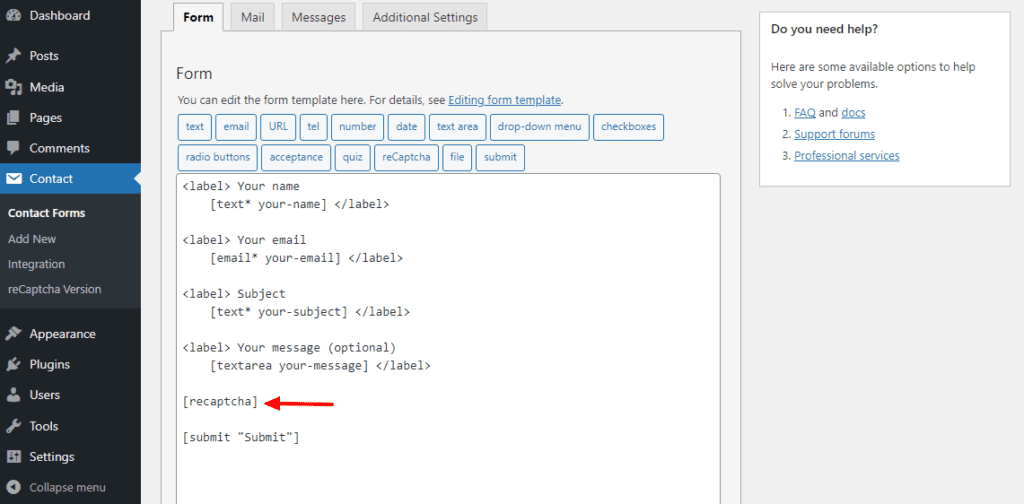
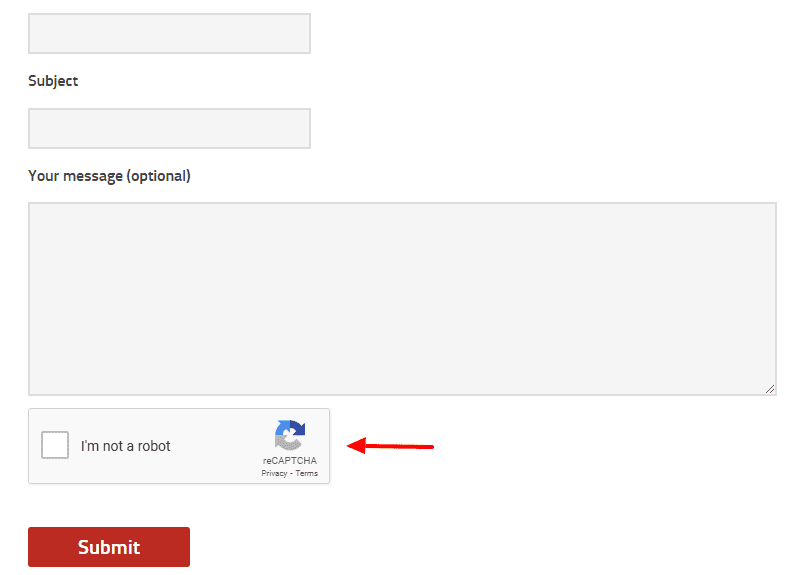
Contact Form 7 dropped reCAPTCHA v2 (the “I’m not a robot” checkbox) back in version 5.1 and moved to the invisible reCAPTCHA v3. This plugin brings the checkbox back. After you add your keys, you place the [recaptcha] tag in your form where the checkbox should appear.
Here is what to weigh. It does one job only. If you do not need the visible checkbox, Contact Form 7’s own Turnstile or reCAPTCHA v3 integration is the simpler choice.
Verdict: Worth it only if you specifically want the visible reCAPTCHA v2 checkbox.
Key features:
- Restores the reCAPTCHA v2 checkbox
- Adds a recaptcha form tag
- Keeps your old API keys when upgrading
- Option to load reCAPTCHA from recaptcha.net
- No paid version
Pricing: Completely free. There is no Pro version.
Best for: Sites whose visitors trust the familiar “I’m not a robot” checkbox.
7. Drag and Drop Multiple File Upload for Contact Form 7
Drag and Drop Multiple File Upload by Glen Don Mongaya (CodeDropz) has 60,000+ active installs and a 4.8 out of 5 rating from 94 reviews. It was updated in October 2026.
It replaces the basic file field with a drag and drop area. Visitors can upload several files at once, see a progress bar and remove a file before sending. You control file types, file size and the number of files, and you can send files as attachments or as links.
Pro adds large file uploads, image previews, zip files, admin entries, auto delete schedules and, on the Extended plan, storage in Google Drive, Dropbox, OneDrive, Amazon S3 or FTP.
Here is what to weigh. In the free version, uploaded files are deleted from the temporary folder one hour after the submission, so you rely on the email copy.
Verdict: The easiest way to accept several files in one Contact Form 7 form.
Key features:
- Drag and drop or browse to upload
- Multiple files per field
- File type, size and count limits
- Progress bar and file removal
- Send files as attachments or links
- Large files, image previews and cloud storage (Pro)
Pricing: Free on WordPress.org. Pro costs $34.99 a year for 1 site or $87.99 for a lifetime license. The Extended plan with cloud storage starts at $44.99 a year.
Best for: Job applications, quote requests and support forms that need attachments.
8. Contact Form 7 Extension for Mailchimp and More (ChimpMatic Lite)
This extension by Renzo Johnson, often called ChimpMatic Lite, sends form signups to your email list. It has 40,000+ active installs and a 4.3 out of 5 rating from 190 reviews, and it was updated in November 2026.
It started as a Mailchimp add-on, but it now connects to eight platforms: Mailchimp, Brevo, MailerLite, Klaviyo, GetResponse, EmailOctopus, Campaign Monitor and Moosend. Each form can send to its own list, with double opt-in and an optional consent checkbox.
Here is what to weigh. The free version sends the email address plus three fields of your choice. Sending to several lists, routing by answers, automatic tags and every field need ChimpMatic Pro.
Verdict: The most flexible way to grow an email list from Contact Form 7.
Key features:
- Connects to 8 email marketing platforms
- A different list for each form
- Email plus any 3 extra fields
- Double opt-in and consent checkbox
- Multiple lists, tags and answer-based routing (Pro)
Pricing: Free on WordPress.org. ChimpMatic Pro costs $39 a year for 1 site, $149 for 5 sites and $249 for 25 sites, and it was 25% off when checked. 14-day money-back guarantee.
Best for: Bloggers and businesses that want every contact form to build their newsletter.
9. Contact Form 7 PayPal and Stripe Add-on

The PayPal and Stripe Add-on by WP Plugin (Scott Paterson) lets visitors pay right after they submit a form. It has 7,000+ active installs and a 4.2 out of 5 rating from 125 reviews, and it was updated in October 2026.
Each form gets its own payment settings. You set the item name, price and SKU, choose success and cancel pages, and test with the PayPal sandbox. The plugin also keeps a payment history in your dashboard.
Pro sends the form email only after a successful payment, links quantities and prices to form fields, and removes the 2% per transaction fee that the free version adds on top of normal PayPal and Stripe fees.
Here is what to weigh. Visitors are sent to PayPal or Stripe to pay, so it is not a full checkout. For a real store, use a proper eCommerce plugin.
Verdict: A simple way to collect payments, deposits or donations from a Contact Form 7 form.
Key features:
- PayPal and Stripe payments per form
- Item name, price and SKU settings
- Payment history in the dashboard
- Success and cancel redirect pages
- 25 currencies and PayPal sandbox testing
- Email only after payment and no extra fee (Pro)
Pricing: Free on WordPress.org, with a 2% fee per transaction. Pro costs $29.95 a year for 1 site or $69.95 for a lifetime license.
Best for: Event registrations, service deposits and small order forms.
10. Webheadcoder Multi-Step Forms for Contact Form 7
Webheadcoder Multi-Step Forms has been around since 2013. It has 50,000+ active installs and a 4.2 out of 5 rating from 49 reviews, and it was updated in October 2026.
It splits a long form across several pages. Each step is its own Contact Form 7 form on its own page, the plugin remembers answers between steps, and the final step sends one email with everything.
Here is what to weigh. You need one page per step, which takes longer to set up than a single-page multi-step form. If you want steps on one page, Ultra Addons for Contact Form 7 includes a multi-step addon.
Verdict: A proven option for long application or quote forms split over several pages.
Key features:
- One step per page
- Answers saved between steps
- One final email with all fields
- Works with standard Contact Form 7 tags
- Pro version with Conditional Fields support
Pricing: Free on WordPress.org. A Pro version is available, but the price is not listed publicly on the product page.
Best for: Long forms like applications, surveys and detailed quote requests.
11. Extensions For CF7

Extensions For CF7 by HT Plugins (HasThemes) is a smaller bundle with 5,000+ active installs and a 4.9 out of 5 rating from 9 reviews. It was updated in October 2026.
The free version covers the common basics: a submission database, conditional fields, redirects, Mailchimp, columns, a range slider, a signature field and an unread message counter. Pro adds repeater fields, popup messages, a phone field with country flags, a GDPR field and an “already submitted” check.
Here is what to weigh. It has far fewer users and reviews than the plugins above, so there is less community feedback to go on.
Verdict: A budget-friendly alternative to Ultra Addons with the most common features.
Key features:
- Save submissions to the database
- Conditional fields and redirects
- Mailchimp integration
- Columns, range slider and signature fields
- Unread message badge in the admin menu
- Repeater fields, popups and phone field (Pro)
Pricing: Free on WordPress.org. Pro costs $29 a year for 1 site or $59 for a lifetime license.
Best for: Small sites that want several features without paying much.
How to Choose the Right Contact Form 7 Extension
Start with the problem you need to fix, not the longest feature list.
- Need several features? Pick one bundle, such as Ultra Addons for Contact Form 7, instead of five separate plugins.
- Afraid of losing messages? Install CFDB7 or Flamingo first.
- Want smarter forms? Use Conditional Fields for Contact Form 7.
- Tracking conversions? Use Redirection for Contact Form 7 for thank you pages.
- Getting spam? Turn on the built-in Turnstile integration before adding a plugin.
Avoid stacking plugins that do the same job. Two database add-ons or two redirect add-ons can conflict and save every entry twice.
Bonus: Put a Pricing or Comparison Table Next to Your Form
A form converts better when visitors already know what they are asking for. If your contact or quote form sits on a services page, a clear pricing table or plan comparison above it answers the “how much?” question first.
You can build that with WP Table Builder, our own drag and drop table plugin for WordPress. Add your plans as columns, list what each one includes, and use a button in each column that links down to your form. See the pricing table demo for an example.

WP Table Builder is free on WordPress.org, with 50,000+ active installs and a 4.8 out of 5 rating from more than 680 reviews as of November 2026. The free version includes the drag and drop builder, text, images, buttons, lists, star ratings, shortcodes and mobile-friendly layouts.
If you want the recommended plan to stand out, WP Table Builder Pro adds badges, ribbons, circle ratings and progress bars, row and column highlights, 25+ ready-made templates and an AI Assistant. Pro starts at $39 a year for 1 site, with lifetime plans from $99.
FAQs
What is the best Contact Form 7 extension?
Ultra Addons for Contact Form 7 is the best all-in-one extension, with conditional fields, multi-step forms, a database and redirects in its free version. If you only need one feature, a dedicated plugin like Conditional Fields for Contact Form 7 or CFDB7 is lighter.
Does Contact Form 7 save form submissions?
No. By default, Contact Form 7 only sends submissions by email. To keep a copy, install Flamingo (made by the Contact Form 7 developer) or CFDB7, which has 600,000+ active installs and lets you export entries to CSV.
How do I add conditional logic to Contact Form 7?
Install Conditional Fields for Contact Form 7, wrap the fields in a Conditional fields Group tag, then set your rules in the Conditional fields tab. The fields stay hidden until a visitor gives the answer you chose.
How do I stop spam in Contact Form 7?
Go to Contact > Integration and connect Cloudflare Turnstile, which is free and recommended by the Contact Form 7 team. Google reCAPTCHA v3 also works. For an invisible extra layer, add a honeypot field with CF7 Apps.
Can Contact Form 7 accept payments?
Not on its own. The Contact Form 7 PayPal and Stripe Add-on adds payments to any form, and CF7 Apps Pro and Redirection for Contact Form 7 Pro also offer payment options.
Can I make a multi-step form with Contact Form 7?
Yes. Webheadcoder Multi-Step Forms splits a form across several pages, and Ultra Addons for Contact Form 7 includes a free multi-step addon that keeps all steps on one page.
Conclusion
Contact Form 7 stays light because it leaves extra features to extensions. For most sites, the best setup is a database add-on like CFDB7 plus either Ultra Addons for Contact Form 7 or one or two focused plugins such as Conditional Fields and Redirection for Contact Form 7.
Your next step: install CFDB7 today so no message is ever lost, then add the one feature your forms are missing. If you outgrow Contact Form 7, see our list of the best Contact Form 7 alternatives.
Related Posts:
Leave a Reply
You must be logged in to post a comment.