


Running a B2B operation on WooCommerce presents unique challenges. From managing different pricing tiers for business customers to handling quote requests and restricting access to certain products, B2B stores require specialized functionality.
B2BKing addresses all this by transforming WooCommerce into a full-featured wholesale platform. With over 137 features and more than 10,000 active installations, it has established itself as a top option for any store dealing with business customers.
The plugin brings together essential tools such as business registration, customer group management, tiered pricing, bulk order forms, and quote handling into a single, integrated system.
Now let’s take a detailed look at B2BKing, how its features work in practice, and whether it provides a complete solution for building a B2B and wholesale store with WooCommerce.
Business Registration
One of the key requirements for any B2B store is the ability to distinguish between regular consumers and business customers. B2BKing addresses this through its comprehensive registration system, which allows store owners to create separate registration forms for B2B and B2C customers.
Hybrid B2B & B2C setups are also well supported, and the plugin allows selling to both at the same time. Adding B2B support to an existing B2C setup is another common scenario the plugin is designed to handle.
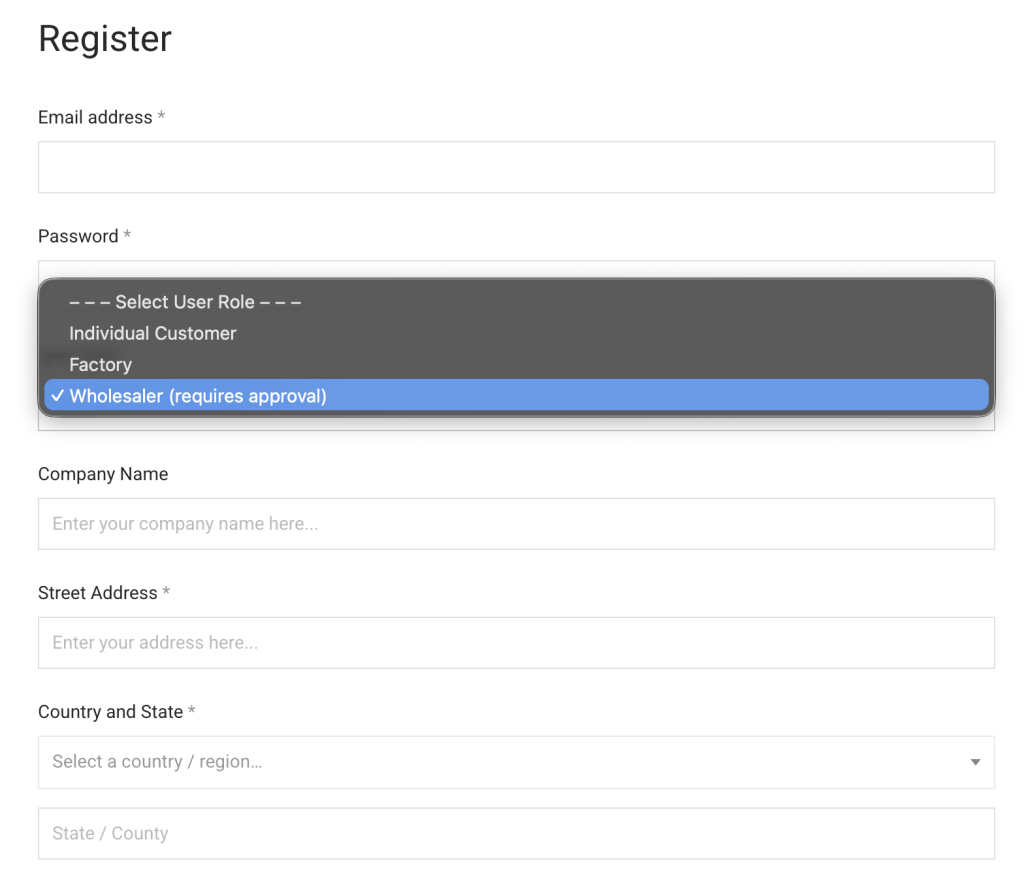
The plugin supports nine different types of custom registration fields, including text inputs, file uploads, dropdown selectors, date pickers, and telephone fields. This flexibility enables businesses to collect essential information such as company names, VAT numbers, business licenses, and trade references during the registration process.
Store administrators can configure automatic or manual approval workflows for each registration role, ensuring that business accounts are properly vetted before gaining access to wholesale pricing and features. The system also supports VAT validation for European businesses through VIES integration.
Bulk Order Form
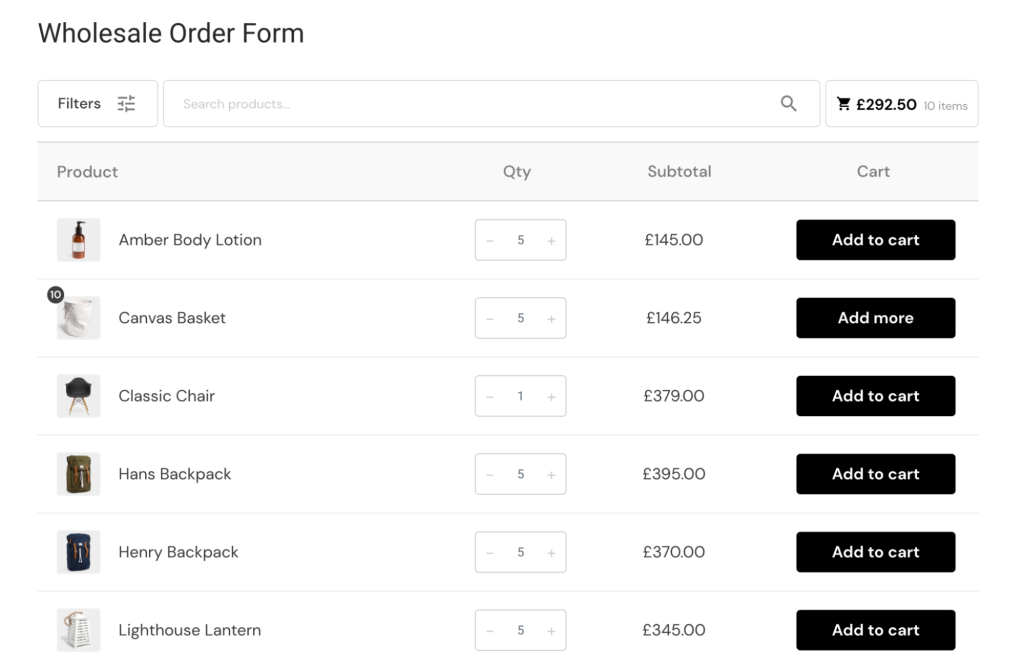
Traditional e-commerce interfaces work well for consumers browsing individual products, but wholesale buyers typically need to order multiple items quickly. B2BKing includes a dedicated wholesale order form that streamlines this process.
The bulk order form features AJAX-powered search functionality, allowing buyers to find products by name or SKU without page reloads. The plugin offers three different theme options for the order form, each with its own visual design and layout.
Buyers can add multiple products to their cart simultaneously, specify quantities inline, and even save frequently ordered items as purchase lists for future use. The plugin also supports CSV upload functionality, enabling buyers to import entire orders from spreadsheets.
Guest Access Restriction
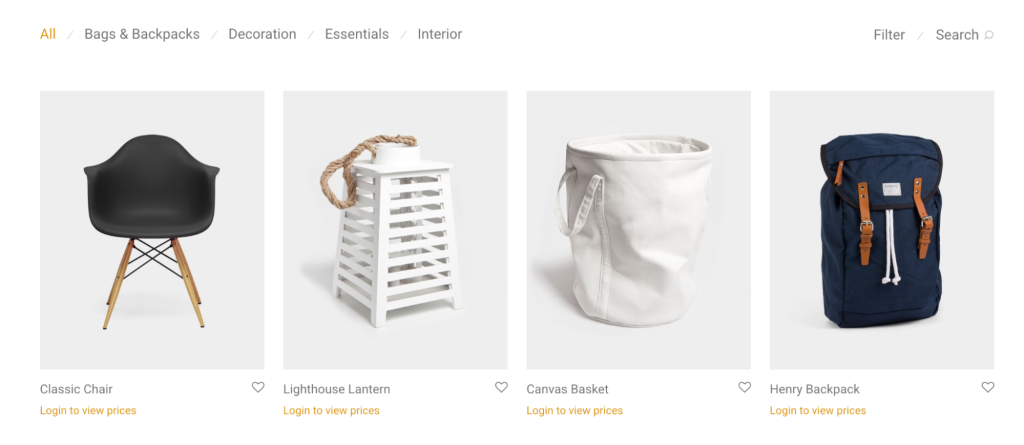
Many B2B businesses prefer to keep their pricing confidential or restrict website access entirely to approved customers. B2BKing provides granular control over what guest users can see and do on the site.
Store owners can hide prices from logged-out users, displaying messages like “Login to view prices” instead. The plugin can also hide the entire website from guests, redirecting them to a login page until they authenticate.
For businesses that want to generate leads while maintaining price confidentiality, there’s an option to replace standard pricing with “Request a Quote” buttons for guest visitors. These access restrictions can be applied globally or configured for specific products and categories, providing flexibility for stores that sell to both wholesale and retail customers. The feature integrates seamlessly with the registration system, creating a natural pathway from discovery to account application.
Tiered Price Table
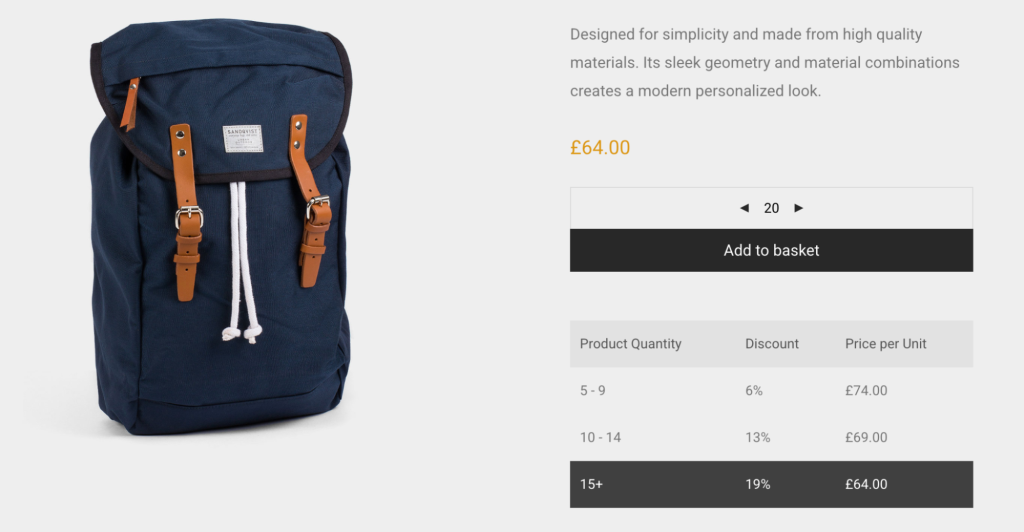
Volume-based pricing is a cornerstone of wholesale stores. B2BKing includes a tiered pricing system that automatically adjusts prices based on quantity ordered. Store administrators can configure multiple price tiers in the backend, specifying quantity thresholds and corresponding unit prices for each level.
The plugin then generates a tiered pricing table that displays directly on product pages, showing customers exactly how much they can save by ordering larger quantities. This transparency helps drive larger orders while eliminating confusion about pricing structures.
The tiered pricing system works independently for each customer group, meaning different business types can have different volume discount structures for the same products. Pricing data can be managed individually per product or imported in bulk through CSV files, making it practical to maintain complex pricing structures across large catalogs.
Bulk Variations Table
Variable products with multiple attributes present a particular challenge in wholesale scenarios. Standard WooCommerce variation dropdowns require selecting each combination individually, which becomes tedious when ordering multiple sizes or colors of the same product.
B2BKing addresses this with a bulk variations table that displays all available variations in a grid format. Buyers can see all options at once and enter quantities for multiple variations simultaneously, adding everything to cart with a single action.
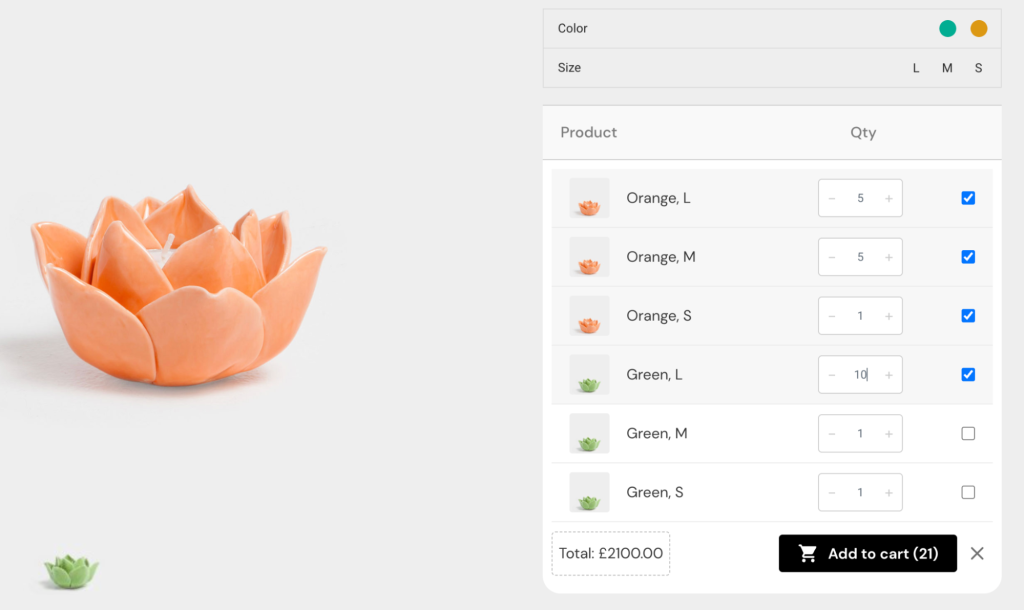
This tabular approach is particularly useful for apparel, where buyers often need to order the same item across multiple sizes, or for products sold in different colors or configurations. The variations table integrates with the tiered pricing system, so volume discounts apply correctly across combined variation quantities when configured to do so.
Quote Requests & Offers
Not every B2B transaction follows a fixed price model. Large orders, custom configurations, and new customer relationships often require negotiation.
B2BKing provides a complete quote request and offer system to handle these scenarios. Customers can request quotes for specific products or their entire cart, submitting inquiries through customizable forms with configurable fields. These requests flow into B2BKing’s built-in conversation system, where store managers can discuss requirements, negotiate terms, and ultimately convert quotes into purchasable offers.
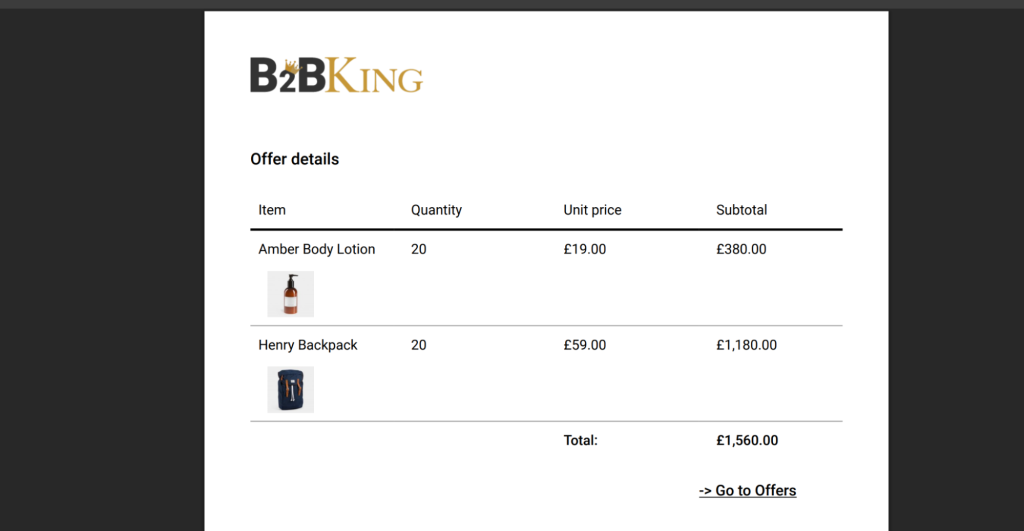
The offers feature allows administrators to create custom packages with specific products, quantities, and negotiated prices. Offers can be sent via email, downloaded as PDF documents with company branding, and purchased directly by customers from their account dashboard. This workflow supports everything from simple price negotiations to complex multi-item proposals, making it suitable for businesses with diverse quoting needs.
B2B Customer Groups
Different business customers often warrant different treatment based on factors like order volume, relationship duration, or business type. B2BKing organizes customers into groups, providing a framework for differentiated experiences.
Store administrators can create unlimited customer groups and assign buyers to them manually or automatically based on their registration role. Each group can have its own pricing structure, with wholesale prices set at the product level for each group. Payment and shipping method availability can be controlled per group, allowing stores to offer invoice payment terms to established customers while requiring prepayment from newer accounts.
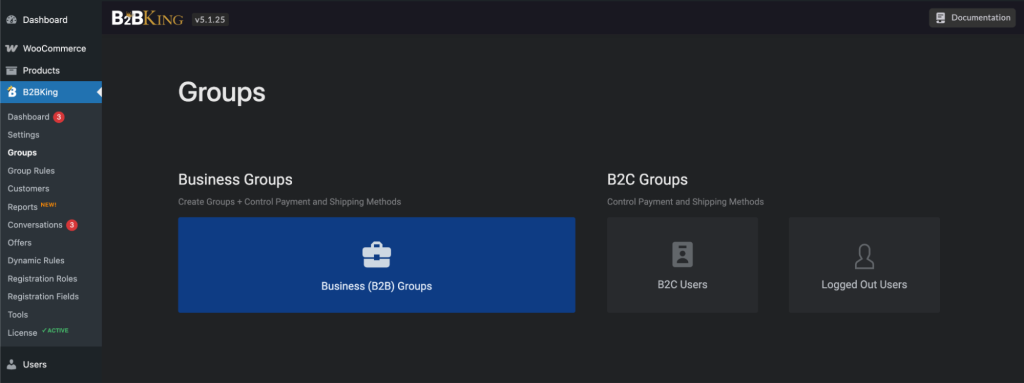
Groups also serve as targets for dynamic rules and visibility settings, making them the foundation for most of the plugin’s differentiation capabilities. The group system supports both pure B2B stores and hybrid B2B/B2C operations where wholesale features only appear after customers log in with appropriate accounts.
Product Visibility
B2B catalogs often contain items that should only be visible to certain customers. A manufacturer might offer products exclusive to specific distributors, or a wholesaler might restrict certain brands based on territorial agreements.
B2BKing includes a visibility system that controls which products and categories each user group can see. Visibility rules can be set at both the product and category level, with products optionally inheriting their category’s visibility settings. When products are hidden from a user, they disappear completely from the store experience, including search results, category pages, and related product sections.
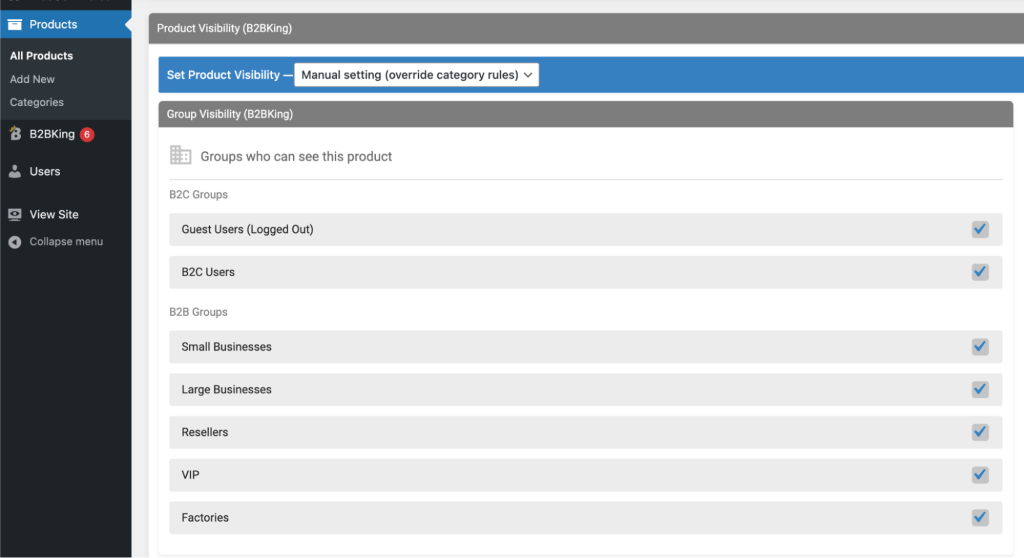
For cases where products should be visible but not purchasable, the “hidden price” dynamic rule can grey out the add-to-cart button while keeping the product listing visible, accommodating scenarios where awareness matters even when direct purchase isn’t permitted.
Subaccounts
Business purchasing often involves multiple people within an organization. A company might have separate individuals handling product selection, order approval, and invoice payment.
B2BKing’s subaccounts feature addresses these multi-user scenarios by allowing parent accounts to create and manage additional user accounts under their company umbrella. Parent account holders can set up subaccounts with specific permissions controlling what each user can do. Available permissions include placing orders, viewing order history, accessing conversations, managing purchase lists, and viewing offers.
The system tracks which subaccount places each order through a “Placed by” column in order management, maintaining accountability within organizations. Subaccounts inherit the parent account’s pricing and visibility settings while maintaining their own login credentials, enabling businesses to delegate purchasing tasks without sharing account access or losing the benefits of their negotiated terms.
Dynamic Rules & Discounts
The most flexible aspect of B2BKing is its dynamic rules engine, which allows store owners to create conditional pricing and behavior modifications based on various criteria.
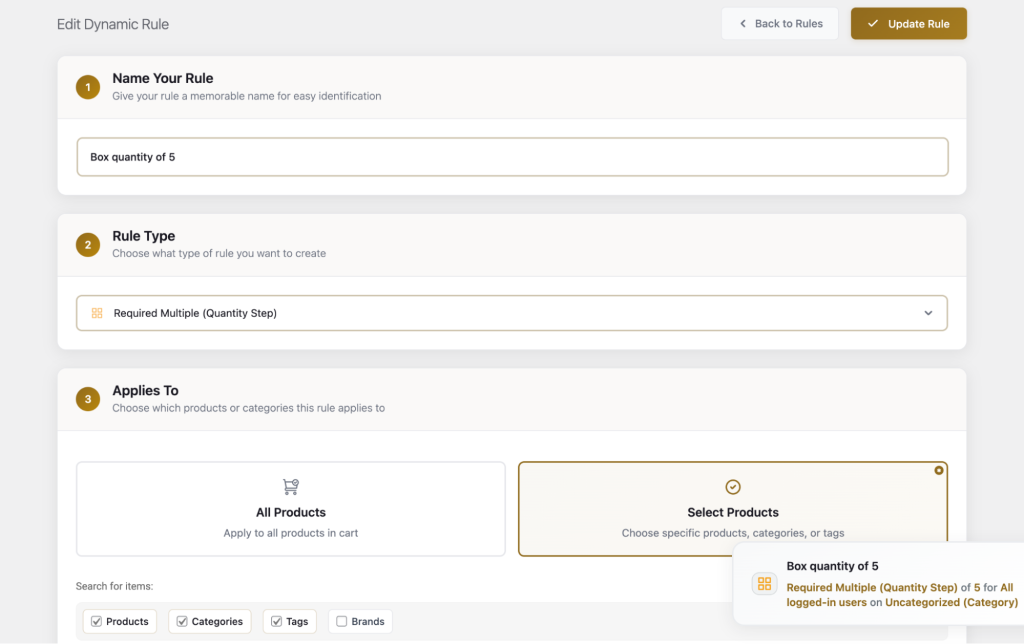
Rules can apply discounts (either percentage or fixed amount), set specific prices, hide prices, configure free shipping thresholds, establish minimum and maximum order requirements, enforce quantity multiples, grant tax exemptions, or add fees. Each rule specifies who it applies to (specific users, groups, or user categories) and what products or categories it affects.
Conditions can require minimum quantities or order values before triggering, enabling sophisticated scenarios like “10% discount on Category X for Group Y when ordering at least 100 units worth at least $1,000.” Multiple rules can stack, and the system handles conflicts through priority settings. This rules engine effectively allows store owners to implement complex business logic without custom development, covering everything from simple group discounts to intricate contractual pricing arrangements.
B2BKing
Summary
B2BKing is a comprehensive WooCommerce plugin for building a B2B and wholesale store. It combines business registration, customer groups, tiered pricing, bulk ordering tools, product visibility controls, and quote requests in one system
FAQs
What is B2BKing used for?
B2BKing is a WooCommerce plugin used to create B2B and wholesale stores. It adds features such as business registration, customer groups, wholesale pricing, bulk ordering, quote requests, and product visibility controls for business customers.
Can B2BKing handle both B2B and B2C customers?
Yes, B2BKing supports hybrid B2B and B2C stores. Store owners can sell to retail and business customers at the same time, while showing different prices, products, and features based on customer roles or groups.
Does B2BKing support wholesale and tiered pricing?
B2BKing includes built-in wholesale and tiered pricing features that allow store owners to set quantity-based discounts and different pricing structures for each customer group.
Can customers request quotes with B2BKing?
Yes, B2BKing includes a quote request and offers system that allows customers to request custom pricing for products or entire carts, with the ability for store managers to respond with negotiated offers.
Is B2BKing suitable for large or complex B2B stores?
B2BKing is suitable for both small and large B2B stores. Its customer groups, dynamic rules, pricing controls, and bulk ordering tools make it capable of handling complex wholesale and distributor-style setups.
Is B2BKing free or paid?
B2BKing offers a free version with core B2B functionality, as well as a premium version that includes advanced features such as dynamic rules, advanced pricing, and quote management.
Conclusion
B2BKing is a comprehensive solution for WooCommerce stores that need wholesale and B2B functionality. It covers the major requirements of business-to-business commerce, from registration and access control through pricing and order management.
The plugin offers both a free version with core features and a premium version with the complete feature set. For store owners evaluating B2B solutions, B2BKing addresses many common wholesale requirements within a single integrated package.
Recommended Reading:
- Best WordPress Wholesale Plugins
- Best ‘Request a Quote’ WordPress Plugins
- Best WooCommerce Variation Swatches Plugins
- Best CSV Import WordPress Plugins
Leave a Reply
You must be logged in to post a comment.