

Some WP Table Builder Pro users may see the following error in their WordPress dashboard.

“An error occurred while activating Freemius, please check your license and try again.”
Don’t worry — this is a known issue and can be fixed in less than a minute by enabling Version Sync in the plugin settings.
Why This Error Happens
This error usually occurs when:
- The Free and Pro versions of WP Table Builder are on different versions
- WordPress cannot properly sync plugin files during license activation
- Freemius fails to initialize due to version mismatch
Enabling Version Sync forces WP Table Builder to align both versions automatically.
Quick Fix: Enable Version Sync #
Follow the steps below to resolve the issue.
- Go to WordPress Dashboard → WP Table Builder
- Click Settings
- Under Plugin Options, enable “Version Sync”
- Click Save
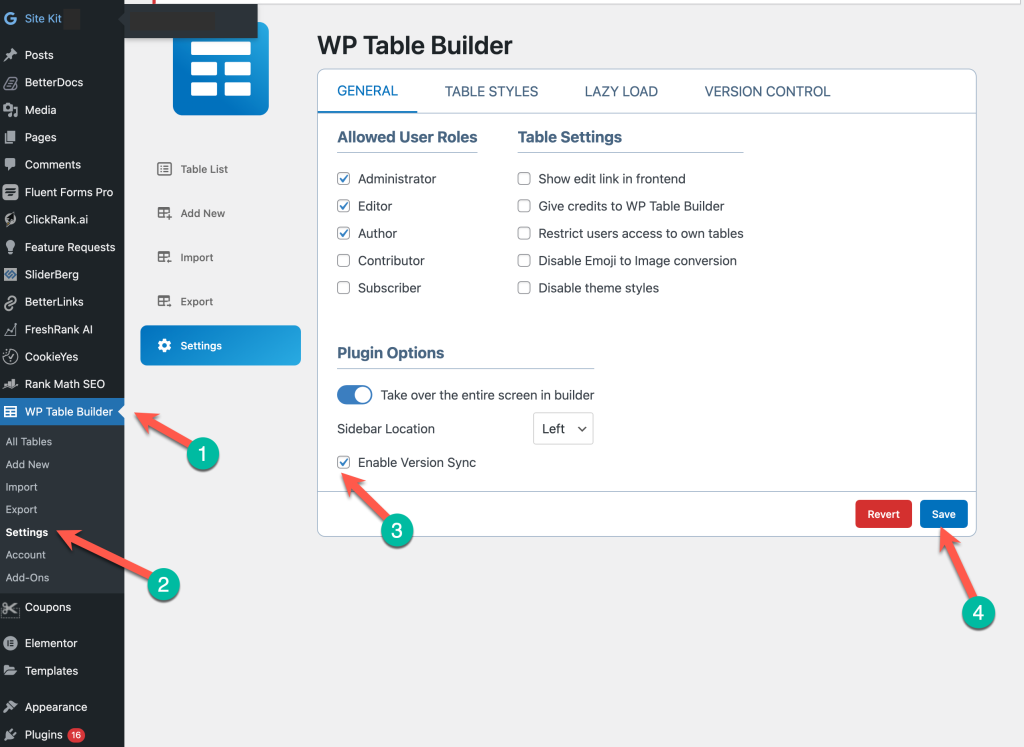
That’s it! Refresh the page and you’ll find that the error notice goes away.
What Happens After Enabling Version Sync? #
Once Version Sync is enabled:
- The Freemius activation error is fixed
- Free & Pro versions are automatically synced
- You receive the latest plugin update
- License activation works smoothly
No data loss. No table breakage.
Still Seeing the Issue? #
If the problem persists after enabling Version Sync:
- Make sure both Free & Pro plugins are active
- Clear any caching plugin or server cache
- Refresh the WordPress dashboard once
- Then try activating the license again
If it still doesn’t work, contact support with a screenshot — we’ll help you out quickly.
Final Recommendation #
We strongly recommend keeping Version Sync enabled at all times. It prevents version-related issues and ensures you always receive the latest stable updates.


