
Quick Answer
To style one text element, click it and use Font Color, Link Font Color, Font Family, Font Size and Tag (Paragraph or Heading 1 to 6) in the left panel. To set fonts for the whole table at once, open the Settings tab and expand Font Style (Font Color, Link Color, Font Size), which needs WP Table Builder Pro. Click Save.
Text styling controls readability and hierarchy. Use larger or bolder text for product names and prices, and a heading tag for text that acts as a heading.
Requirements #
| Item | Details |
|---|---|
| Plan | Free (per element) and Pro (table-wide Font Style) |
| Plugin version | WP Table Builder 2.3.0 or later for heading tags, 2.2.0 or later for font families |
| Time needed | About 1 minute |
Style a single text element #
- Click the text in a cell. The left panel shows Text Options.
- Change any of these settings:
| Setting | What it does |
|---|---|
| Tag | Paragraph, or Heading 1 to Heading 6 for real heading tags |
| Font Color | Text color |
| Link Font Color | Color of links inside the text |
| Font Family | Default (your theme font), Mona Sans, Mona Sans Expanded, Mona Sans Condensed, Mona Sans Narrow or Monospace |
| Font Size | Size in px (0 means the table or theme default) |
| Padding / Margin | Space inside and around the text (Pro) |
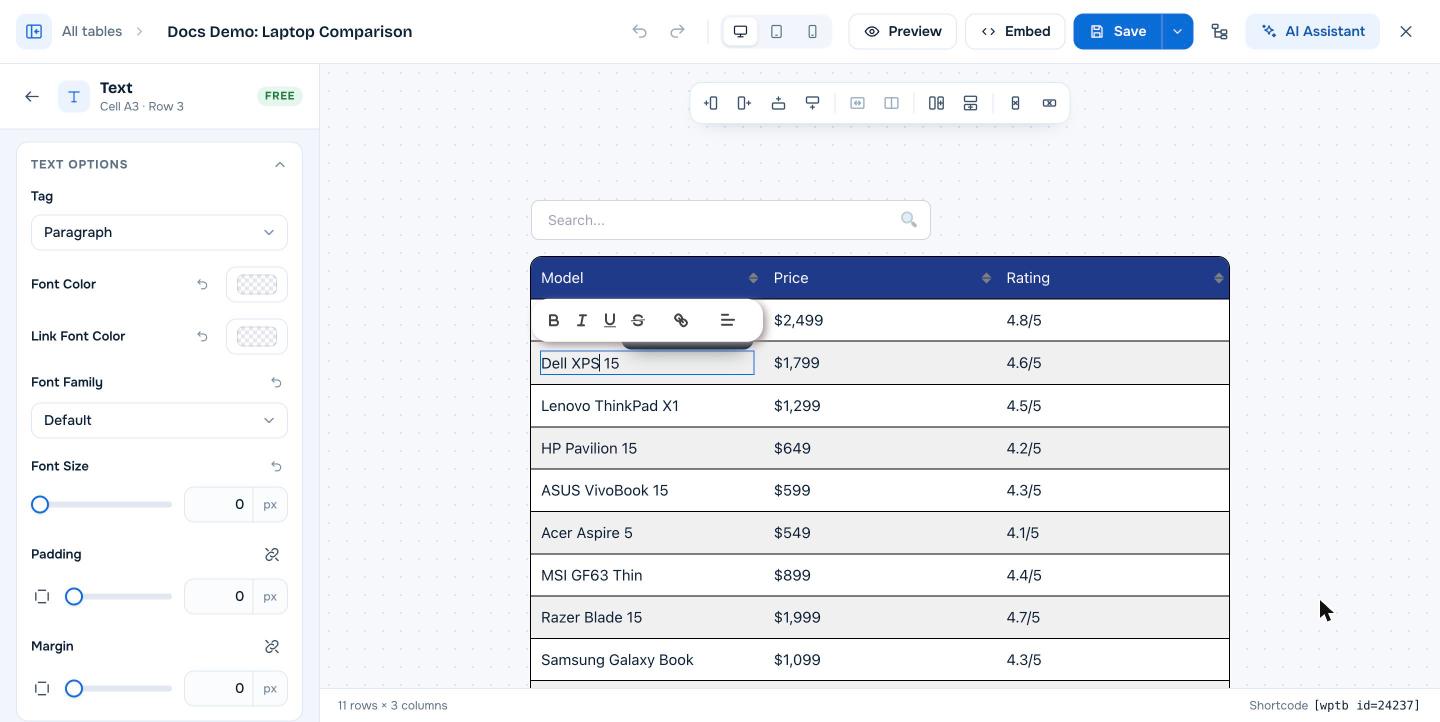
For bold, italic, underline or strikethrough on part of the text, select the words and use the formatting bar above the cell.
Style all text in the table (Pro) #
- Click the Settings tab and expand Font Style.
- Set Font Color, Link Color and Font Size for the whole table.
- Click Save.
Settings on a single text element override the table-wide Font Style.
When to use heading tags #
Set Tag to a heading level when the text is a real heading, for example product names in a comparison table. Headings help search engines and AI tools understand the structure of your content. Keep the heading order logical on the page (for example H3 under the post’s H2).
Frequently asked questions #
How do I change the font size in a WP Table Builder table?
Click the text, then change Font Size in the left panel. To change all text at once, use Font Style in the Settings tab (Pro).
Can I use my theme’s font?
Yes. Leave Font Family on Default to use your theme’s font.
How do I make table text a heading (H2, H3)?
Select the text element and change Tag from Paragraph to the heading level you need.
How do I change link colors in a table?
Use Link Font Color on the text element, or Link Color in the table’s Font Style section (Pro).


