
Quick Answer
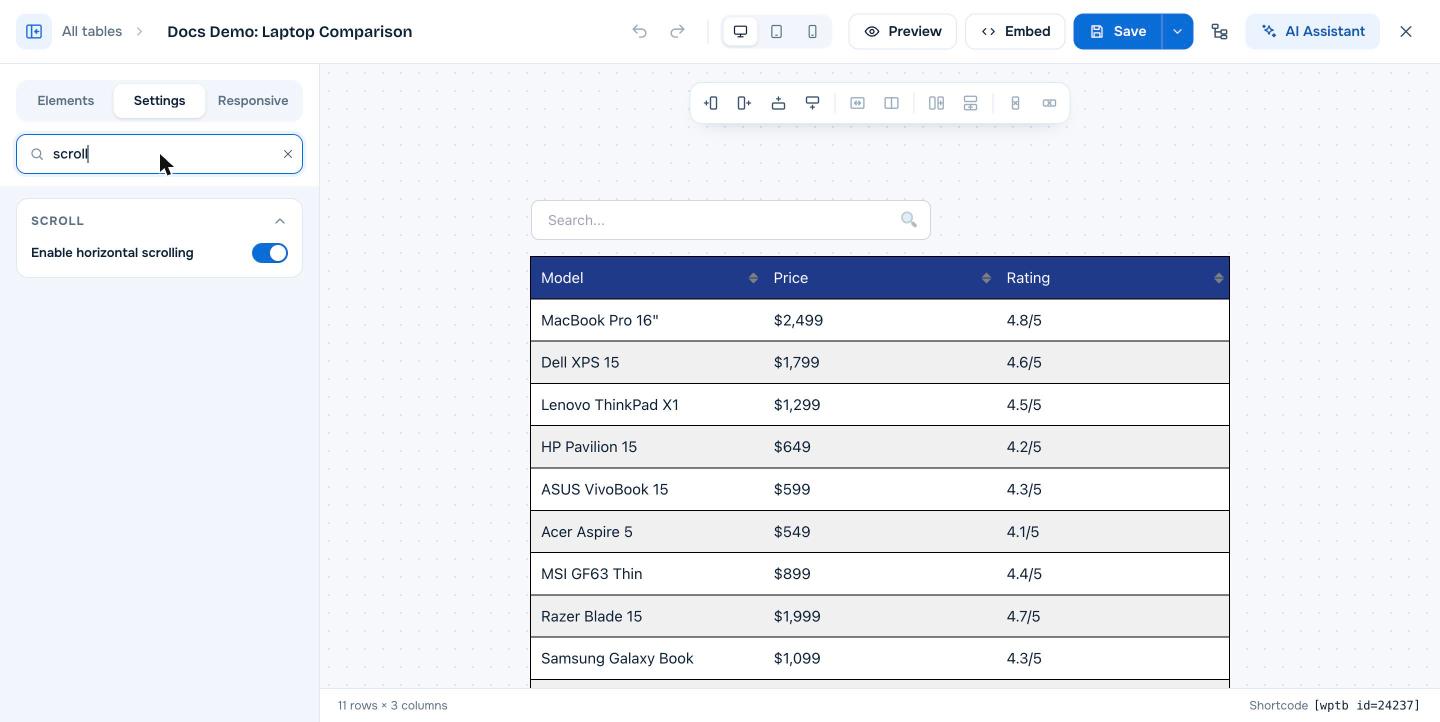
Open the table in the builder, go to the Settings tab, open the Scroll section and turn on Enable horizontal scrolling, then click Save. When the table is wider than the page area, visitors get a horizontal scroll bar instead of squeezed columns. Horizontal scrolling is included in the free version of WP Table Builder.
Horizontal scrolling lets visitors swipe or scroll a wide WP Table Builder table from side to side. It is the simplest way to keep wide comparison and pricing tables readable on small screens without changing their layout.
Requirements #
| Item | Details |
|---|---|
| Plan | Free and Pro |
| Plugin version | WP Table Builder 2.0 or later |
| Time needed | Under 1 minute |
Step 1: Turn on horizontal scrolling #
- Go to WP Table Builder > All Tables and click Edit under your table.
- Click the Settings tab in the left panel.
- Type
scrollin Search settings, or scroll to the Scroll section. - Turn on Enable horizontal scrolling.
- Click Save.
Step 2: Set a minimum column width #
Scrolling only appears when the table is wider than the space it sits in. To control when that happens, set a minimum width for columns:
- In the Settings tab, open the General section.
- Set Cell Min Auto Width (120 px by default). Columns will not shrink below this width, so a table with many columns overflows and becomes scrollable on small screens.
- To set a fixed width for one column, select a cell in that column and change Column Width under Row & Column Control.
Horizontal scrolling or responsive stacking? #
| Option | What visitors see on a phone | Best for |
|---|---|---|
| Horizontal scrolling | The same table layout, scrolled sideways | Comparison tables where columns must stay side by side |
| Responsive table | Rows or columns stacked vertically | Simple tables, pricing cards, lists |
You can also combine horizontal scrolling with a sticky first column (Pro), so product names stay visible while visitors scroll across.
Frequently asked questions #
How do I stop a WordPress table from being cut off on mobile?
Turn on Enable horizontal scrolling in the Scroll section of the table’s Settings tab. Wide tables then scroll sideways instead of overflowing the page or squeezing their columns.
Is horizontal scrolling available in the free version of WP Table Builder?
Yes. Enable horizontal scrolling is a free feature.
Why is there no scroll bar after I turned scrolling on?
The table fits inside its container, so there is nothing to scroll. Increase Cell Min Auto Width or individual column widths, or test on a narrower screen.
Can I keep the first column fixed while scrolling?
Yes, with WP Table Builder Pro. Turn on Make Column Sticky in the Sticky section and set Sticky Column to 1.


