
Quick Answer
In the builder, click a cell in the column you want to hide on phones, open Row & Column Control in the left panel and turn on Hide this column on mobile. Click Save. The column stays visible on desktop and tablet and is hidden on mobile screens. This setting is included in the free version of WP Table Builder.
Hiding a column on mobile removes less important information (for example SKU, weight or a long description) from small screens, so the remaining columns have more space. Desktop visitors still see the full table.
Requirements #
| Item | Details |
|---|---|
| Plan | Free and Pro |
| Plugin version | WP Table Builder 2.0 or later |
| Time needed | Under 1 minute per column |
Step 1: Select a cell in the column #
- Open the table in the builder.
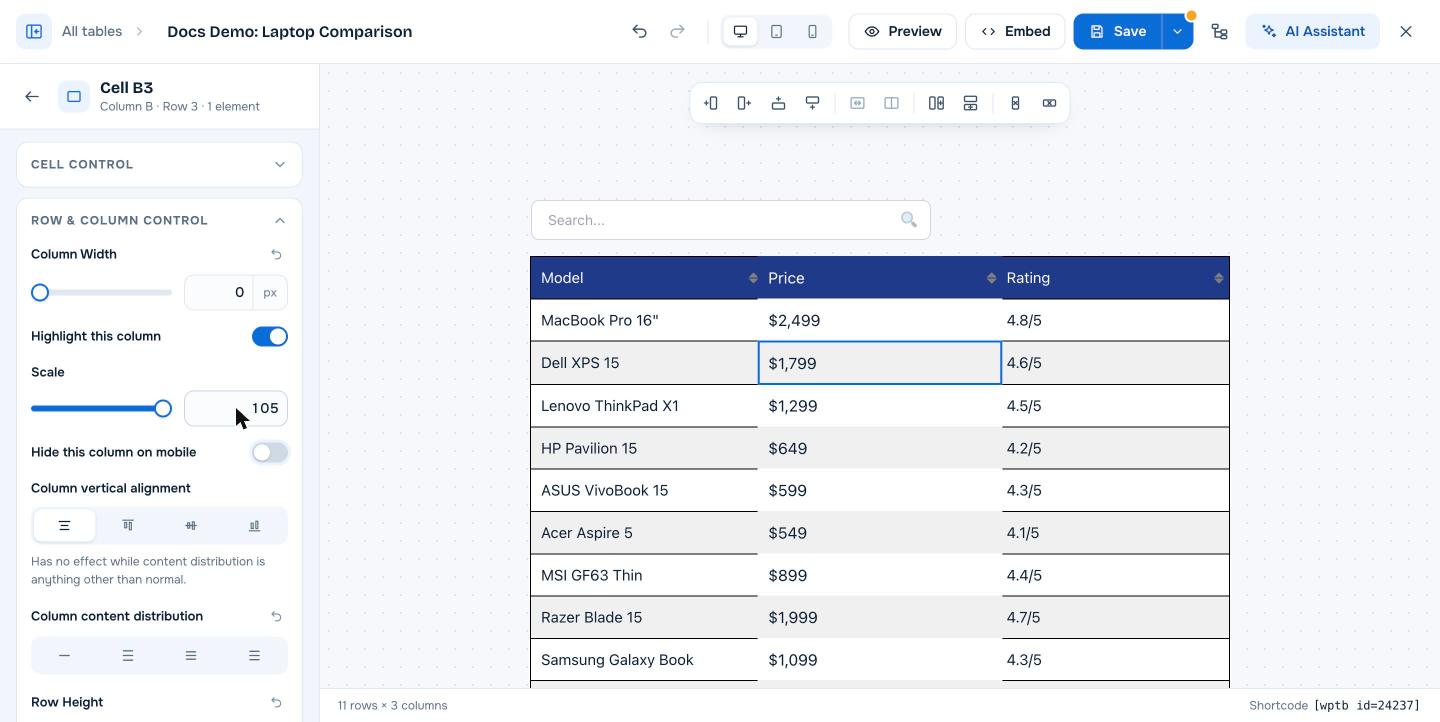
- Click the empty space inside any cell of the column (not the text itself). The left panel shows the cell name, for example Cell B3.
- Expand Row & Column Control.
Step 2: Hide the column on mobile #
- Turn on Hide this column on mobile.
- Repeat for any other columns you want to hide.
- Click Save.
Step 3: Check the result #
Click the Mobile icon in the top bar of the builder, or open the published page on a phone, to check which columns are shown. To bring a column back, select a cell in it and turn the switch off.
Other ways to fit a table on small screens #
- Horizontal scrolling keeps every column and lets visitors scroll sideways.
- Responsive mode stacks rows or columns vertically on tablets and phones.
Frequently asked questions #
Can I hide a column only on mobile in WP Table Builder?
Yes. Select a cell in the column, open Row & Column Control and turn on Hide this column on mobile. The column is hidden on mobile screens and visible on larger screens.
Is the column content removed from the page?
No. The column is hidden with styling on small screens. The content is still in the page HTML and visible on desktop.
Can I hide a row on mobile?
WP Table Builder 2.3 has a hide option for columns only. To change what appears on phones row by row, use responsive mode.
Is this a Pro feature?
No. Hide this column on mobile is available in the free version.


