
Quick Answer
Go to WP Table Builder > All Tables to see every table with its title, shortcode, created date and last modified date. Hover over a table to Edit, Duplicate, Preview or Trash it. Use Search table… to find a table by name, ID or shortcode, and open the Trash view to restore tables or delete them permanently.
The All Tables page is where you manage every WP Table Builder table on your site. This guide covers searching, copying shortcodes, duplicating, trashing, restoring and bulk deleting tables.
Requirements #
| Item | Details |
|---|---|
| Plan | Free and Pro |
| Plugin version | WP Table Builder 2.3.0 or later |
| User role | Administrator, or a role allowed in WP Table Builder user roles |
The All Tables list #
- In your WordPress dashboard, go to WP Table Builder > All Tables.
- The list shows Title, Shortcode, Created and Last Modified for each table. Click a column header to sort by it.
- Use Show in the top right to display 15, 25, 50 or 100 tables per page.
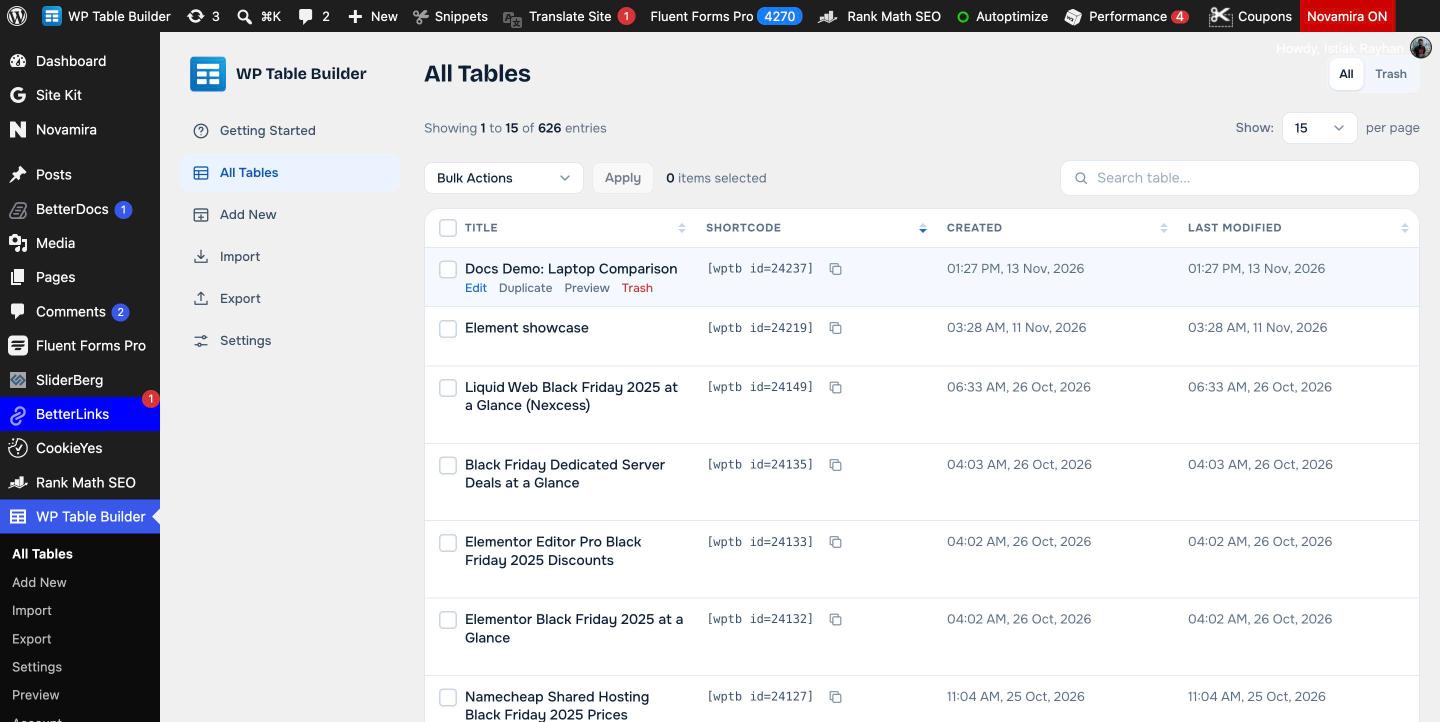
Find a table #
Type in Search table… above the list. The search matches the table title, the table ID and the shortcode, so you can paste [wptb id=123] from a post to find the table it shows.
Copy a shortcode #
Click the copy icon next to a shortcode, for example [wptb id=24237], then paste it into a post or page. See Embed a table with a shortcode.
Row actions #
Hover over a table title to see its actions:
| Action | What it does |
|---|---|
| Edit | Opens the table in the builder |
| Duplicate | Creates a copy of the table with a new ID. See How To Duplicate A Table. |
| Preview | Opens the table on a front-end preview page |
| Trash | Moves the table to the Trash. Pages that use its shortcode stop showing it. |
Trash, restore and delete tables #
- Click Trash in the top right of the All Tables page.
- Hover over a table and click Restore to bring it back, or Delete to remove it permanently.
- To handle several tables, check them, choose Restore or Delete Permanently from Bulk Actions and click Apply.
In the All view, Bulk Actions has Delete, which moves the checked tables to the Trash.
A permanently deleted table cannot be restored. Export important tables to XML first as a backup. See How to Export Tables in WP Table Builder (CSV and XML).
Frequently asked questions #
How do I find which table a shortcode shows?
Copy the shortcode from the post, for example [wptb id=123], and paste it into Search table on the All Tables page. The search matches table IDs and shortcodes.
What happens to a post when I trash a table?
The shortcode in the post no longer displays the table. Restore the table from the Trash and it appears again.
Can I restore a deleted table?
Yes, if it is in the Trash. Open the Trash view and click Restore. Tables deleted permanently cannot be restored.
Can I delete many tables at once?
Yes. Check the tables, choose Delete from Bulk Actions to move them to the Trash, then use Delete Permanently in the Trash view.


