
Quick Answer
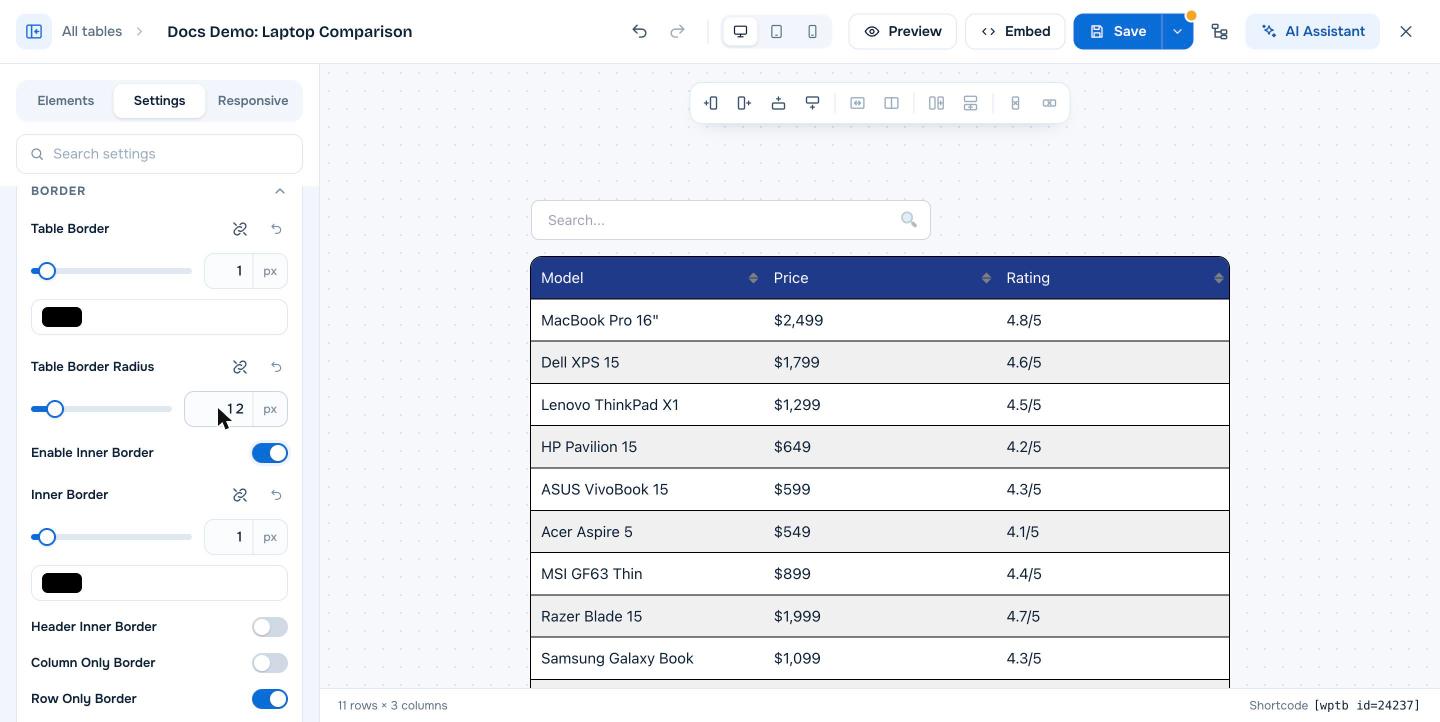
Open the table in the builder, go to the Settings tab, expand Border and set Table Border Radius in pixels, for example 12. Click Save. The table gets rounded corners. Use the link icon next to the setting to give each corner a different radius. Table Border Radius is free. Rounded corners on individual cells (Cell Border Radius) need WP Table Builder Pro.
Rounded corners make a table look softer and more modern, and they match many current WordPress themes and card designs.
Requirements #
| Item | Details |
|---|---|
| Plan | Free (Table Border Radius) and Pro (Cell Border Radius) |
| Plugin version | WP Table Builder 2.2.0 or later |
| Time needed | Under 1 minute |
Step 1: Set the table border radius #
- Go to WP Table Builder > All Tables and click Edit under your table.
- Click the Settings tab and expand Border.
- Enter a value in Table Border Radius, or drag the slider. Values between 8 and 16 px work well for most designs.
- Click Save.
Step 2 (optional): Set different corners #
Click the link icon next to Table Border Radius to unlink the corners, then set the top left, top right, bottom right and bottom left radius separately. For example, round only the top corners when the table sits directly on top of another element.
Round individual cells (Pro) #
In WP Table Builder Pro, the Border section also has Cell Border Radius, which rounds the corners of every cell. This works best together with Separate Rows/Columns in the General section, which adds space between cells so each cell looks like a card. See How To Add Spacing (PRO).
Related border settings #
| Setting | What it does |
|---|---|
| Table Border | Width and color of the outer border |
| Enable Inner Border / Inner Border | Lines between cells |
| Header Inner Border | Lines inside the header row |
| Column Only Border / Row Only Border | Show only vertical or only horizontal inner lines (Pro) |
See How To Add Borders To A Table and How To Remove Table Borders for full border guides.
Frequently asked questions #
How do I make rounded table corners in WordPress?
In WP Table Builder, open the table’s Settings tab, expand Border and set Table Border Radius, for example to 12px. Click Save.
Is the border radius option free?
Yes. Table Border Radius is free. Cell Border Radius, which rounds every cell, is a Pro feature.
My rounded corners show a square background behind them. How do I fix it?
Check that the cells and the header row do not have a background color that extends past the table border, and that your theme is not adding its own table border. Turning on Disable theme styles in WP Table Builder settings can help.


