
Quick Answer
For the whole table, open the Settings tab, expand Content Alignment and pick a Vertical Alignment (Default, Top, Middle or Bottom) or a Content Distribution (Normal, Space between, Space around or Space evenly). For one row, column or cell, select a cell and use the same options under Cell Control or Row & Column Control. Vertical alignment only works while Content Distribution is set to Normal.
Vertical alignment decides where content sits inside a cell when the cell is taller than its content: at the top, in the middle or at the bottom. Content distribution decides how several elements in one cell share the free space, for example pushing a button to the bottom of every column in a pricing table.
Requirements #
| Item | Details |
|---|---|
| Plan | Free and Pro |
| Plugin version | WP Table Builder 2.3.0 or later for table-wide alignment (row and column alignment since 2.1.12) |
| Time needed | About 1 minute |
The options #
| Setting | Options | What it does |
|---|---|---|
| Vertical Alignment | Default, Top, Middle, Bottom | Moves all content in the cell up, to the center or down |
| Content Distribution | Normal, Space between, Space around, Space evenly | Spreads the elements in a cell across its height |
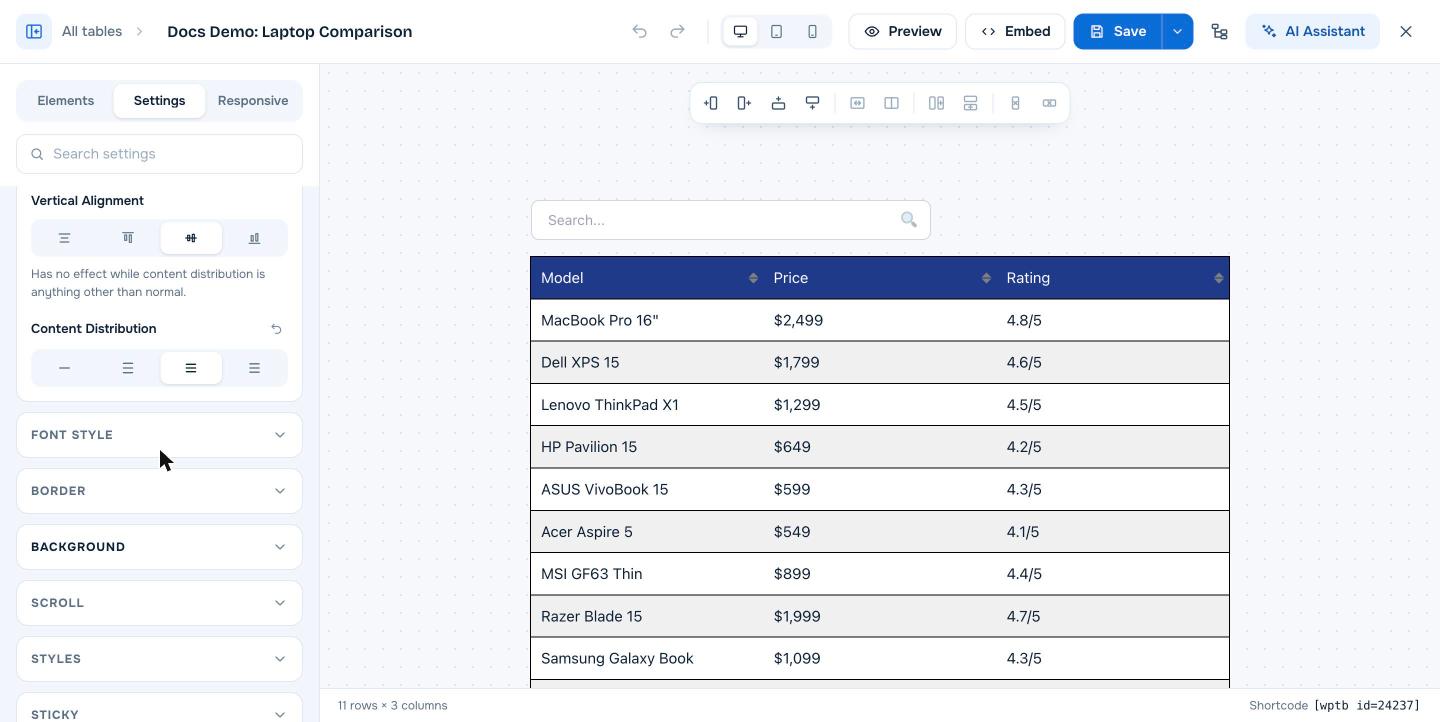
Important: Vertical alignment has no effect while Content Distribution is anything other than Normal. The builder shows this note under the setting.
Set alignment for the whole table #
- Open the table in the builder and click the Settings tab.
- Expand Content Alignment.
- Choose a Vertical Alignment, or a Content Distribution.
- Click Save.
Set alignment for a row, column or cell #
- Click the empty space in a cell to select it.
- For that cell only, expand Cell Control and use Vertical Alignment and Cell content distribution.
- For its whole column or row, expand Row & Column Control and use Column vertical alignment, Column content distribution or Row vertical alignment.
Cell settings override column and row settings, and those override the table-wide setting.
Example: line up buttons in a pricing table #
Pricing columns often have feature lists of different lengths, so the buttons end up at different heights. Set Content Distribution to Space between for the table or for the row with the lists and buttons. The first element stays at the top and the last element (the button) moves to the bottom, so every button lines up.
Frequently asked questions #
How do I vertically center text in a WP Table Builder table?
Open the Settings tab, expand Content Alignment and set Vertical Alignment to Middle. Make sure Content Distribution is set to Normal.
Why does vertical alignment not change anything?
Vertical alignment only works when Content Distribution is Normal, and only when the cell is taller than its content, for example when another cell in the row has more content.
How do I align buttons at the bottom of each column?
Set Content Distribution to Space between for the table, the row or the cells that contain the buttons.
Can I align one cell differently from the rest?
Yes. Select the cell and change Vertical Alignment or Cell content distribution under Cell Control.


