
Quick Answer
To link text, select the words in a Text element, click the link icon in the formatting bar, paste the URL in Link, set Open in new tab, Set to nofollow or Set to sponsored under Advanced, and click Apply. Buttons, images and icons have their own Link settings in the left panel with the same rel options. All link options are free.
Links turn a table into a navigation and conversion tool: product names that go to reviews, buttons that go to checkout pages, and images that go to affiliate offers. WP Table Builder lets you control how each link opens and which rel attributes it gets.
Requirements #
| Item | Details |
|---|---|
| Plan | Free and Pro (icon links need the Pro Icon element) |
| Plugin version | WP Table Builder 2.3.0 or later for the editor shown here |
| Time needed | Under 1 minute per link |
Add a link to text #
- Click the text in a cell to edit it.
- Select the words you want to link. The formatting bar appears above the text.
- Click the link icon.
- Check the Text and paste the URL into Link.
- Expand Advanced and choose the options you need.
- Click Apply.
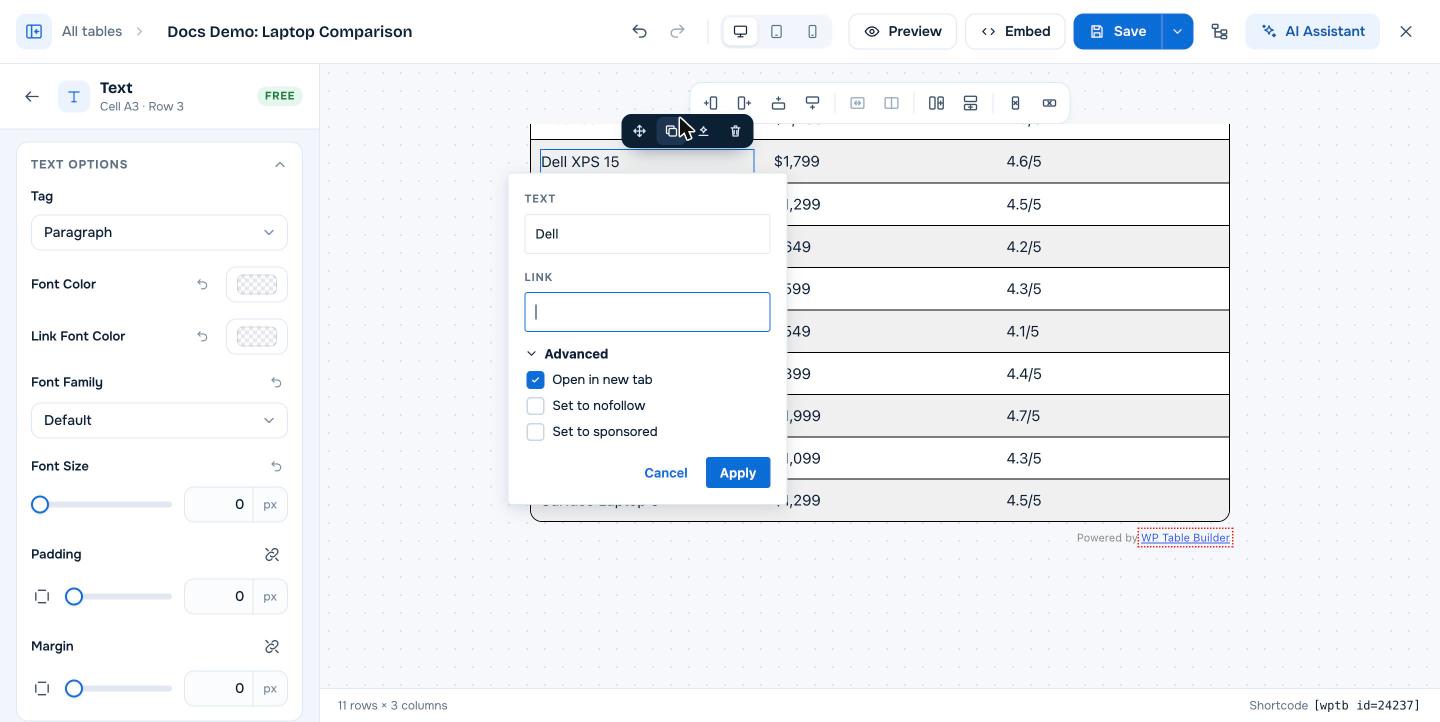
| Option | HTML result | When to use it |
|---|---|---|
| Open in new tab | target="_blank" | Links to other websites. On by default. |
| Set to nofollow | rel="nofollow" | Links you do not want to pass ranking signals to |
| Set to sponsored | rel="sponsored" | Affiliate links and paid placements, as Google recommends |
Use Link Font Color in the text element settings to change the color of links in that element.
Add a link to a button, image or icon #
| Element | Where the link setting is | Options |
|---|---|---|
| Button | Link tab in the button settings | Button Link, Link rel (Sponsored, No Follow, No Referer), Open in new tab, Convert link to absolute |
| Image | Link tab in the image settings | Image Link, Link rel, Open in new tab, Convert link to absolute |
| Icon (Pro) | Select one icon in the element | Icon Link, Link rel, Link Target (Self or Blank), Convert link to absolute |
Convert link to absolute adds https:// to a link typed without it, so example.com does not become a broken relative link.
Affiliate link checklist #
- Turn on Sponsored (and optionally No Follow) for every affiliate link.
- Use Open in new tab so readers keep your page open.
- Use a link cloaking or redirect plugin if your affiliate program allows it, and paste the short link into WP Table Builder.
- Add a disclosure near the table, as most affiliate programs require.
Frequently asked questions #
How do I add a link to text in a WP Table Builder table?
Select the text in the cell, click the link icon in the formatting bar, paste the URL, choose the Advanced options and click Apply.
Can I make table links nofollow or sponsored?
Yes. The text link editor has Set to nofollow and Set to sponsored, and buttons, images and icons have Link rel options including Sponsored, No Follow and No Referer.
Do links open in a new tab by default?
In the text link editor, Open in new tab is checked by default. For buttons and images, turn on Open in new tab in the Link tab.
Can I link a whole table cell?
Add the link to the element inside the cell instead: the text, button or image. Each element has its own link setting.


