
Quick Answer
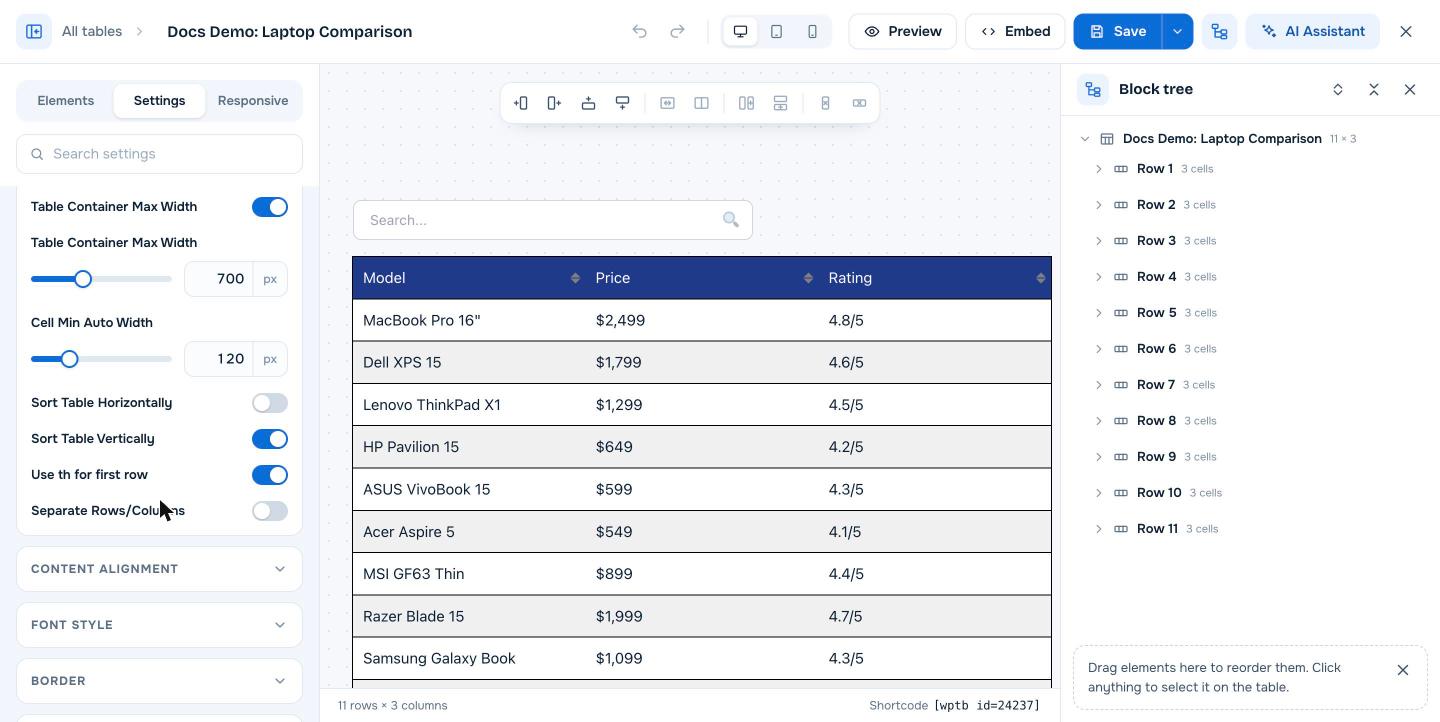
Open the table in the builder, go to the Settings tab, and in the General section turn on Use th for first row. Click Save. WP Table Builder then outputs the first row as th header cells instead of td data cells, which tells browsers, screen readers, search engines and AI tools that the row contains column headings. The setting is free.
In HTML, a table header cell (th) marks a cell as a heading for its column, while a data cell (td) holds normal content. Using th cells for your column names makes your table more accessible and easier for machines to understand.
Requirements #
| Item | Details |
|---|---|
| Plan | Free and Pro |
| Plugin version | WP Table Builder 2.1.11 or later |
| Time needed | Under 1 minute |
Step 1: Turn on th cells for the first row #
- Go to WP Table Builder > All Tables and click Edit under your table.
- Click the Settings tab and open the General section.
- Turn on Use th for first row.
- Click Save.
Step 2: Style the header row #
Turning on th cells changes the HTML, not the look. To make the header row stand out visually:
- Set Header Background in the Background section of the Settings tab. See How To Change The Header Background Color.
- Make the header text bold or larger in the text element settings. See How to Change Font Color and Font Size in WP Table Builder.
- Turn on Header Inner Border in the Border section to control the lines inside the header.
Why th header cells matter #
| Benefit | Why |
|---|---|
| Accessibility | Screen readers announce the column heading when reading each cell |
| SEO | Search engines can tell which row holds labels and which rows hold data |
| AI citations | AI assistants and AI search tools parse tables more reliably when headings are marked with th |
| Features | Header-aware features such as search with Keep top row as header and sticky rows work with a clear header row |
Header rows on mobile #
When responsive mode stacks a table on phones, the First Row As Header option in the Responsive tab repeats the header labels next to each value. See How To Make A Table Responsive.
Frequently asked questions #
How do I make the first row a header in WP Table Builder?
Turn on Use th for first row in the General section of the table’s Settings tab, then click Save. The first row becomes th header cells.
Does Use th for first row change how my table looks?
No. It changes the HTML from td to th cells. Use Header Background and text settings to change the look.
Are WP Table Builder tables good for SEO?
Yes. They are real HTML tables, and with Use th for first row the column headings are marked up as th cells. See Are WP Table Builder Tables SEO-Friendly? (Do They Use HTML?).
Can I use th cells for the first column instead?
WP Table Builder 2.3 has the th option for the first row only.


