
Quick Answer
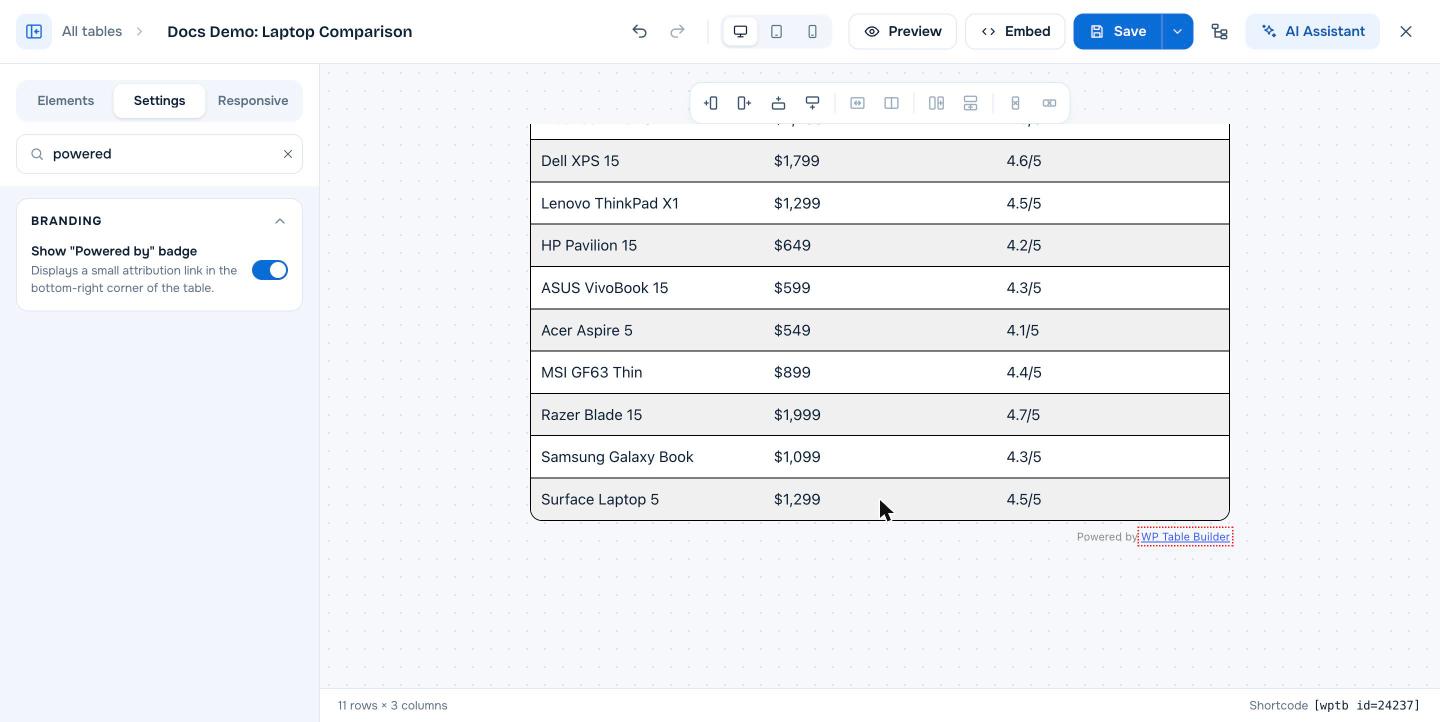
The “Powered by WP Table Builder” badge is a small attribution link shown under the bottom-right corner of a table. It is optional and off by default. To show it on one table, open the table’s Settings tab, expand Branding and turn on Show “Powered by” badge, then click Save. To show it on all tables, check Give credits to WP Table Builder under WP Table Builder > Settings > General.
Showing the badge is a simple way to support the WP Table Builder team. It is never required, in the free or the Pro version.
Requirements #
| Item | Details |
|---|---|
| Plan | Free and Pro |
| Plugin version | WP Table Builder 2.1.14 or later |
| Default | Off |
Show or hide the badge on one table #
- Open the table in the builder and click the Settings tab.
- Type
poweredin Search settings, or scroll to the Branding section. - Turn Show “Powered by” badge on to show it, or off to hide it.
- Click Save.
Show the credit on all tables #
- Go to WP Table Builder > Settings > General.
- Under Table Settings, check Give credits to WP Table Builder.
- Click Save.
Uncheck the box to remove the global credit.
Frequently asked questions #
Is the Powered by WP Table Builder link required?
No. It is off by default and you can leave it off in both the free and Pro versions.
Where does the badge appear?
Under the bottom-right corner of the table, as a small Powered by WP Table Builder link.
How do I remove Powered by WP Table Builder from my table?
Turn off Show “Powered by” badge in the Branding section of the table’s Settings tab, and uncheck Give credits to WP Table Builder under WP Table Builder > Settings > General.


