
Quick Answer
Go to WP Table Builder > Settings > Lazy Load, turn on Enable Lazy Loading Images, adjust the placeholder and animation options, and click Save. Images inside your WP Table Builder tables then load only when they scroll into view, which makes pages with image-heavy tables load faster. Lazy loading is a WP Table Builder Pro feature.
Lazy loading delays loading an image until the visitor scrolls near it. For comparison and product tables with many images, this reduces the amount of data loaded when the page opens and can improve page speed scores.
Requirements #
| Item | Details |
|---|---|
| Plan | WP Table Builder Pro |
| Applies to | Image elements inside WP Table Builder tables, on every table |
| User role | Administrator |
| Time needed | About 2 minutes |
Step 1: Turn on lazy loading #
- Go to WP Table Builder > Settings.
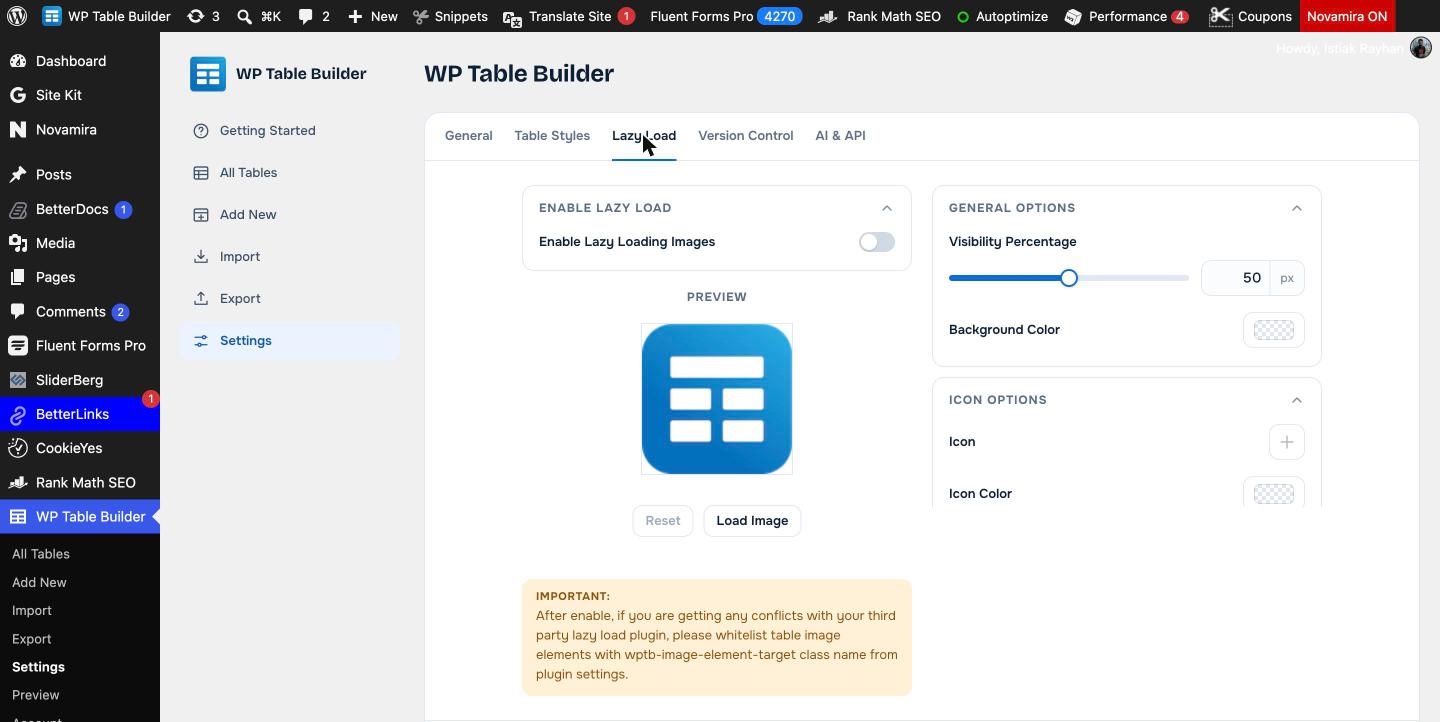
- Open the Lazy Load tab.
- Turn on Enable Lazy Loading Images.
Step 2: Set the options #
Use the Preview box to test your choices. Click Load Image to play the loading effect and Reset to start again.
| Section | Setting | What it does |
|---|---|---|
| General Options | Visibility Percentage | How much of the image area must be on screen before it loads |
| General Options | Background Color | Placeholder color shown before the image loads |
| Icon Options | Icon, Icon Color, Icon Size | An optional icon shown in the placeholder |
| Icon Options | Icon Animation | None, Heartbeat, Rotate, Flip or Jump |
| Image Load Options | Animation | How the image appears: None, Slide In, Grow Sling, Flash or Flip |
| Image Load Options | Speed | How fast the load animation plays |
Click Save when you are done.
Avoid conflicts with other lazy load plugins #
If you also use a performance plugin that lazy loads images (for example a caching or image optimization plugin), images can load twice or not at all. Either turn off WP Table Builder lazy loading, or exclude table images in your other plugin by adding the class wptb-image-element-target to its exclusion list.
Frequently asked questions #
Does WP Table Builder lazy load table images?
Yes, with WP Table Builder Pro. Turn on Enable Lazy Loading Images under WP Table Builder > Settings > Lazy Load.
Does lazy loading apply to every table?
Yes. The Lazy Load setting is global and applies to Image elements in all WP Table Builder tables.
My table images do not appear after enabling lazy load. What should I do?
Another lazy load plugin is probably handling the same images. Exclude the wptb-image-element-target class in that plugin, or turn off one of the two lazy load features.
Is lazy loading available in the free version?
No. Lazy loading is a WP Table Builder Pro feature.


